

I’ve been blogging since 2017, and if you’re trying to figure out how to start a blog that actually earns money, you’re in the right place. It starts with choosing a niche, setting up your blog, creating helpful content, growing your traffic consistently, getting recommended in AI search results, and monetizing your audience effectively.
I’ve made real income from blogging, made expensive mistakes along the way, and I’m still doing it today. This is the guide I wish someone had handed me on day one, no fluff, no affiliate padding, just the exact steps you need to build a blog that earns.
- Is Blogging Still Worth It in 2026?
- How Much Does It Cost to Start a Blog?
- Step 1: Choose a Blog Niche (Topic or Category)
- Step 2: Choose a Domain, Hosting & Platform
- Step 3: Design Your Blog
- Step 4: Set Up Blog SEO
- Step 5: Create Content
- Step 6: Promote Your Blog
- Step 7: Make Money Blogging
- Common Blogging Mistakes to Avoid
- FAQs About Starting a Blog
Is Blogging Still Worth It in 2026?
Yes, blogging is still worth it in 2026—but the way you succeed has changed.
I learned that the hard way. When I first started blogging, I followed advice focused on publishing more articles, adding keywords, and chasing rankings. It worked to some extent, but it wasn’t enough to build lasting traffic or income.
Today, successful blogging is less about writing as much as possible and more about creating genuinely useful content for a specific audience. Search engines are getting better at recognizing shallow, repetitive, and keyword-stuffed content, while readers have more choices than ever.
AI has also made generic content incredibly easy to produce. That means your real advantage is what AI can’t easily replicate: first-hand experience, original insights, examples, testing, opinions, and practical advice.
If you’re planning to start a blog in 2026, focus on choosing the right blog niche, understanding your target audience, and creating helpful content that answers real questions. Learning how to start a blog is only the first step—building useful content and attracting the right readers is what turns a new blog into a long-term asset.
A blog can help you build organic traffic, grow an audience, generate leads, and eventually make money blogging through affiliate marketing, ads, digital products, services, or other monetization methods.
The key is to treat your blog as a long-term asset—not a quick way to make money.
Blogging isn’t dead. Low-value blogging is. If you’re willing to focus on a specific audience and consistently publish content that genuinely helps them, starting a blog in 2026 can still be a smart move.
How Much Does It Cost to Start a Blog?
One of the most common questions I get from beginners is: “How much money do I need to start a blog?” The honest answer is that you can get a professional blog live for under $30 for the first month. Here’s exactly what you’ll spend:
| Item | What It Does | Monthly Cost | Notes |
| Domain Name | Your blog’s web address (e.g. yourblog.com) | Free (Year 1 with Hostinger) | ~$10–15/yr from Year 2 |
| Hostinger Premium Hosting | Server that keeps your site online | ~$2.49–$3.99/mo | Billed annually; best value for beginners |
| WordPress CMS | Platform your blog runs on | Free | One-click install via Hostinger |
| WordPress Theme (Astra/Kadence) | Controls the look of your blog | Free | Premium upgrade optional later ($49+/yr) |
| SSL Certificate | The padlock — secures your site | Free | Included with Hostinger |
| Essential Plugins | Rank Math, LiteSpeed Cache, WPForms, etc. | Free | All beginner essentials have strong free tiers |
| Email Marketing (Starter) | Build & email your subscriber list | Free up to 500 subs | Mailchimp / Brevo free tiers work fine to start |
| TOTAL TO LAUNCH | ~$2.49–$4/mo | Less than a coffee per week |
The only non-negotiable paid investment is hosting. You can read my detailed best web hosting comparison → to see how different providers stack up. For bloggers on a tight budget, I also have a dedicated guide to cheap web hosting under $3/month →.
Step 1: Choose the Right Blog Niche (Don’t Overthink It)
I spent three weeks trying to find the perfect blog niche before writing a single article. Don’t make the same mistake. Your niche is simply the main topic your blog will focus on—and you can narrow or refine it as your blog grows.
Before you start a blog, use these three simple questions to find a niche with real potential:
1. Can you write at least 50 useful articles about it? Your blog niche should be broad enough to support consistent content. Think about the questions, problems, tutorials, comparisons, and experiences you could cover.
2. Are people searching for it? Search your topic on Google and check autocomplete suggestions, “People also ask,” related searches, and competing articles. These can help you understand what your potential audience wants to learn.
3. Can you eventually make money from it? Look for opportunities such as affiliate marketing, digital products, services, courses, advertising, or sponsorships. You don’t need to monetize from day one, but it’s smart to know what’s possible.
Blog Niche Ideas You Can Consider
If you’re not sure where to start, here are some blog niche ideas you can narrow down further:
- Personal finance: budgeting for freelancers, saving money, beginner investing
- AI and technology: AI tools for small businesses, productivity tools, beginner-friendly AI guides
- Health and fitness: running for beginners, home workouts, fitness for people over 40
- Career and side hustles: remote work, freelancing, career changes, online income
- Travel: budget travel, solo travel, family trips, travel guides for specific destinations
- Food: healthy recipes, meal prep, regional cuisine, cooking for beginners
- Sustainable living: affordable eco-friendly products, low-waste living, energy saving
- Hobbies: photography, gardening, DIY projects, gaming, crafts
The key is to narrow a broad topic into a specific audience or problem. For example, instead of targeting a broad niche like “fitness,” you could focus on something more specific, such as “strength training for beginners over 40.”
My Rule for Choosing a Blog Niche
Choose a topic you know, enjoy, or have real experience with—not simply one you think will make money. Your experience gives your content something generic articles often lack: real examples, practical advice, opinions, and lessons learned.
A strong blog niche sits at the intersection of your knowledge, audience demand, and monetization potential. That’s a much better starting point than spending weeks searching for the perfect niche.
Step 2: Set Up Your Domain, Hosting and WordPress with Hostinger
This is the step that feels the most technical to beginners, but I promise it’s the easiest part. Setting up a WordPress blog in 2026 is a 20-minute process — and I’ll walk you through every click.
I’ve personally used Hostinger to host nearly 25 client websites over the past 7 to 8 years. Their hPanel dashboard is by far the most beginner-friendly in the industry, and the one-click WordPress installer has never once given me a headache. You can also check my full best web hosting services review → for a complete comparison.
Why Self-Hosted WordPress Is the Only Right Answer
I learned this the hard way. I built a publication on Medium — spent two years growing it to over 6,000 followers. One day, Medium flagged a small portion of content as duplicated and suspended the account without warning. Two years of writing. Gone. With a self-hosted WordPress blog on your own domain, that cannot happen. You own the domain. You own the hosting. You own every word you’ve ever written.
If you want to explore WordPress-specific hosting options in detail, I’ve reviewed the best WordPress hosting providers →. For small business owners, I also recommend checking my best hosting for small business guide →.
Step-by-Step: Getting Live with Hostinger
1. Choose Your Hosting Plan
Go to Hostinger and select the Premium Web Hosting plan. This is the sweet spot for new bloggers — it includes a free domain name and all the tools you need to start. One important tip: choose the 48-month billing period if your budget allows. Apply coupon code MANIPATHAK at checkout for an additional 7–10% discount.
2. Register Your Domain

Your domain is your blog’s permanent web address. Keep it under 15 characters if possible, easy to spell when you say it out loud, avoid hyphens, and make sure it’s clearly relevant to your topic. Don’t spend more than 30 minutes on this decision — the content matters far more than the perfect domain name.
- Also read: 10 Best Domain Registrars (You can use to register your domain name).
3. Install WordPress in One Click
Once inside the Hostinger hPanel, click Set Up on your hosting plan, choose WordPress, enter your blog title, admin email, and a strong password. Hostinger installs WordPress automatically. Your dashboard is now live at yourdomain.com/wp-admin.
4. Activate SSL
In Hostinger’s dashboard, go to Websites → Manage → SSL and activate the free SSL certificate. This gives your site the padlock icon and is one of the most important quick wins for your blog’s SEO. Takes about 30 seconds.
Essential Plugins to Install After WordPress Setup
- Rank Math SEO — on-page SEO optimization, schema markup, sitemap generation. My go-to over Yoast for new blogs.
- LiteSpeed Cache — works perfectly with Hostinger’s LiteSpeed servers for maximum speed performance.
- WPForms Lite — contact forms. Every blog needs one.
- Site Kit by Google — connects your blog to Google Analytics and Search Console from one dashboard inside WordPress.
- UpdraftPlus ( or Duplicator) — automatic backups to Google Drive or Dropbox. Set it and forget it.
- Smush Image Compression — auto-compresses images on upload. Massive impact on page load speed.
Considering cloud hosting as you grow?
Once your blog is generating consistent traffic, you may want to upgrade. I’ve reviewed the best cloud hosting services on the site — read the full comparison to understand when it makes sense to upgrade from shared hosting.
Read: Best Cloud Hosting Services for Bloggers →
Create Your Core Pages Before Your First Post
- About Me / About Page — Tell your story. This page is often the second-most visited page on any blog.
- Contact Page — Brands and collaborators will want to reach you. View Mani’s contact page as an example →
- Privacy Policy — Required if you collect any user data. Google AdSense will reject sites without one.
- Disclaimer / Affiliate Disclosure — Required by the FTC in the USA if you will ever use affiliate links.
Step 3: Design Your Blog for First Impressions That Last
Here’s the design principle I live by: your blog’s design should make your content easier to read, not harder. That’s it. Every design decision runs through that filter.
I see so many new bloggers spending weeks tweaking colors and fonts when they should be writing. Give yourself a maximum of one weekend to set up your blog design. Then lock it in and commit to writing for at least three months before you touch it again.
Theme Recommendations for 2026
Astra is still my top recommendation for beginners. Lightweight (under 50kb page size), extremely fast on Hostinger’s servers, and hundreds of free starter templates.
Kadence is a strong alternative with more design flexibility without needing a page builder. Slightly steeper learning curve but rewards with a more distinctive-looking site.
Blocksy is well-suited to food, lifestyle, and travel blogs where visual presentation matters more than technical content.
Design Decisions That Actually Affect SEO
- Mobile-first layout — Over 60% of Google searches in the USA happen on mobile. Test your blog on your actual phone before publishing.
- Readable body font size — Minimum 16px, I recommend 17–18px. Small fonts increase bounce rate, which negatively affects SEO.
- High colour contrast — Dark text on light background, always.
- No popup on arrival — A popup that fires the second someone lands is one of the fastest ways to increase your bounce rate. Wait at least 30 seconds or use exit intent.
“Launch first, improve later. A live, imperfect blog beats a perfect blog that hasn’t launched yet — every single time.”
Step 4: Build Your SEO Foundation Before Writing a Single Post
Why Most Bloggers Skip This and Regret It
Most new bloggers start writing immediately and do SEO setup “later.” The problem is that Google starts crawling your site from your first published post. If your technical SEO isn’t in place on day one, you’re sending Google a messy, confusing first impression that takes months to correct.
SEO isn’t just about keywords in your articles. It starts at the structural level — how your site is set up, how Google navigates it, and what signals you’re sending about your authority and trustworthiness.
1. Connect Google Search Console
Google Search Console is the single most important free tool for any blogger. If you’ve installed Site Kit by Google (mentioned in Step 2), connecting Search Console takes about five minutes. Once connected, submit your XML sitemap.
In Rank Math, go to Rank Math → Sitemap Settings, enable the sitemap, and submit yourdomain.com/sitemap_index.xml to Google Search Console under the Sitemaps tab.
- Also read: How to Submit Your Website to Search Engines
2. Set Up Your Permalink Structure Correctly
In WordPress, go to Settings → Permalinks and select Post Name as your permalink structure. This gives you clean URLs like yourblog.com/how-to-make-sourdough instead of yourblog.com/?p=123. This is one of those settings that’s almost impossible to change later without causing SEO damage. Get it right before you publish anything.
(Note: if your blog posts publish at /blog/ prefix and you want to change that later, read my 301 redirect guide → first to understand how to avoid losing link equity during the change.)
3. Configure Rank Math for On-Page SEO
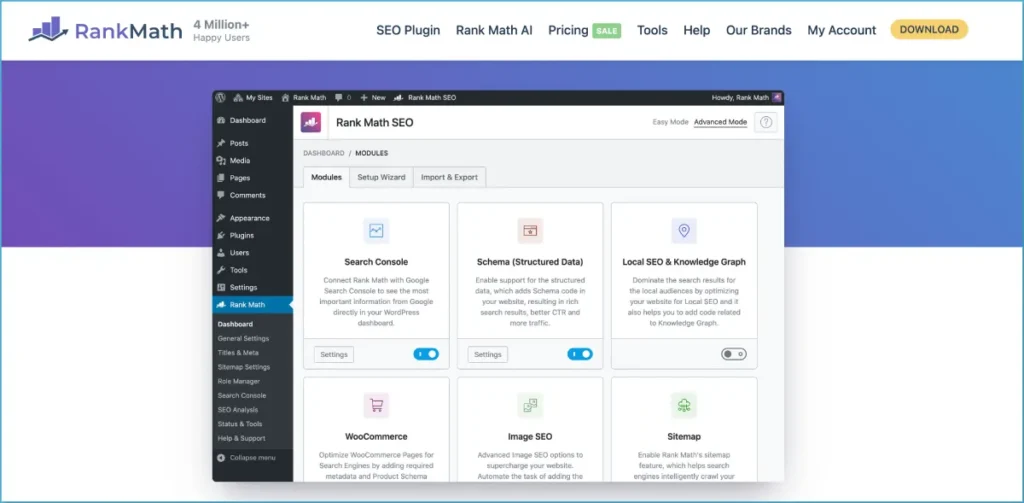
Run through Rank Math’s setup wizard after installing it. The important settings to configure are: site type (blog/personal), social profile URLs, and enabling the Local SEO and FAQ schema modules. Rank Math’s free tier gives you everything a beginner needs — focus keyword optimization, readability scoring, and automatic schema markup.
4. Do Your Keyword Research Before Writing
Every article you write should target one primary keyword — a phrase real people type into Google that your article will answer better than anything else on the internet.
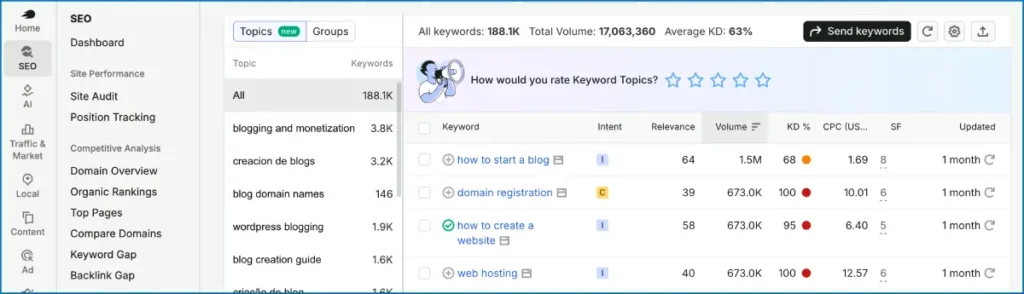
Free method: Type your topic into Google and study the autocomplete, “People also ask,” and “Related searches” sections. These are real searches from real people.
Free method #2: Google Keyword Planner – Open Google Keyword Planner (free inside any Google Ads account — you don’t need to run ads to use it), type your topic idea into the “Discover new keywords” box, and set the location to United States. It will show you exact monthly search volumes, competition level, and dozens of related keyword ideas you probably hadn’t thought of.
For a new blog, I filter for keywords with 500–5,000 monthly searches and low-to-medium competition — high enough to drive real traffic, realistic enough to actually rank for in your first year.
Better method: Use Google Keyword Planner (free) to check search volumes. For a new blog, target keywords with 500–5,000 monthly US searches.
Best method: Use a dedicated SEO tool. I’ve compared the two most popular options in my Ubersuggest vs Ahrefs comparison →. I also cover the full landscape in my guide to AI SEO tools for bloggers →.
Also read: How to Find Low Competition Keywords That Actually Rank (Step-by-Step Guide)
5. Understand Search Intent Before You Write Anything
Search intent is the reason behind a search query. Google now understands intent with remarkable accuracy, and if your article doesn’t match the intent behind a keyword, it will never rank for it regardless of how good the writing is. Focus on
- Informational intent — the person wants to learn something (e.g. “how to write a blog post”)
- Commercial intent — the person is researching before a purchase (e.g. “best blogging platforms”)
📌 The Keyword Test I Run on Every Article
Before writing any article, I Google my target keyword and read the top 3 ranking pages carefully. I ask: What format are they using? How long are they? What questions do they answer? Then I write something that covers everything they cover, plus at least 3 things they missed. That’s how you outrank established pages on a brand new blog.
Step 5: Write Blog Posts That Google and Real Humans Both Love
Stop trying to write perfectly.
Write honestly.
Perfectly written content sounds polished, distant, and robotic. Honestly written content sounds like a real person who has actually done the thing they’re describing — which is exactly what Google’s quality raters are trained to look for.
Also read: 15 Best AI Writing Tools We Tested & Reviewed For You
The Anatomy of a High-Ranking Blog Post in 2026
Title (H1)
Your title should contain your primary keyword and communicate a clear, specific benefit. “How to Bake Bread” is weak. “How to Bake Sourdough Bread for Beginners (No Starter Needed)” is strong. Specific beats generic every time. Aim for 55–60 characters so Google doesn’t truncate your title in search results.
Introduction (The First 150 Words)
Your introduction has one job: convince the reader they’re in the right place. I follow a three-sentence framework: (1) acknowledge the problem the reader has, (2) establish why I’m qualified to help — briefly, based on real experience, (3) promise exactly what the article will deliver.
Content Structure
Use H2 headings for main sections and H3 headings for subsections. A reader should be able to read only your headings and understand the full structure of your argument. Google uses heading structure to understand how comprehensive an article is.
Length
There’s no magic word count. The right length is: long enough to completely answer the query, short enough not to waste the reader’s time. Comprehensive how-to guides typically land between 2,500 and 5,000 words. Let the topic determine the length — never add padding to hit a word count.
The Writing Habits That Changed My Blog’s Performance
Write a messy first draft, edit separately.
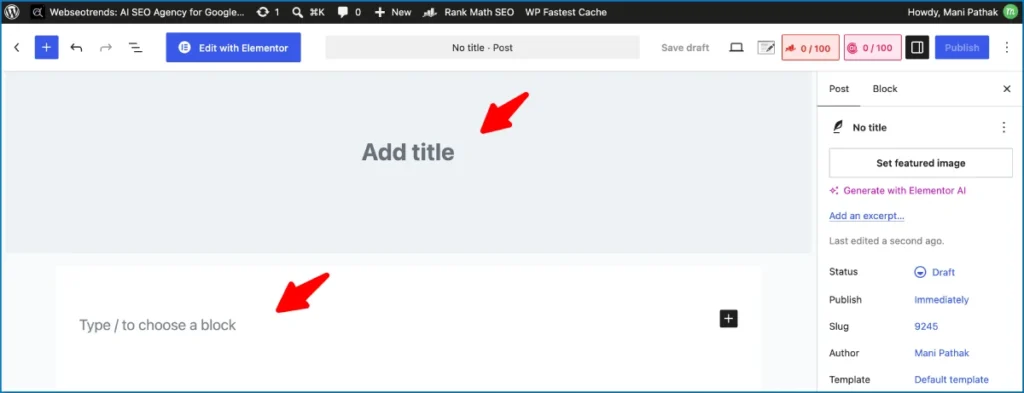
Write each article’s first draft without stopping to edit. The inner critic kills momentum. Get everything on the page first, then go back in a separate editing pass.
Use the “so what?” test on every paragraph.
After writing any paragraph, ask: “So what? Why does my reader need this?” If you can’t answer clearly, cut the paragraph or rewrite it so the value is obvious.
Always include a specific personal story or experience.
This is the single most powerful differentiator between an article that ranks and one that doesn’t in 2026. Google’s Quality Raters are explicitly trained to identify and reward first-hand experience. This is the core of Google’s E-E-A-T framework.
End with a clear next step.
Every article should end by pointing the reader somewhere useful — a related article, a free resource, or an invitation to comment. Guide them forward.
Step 6: Promote Your Blog and Grow a Real Audience
Writing great content is necessary but not sufficient. The internet is enormous, and a new blog is invisible until you actively put it in front of people.
The First Week: Tell People You Exist
Share your first article with people you actually know. Your personal network will give you your first readers, your first comments, and your first social shares. Those early engagement signals matter to Google.
Pinterest: The Underrated Traffic Driver
For most niches, Pinterest is the fastest way to drive traffic to a new blog. Unlike Google SEO which takes months, Pinterest can send traffic within days of pinning. Create a business account, design simple vertical pin images for each article (Canva works well), and pin consistently — at least 5–10 times per week.
SEO: The Long Game That Pays Forever
Organic search traffic from Google is the holy grail for bloggers because it’s passive — write an article once, rank for a keyword, and traffic arrives every day without further effort. But it takes time. For a new domain, expect 6–12 months before meaningful organic traffic, even with perfect on-page SEO. This is normal.
Submit Your Blog to Search Engines:
Once your blog is live, the next important step is making sure people can actually find it. One of the easiest ways to start getting traffic is to submit your blog to search engines like Google and Bing.
Search engines discover new websites automatically, but submitting your blog helps them find and index your pages faster. You can do this by creating a free account on tools like Google Search Console and Bing Webmaster Tools, then adding your website and submitting your sitemap.
This simple step tells search engines that your blog exists and allows them to start showing your content in search results. Over time, as you publish helpful posts and optimize them for keywords, search engines can become one of the biggest sources of traffic to your blog.
Build Backlinks the Right Way
Backlinks remain one of the most powerful ranking factors in 2026. I cover exactly why and how in my guide to why backlinks still matter and how to build quality links →. For a deeper dive on where to get links as a new blogger, read my best places to build backlinks →.
Build an Email List From Day One
Start collecting email addresses from your very first reader. Your email list is the only audience you truly own. Add a simple opt-in form to your sidebar and at the end of each article. Offer a free resource in exchange for the email address.
Guest Posting: My Favorite Authority-Building Strategy
Writing guest articles for established blogs in your niche does two things simultaneously: it gets your name in front of an existing audience, and it earns you a backlink from an authoritative site — the most powerful SEO signal there is.
Community Participation: Quora, Reddit, and Niche Forums
Find where your target readers are already asking questions and answer them genuinely — not as a promotional exercise, but as a real contribution to the community. If your answer is genuinely the most helpful response to a question on Quora or Reddit, including a link to your relevant blog article is completely natural and appropriate.
Step 7: How to Make Money Blogging (Monetize Your Blog)
Now for the part everyone asks about first but should actually think about last. Monetization works when you have an audience. Before you have an audience, monetization is a distraction.
Realistic Blogging Income Timeline for USA Bloggers
| Timeframe | Realistic Monthly Income | Primary Revenue Sources |
| Months 1–6 | $0–$200 | Small affiliate commissions; focus on content volume and quality. |
| Months 6–12 | $200–$1,000 | Affiliate marketing picks up; possible first sponsored post opportunities. |
| Year 2 | $1,000–$5,000/mo | Display ads (Mediavine 50k+ sessions), affiliate income, email marketing, 1–2 sponsored posts/month. |
| Year 3+ | $5,000–$20,000+/mo | All of the above plus digital products, courses, consulting, and brand partnerships. |
These are realistic numbers for bloggers who publish consistently (at least 2–4 articles per month) and follow a proper SEO strategy.
Method 1: Affiliate Marketing
This is where most bloggers earn their first real income. You recommend products or services your readers would find genuinely useful, and you earn a commission when they purchase through your link. For higher-ticket commissions, read my guide to high ticket affiliate marketing →. Best programs for new bloggers: Amazon Associates, ShareASale, and Impact Radius.
📌 My One Unbreakable Rule
I only recommend products I have personally used or would genuinely buy myself. Readers trust you enough to click your links — honour that trust. One dishonest recommendation can permanently damage a relationship with your audience that took years to build.
Method 2: Display Advertising
Google AdSense is the entry point (no traffic minimum), but the real money starts with premium networks: Mediavine (50,000 monthly sessions minimum) or Raptive/AdThrive (100,000 monthly pageviews). The RPM at Mediavine is typically 5–10× higher than AdSense.
Method 3: Sponsored Content and Brand Partnerships
As your blog grows, brands will approach you about featuring their products. Sponsored posts are typically the highest single-payment income source for mid-size blogs — $500 to $5,000+ per article depending on your niche and audience size.
Method 4: Digital Products and Courses
The highest-margin blogging income comes from selling your own products — eBooks, template packs, email courses, or online courses. The key: your product must solve a specific, painful problem for a specific audience.
Method 5: Consulting and Services
If your blog establishes you as a credible expert in a professional field, you can monetize that expertise directly through consulting or coaching. I use my own blog as a lead generation engine for my SEO consulting — it’s how most of my clients find me. If you’re interested in professional SEO help, get in touch here →.
📌 My Recommended Monetization Sequence
Month 1–3: Affiliate links in articles only.
Month 4–6: Apply for AdSense, continue affiliate marketing.
Month 7–12: Pitch for first sponsored post, start building email list with a lead magnet.
Year 2: Create your first digital product, apply to Mediavine, pursue brand partnerships. Year 3: Consider consulting or coaching if relevant to your niche.
Frequently Asked Questions About How to Start a Blog
How long does it take to make money from a blog?
Most bloggers see their first meaningful income (over $500/month) between months 6 and 12, assuming they’re publishing consistently and following proper SEO practices. Bloggers who earn nothing after a year typically made one of two mistakes: they didn’t publish consistently enough, or they published a lot but skipped keyword research. If you do both things right, income will grow. $1,000+ per month in Year 2 is achievable and realistic.
Do I need technical skills to start a blog?
No. WordPress on Hostinger is genuinely beginner-friendly. You don’t need to know how to code. If you can use a word processor, you can run a WordPress blog in 2026.
How many blog posts do I need before I start getting traffic?
Blogs typically start seeing meaningful organic traffic growth between their 20th and 30th published article — assuming each targets a specific keyword and is properly optimized. This usually takes 3–6 months of regular publishing. Write your first 25 articles on closely related sub-topics within your niche to establish topical authority faster.
Should I blog about something I’m passionate about or something profitable?
Both, ideally — but if you can only pick one, lean toward passion. Blogging requires writing dozens or hundreds of articles over years, and it’s very difficult to maintain that output on a topic you don’t genuinely care about. Passion keeps you writing through the slow months when traffic is flat and revenue feels distant.
Is WordPress the only platform I should use?
For a serious, long-term, monetizable blog — yes. WordPress powers over 43% of all websites for a reason. I lost two years of work on Medium to a platform suspension. With self-hosted WordPress, no one can take your content away.
How often should I publish new blog posts?
Consistency matters more than frequency. Aim for one thoroughly researched, properly optimized article per week. That gives you 52 articles in Year 1 — enough to establish real topical authority in most niches.
What is E-E-A-T and why does it matter for my blog?
E-E-A-T stands for Experience, Expertise, Authoritativeness, and Trustworthiness — Google’s framework for evaluating content quality. For your blog, this means: write an author bio that clearly establishes your background, include personal stories and real examples, cite credible sources, and build a reputation through consistent high-quality publishing. E-E-A-T is why niche experts with small blogs can outrank large generic sites.
Does blogging still work in the age of AI-generated content?
Yes — more than ever. AI can generate text about any topic. What AI cannot generate is genuine first-hand experience, original research, personal stories, or authentic opinion. Google’s Helpful Content algorithm was built precisely to surface content written by humans with real expertise. The flood of AI-generated mediocrity has made authentic human blogging more valuable, not less.
If you have questions about starting your own blog, contact Mani here →
About the Author
Mani Pathak is a blogger, SEO consultant, and founder of Webseotrends.com. An engineering graduate who left his 9-to-5 to blog full-time, Mani has helped 250+ clients build profitable websites and has been creating SEO-driven content since 2017. Everything in this guide comes from real experience — not theory.
Affiliate Disclosure
Some links in this article are affiliate links, meaning I may earn a small commission if you make a purchase — at no additional cost to you. I only recommend products I personally use and trust. The Hostinger recommendation in this guide is based on 7+ years of personal use across 25+ client projects.
You Might Also Find These Helpful
- Web Hosting Services — Tested & Reviewed →
- 11 Best Cheap Web Hosting Providers (Under $4/mo) →
- Best WordPress Hosting →
- AI SEO Tools That Actually Work in 2026 →
- Why Backlinks Still Matter & How to Build Quality Links →
- High Ticket Affiliate Marketing: Complete Beginner’s Guide →
- Ubersuggest vs Ahrefs — Which SEO Tool Is Better? →
- Get a Free SEO Audit from Webseotrends →
