

Does blogging help SEO? Yes. Blogging can improve your website’s search visibility by helping you answer relevant search queries, publish useful information, build internal links, and attract visitors who are looking for solutions related to your business.
However, publishing blog posts alone does not guarantee higher Google rankings. Your content must satisfy search intent, provide original value, and offer a useful experience. Technical SEO, competition, website authority, and the quality of your existing pages also influence results.
Consider a website offering digital marketing services. Its service page might target a competitive keyword such as “SEO services,” while its blog answers related questions about keyword research, content optimization, and website performance. These educational articles can help potential customers discover the business before they are ready to purchase a service.
That is where blogging and SEO work together.
A successful blog SEO strategy is not about publishing as many articles as possible. It involves choosing the right topics, creating helpful content, connecting related pages, and measuring whether your work attracts relevant visitors.
In this guide, you’ll learn how blogs help SEO, the benefits of SEO blogging, how to write SEO-friendly blog posts, and how to build a content strategy that supports sustainable organic growth.
1. Does Blogging Help SEO?
Yes, blogging can help SEO when you publish relevant, helpful content that meets the needs of your audience. A well-planned blog gives your website opportunities to appear for informational searches, explain complex topics, connect related pages, and attract visitors who may eventually become customers.
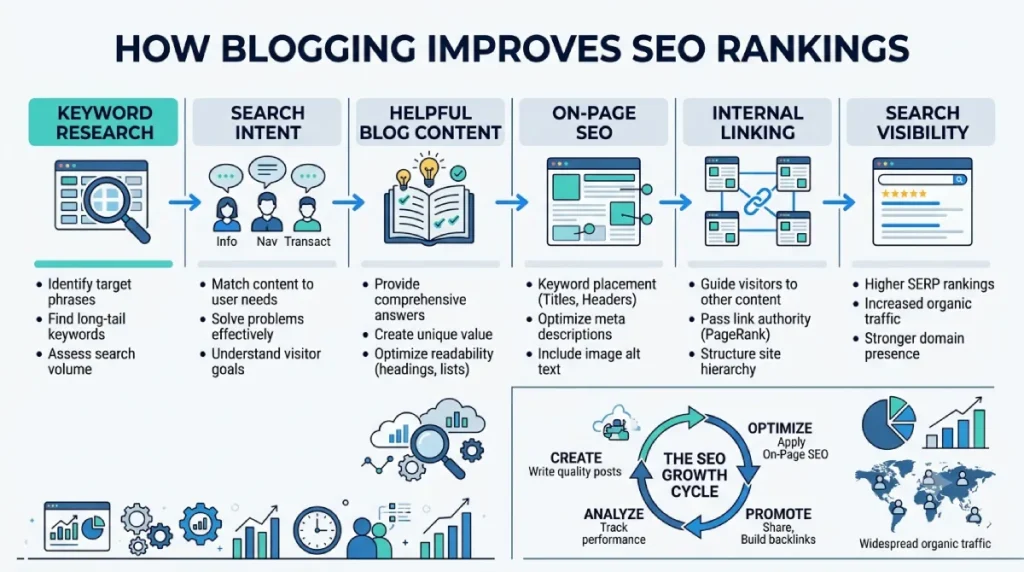
Search engines do not reward a website simply because it publishes frequently. The value comes from creating pages that help people and can be discovered, crawled, indexed, and understood by search engines.
For example, a website selling web hosting could publish useful articles about website speed, hosting security, WordPress performance, and server resources. These topics answer questions potential customers may have before choosing a hosting provider.
A blog post can also support a relevant commercial page through contextual internal links. Someone researching website performance might discover a hosting comparison when they need to choose a provider.
How do blogs help SEO?
Blogs help SEO in several connected ways:
- Relevant search queries: Each useful article can answer a distinct question or address a specific topic.
- Search intent: Informational articles help people researching a problem or solution.
- Internal linking: Blog posts can connect related resources and important commercial pages.
- Content discovery: Descriptive links help search engines discover related URLs.
- Topical coverage: A collection of useful articles can cover different aspects of a subject.
- Backlink opportunities: Original research and practical resources may earn editorial links.
- Qualified traffic: Helpful content can attract visitors who are genuinely interested in your products or services.
These benefits depend on relevance and quality. Publishing ten repetitive articles about the same keyword may be less useful than publishing a smaller collection of distinct, comprehensive resources.
Are blogs good for SEO for small businesses?
Yes. Blogging can be useful for small businesses that need to answer niche questions, demonstrate expertise, and attract relevant visitors.
A smaller website may find opportunities in specific, lower-competition topics instead of competing immediately for broad commercial keywords.
For example, a digital marketing agency might publish an article explaining how to optimize title tags, another about internal linking, and another about measuring organic traffic. Each resource addresses a different question while supporting the agency’s wider subject expertise.
The key is to choose topics that relate to your audience and business goals rather than publishing articles simply to increase your website’s page count.
2. What Is Blog SEO?
Blog SEO, also known as SEO for blogs or search engine optimization for blogs, is the process of making blog content easier for search engines to understand and more useful for people who discover it through search.
It includes keyword research, search intent analysis, content planning, on-page optimization, internal linking, image optimization, technical checks, and performance measurement.
Blog SEO is not simply the practice of inserting a target keyword repeatedly into an article. Search engines can understand related wording, and readers need natural language rather than repetitive phrases.
What is SEO in blogging?
SEO in blogging means creating and optimizing articles so they address relevant search queries and provide useful answers.
A typical workflow includes:
- Research what your audience searches for.
- Identify the main intent behind each query.
- Choose a clear primary topic for the page.
- Create an outline that covers the important questions.
- Write useful, original content.
- Optimize the title, headings, URL, images, and links.
- Publish the article and check its indexing status.
- Monitor performance and improve the content when needed.
Content quality is central to this process. For detailed advice on writing content that satisfies readers while following SEO best practices, read our guide to SEO content writing.
What is the difference between blogging and SEO?
Blogging is the process of creating and publishing articles. SEO is the broader practice of improving a website’s visibility in search engines.
The two overlap when you plan, write, and optimize blog content for relevant searches.
| Blogging activity | How it supports SEO |
|---|---|
| Researching topics | Identifies relevant search demand |
| Writing informative articles | Answers questions and supports search intent |
| Structuring headings | Makes content easier to navigate |
| Adding internal links | Connects related pages |
| Optimizing images | Improves accessibility and image understanding |
| Updating outdated information | Keeps content useful and accurate |
| Measuring search performance | Reveals opportunities for improvement |
A blog can exist without SEO, but a deliberate SEO strategy helps readers discover its content through organic search.
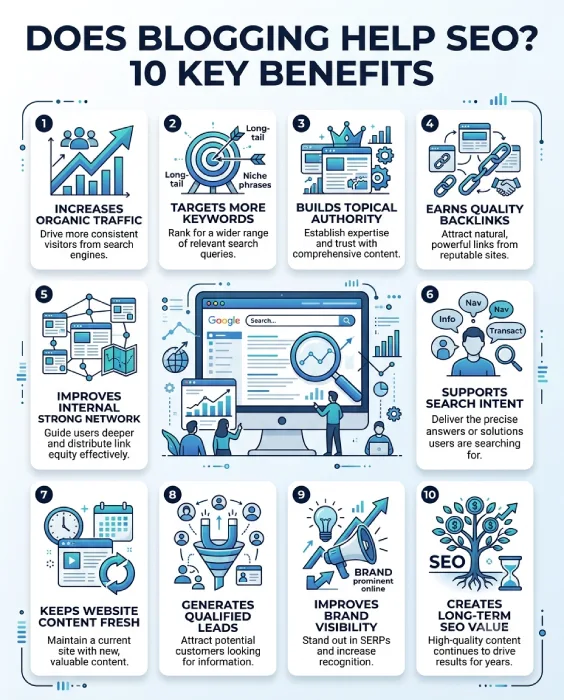
3. Ten Ways Blogging Helps SEO
Blogging can contribute to organic growth in several ways. Understanding these benefits helps you decide which topics to publish and how to connect your articles to your wider website.
1. It helps you target more relevant search queries
A homepage or service page usually has a specific purpose. It may not answer every question a potential customer has.
Blog posts let you cover related informational searches without turning a service page into an overly broad article.
For example, a website offering SEO services could publish separate resources about keyword research, internal linking, title tag optimization, and content audits. Each page should address a distinct user need.
This is one reason SEO blogging can expand a website’s search visibility.
2. It helps match informational search intent
Search intent is the reason behind a query. Someone searching “what is blog SEO” wants an explanation, while someone searching for an SEO agency may want to compare providers.
If your content matches the searcher’s intent, it has a better chance of being useful.
Before writing, review the search results for your target keyword. Look at the types of pages ranking, the questions they answer, and the formats that seem most helpful.
Do not assume that every keyword containing “SEO” requires the same type of article.
3. It builds topical relevance
A collection of related, useful articles can demonstrate that your website covers a subject in depth.
Suppose your website focuses on search engine optimization. You could create a central SEO guide and support it with articles about on-page SEO, technical SEO, link building, keyword research, and content optimization.
Connect these pages with relevant internal links so readers can move between related topics.
Start with the SEO beginner’s guide on Webseotrends and build supporting content around the areas most relevant to your audience.
Topical coverage does not guarantee rankings. The goal is to make your website more useful and comprehensive for a defined audience.
4. It creates opportunities for internal linking
Internal links connect pages on the same website. They help readers discover related resources and help search engines understand relationships between pages.
For example, a blog post about keyword research could link to our guide explaining how many SEO keywords to use.
That link is useful because readers interested in keyword research may also want to understand how keywords should be distributed across a page.
Strong internal linking is contextual. Links should appear where they help readers, rather than being added simply to increase the number of links.
5. It can attract relevant backlinks
Backlinks are links from other websites to yours. Relevant editorial backlinks can help search engines understand how other websites reference your content.
Blog posts can earn these links when they offer something worth citing, such as original research, practical resources, detailed explanations, or expert commentary.
For example, an original study about SEO performance could become a reference for writers covering the same topic.
However, not every article will attract backlinks automatically. Promotion, outreach, the quality of the resource, and the interests of other publishers all matter.
Avoid buying or manufacturing links in ways intended to manipulate search rankings.
6. It supports important product and service pages
Informational content can help potential customers understand a problem before deciding whether to purchase a product or service.
A blog article should not exist only to send traffic to a commercial page. It should answer the reader’s question first and provide a relevant next step when appropriate.
For instance, an article about on-page optimization could link to our on-page SEO services for readers who need professional assistance.
The link should fit the context and offer a genuine benefit to the reader.
7. It demonstrates relevant expertise
Useful articles give businesses an opportunity to explain processes, share experience, answer difficult questions, and correct common misconceptions.
A generic article that repeats widely available advice offers little reason for readers to choose your website over another.
Instead, include practical examples, clear explanations, limitations, and original observations supported by evidence.
For topics involving professional experience, identify the author accurately and ensure that claims about results or qualifications can be substantiated.
8. It reaches readers at different stages of the buying journey
Not every visitor is ready to purchase immediately.
Some people are learning about a problem. Others are comparing approaches, evaluating services, or deciding which solution fits their needs.
A useful blog can serve readers at these different stages.
| Reader stage | Example search | Suitable content |
|---|---|---|
| Learning | What is blog SEO? | Beginner’s guide |
| Exploring | How does keyword research work? | Practical tutorial |
| Comparing | Which SEO tools fit my needs? | Comparison article |
| Taking action | How do I improve my website’s SEO? | Checklist or service guide |
This structure helps you connect informational content with relevant resources without making every article promotional.
9. It can generate qualified organic traffic and leads
Traffic is useful when it connects to your actual goals.
An article may attract many visitors but generate few relevant enquiries. A smaller article addressing a specific business problem may attract fewer visitors but be more useful to potential customers.
Measure the results that matter to your business, including organic clicks, qualified leads, enquiries, and conversions.
The objective is not to publish the largest possible number of posts. It is to attract the right audience and help them find useful information.
10. It creates opportunities for long-term organic growth
A useful article can continue attracting search traffic after publication, provided it remains relevant, accessible, and competitive.
However, rankings can change as competitors publish new resources, search demand shifts, and search systems evolve.
Review important articles periodically. Update facts, replace broken links, improve unclear explanations, and add information when it genuinely improves the page.
Do not change publication dates or rewrite content merely to make an article appear fresh. Updates should make the resource better.
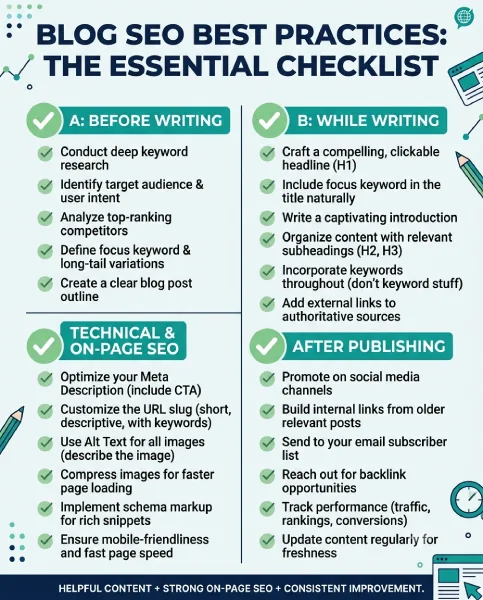
4. How to Do SEO for a Blog: A Step-by-Step Guide
If you want blogging to support your SEO performance, follow a repeatable process rather than publishing articles without a plan.
Step 1: Identify your audience and search intent
Start by defining the people your content should help.
Ask yourself:
- What problems are they trying to solve?
- What questions do they ask before purchasing?
- What level of knowledge do they have?
- Which information would help them make a decision?
Then determine the search intent behind the target keyword.
For example, “does blogging help SEO” has primarily informational intent. The reader wants to understand the relationship between blogging and search visibility, not purchase a blogging platform immediately.
Your article should answer that question directly.
Step 2: Research primary, secondary, and long-tail keywords
Use keyword research tools to identify relevant queries, estimated search volume, competition, and related terms.
For this topic, the primary keyword is “does blogging help SEO.” Supporting phrases include “blogging and SEO,” “how do blogs help SEO,” “SEO for bloggers,” and “blog writing for SEO.”
You do not need a separate page for every variation.
Group keywords that share the same intent and assign them to a page that can answer them naturally.
Our guide on how many SEO keywords to use explains how to approach keyword targeting without making content repetitive.
Step 3: Analyze the search results
Search for your primary keyword and examine the pages that currently rank.
Look for:
- The questions they answer.
- Their content structure and readability.
- Examples, diagrams, and practical advice.
- Important topics that are missing or poorly explained.
- The kind of page Google appears to favor for the query.
Competitor research should help you understand the searcher’s expectations. Do not copy another article or expand a page merely to make it longer.
Your goal is to create a more useful resource with a clear reason to exist.
Step 4: Map keywords to the right URLs
Create a simple keyword map before writing.
| Page | Primary topic | Supporting topics |
|---|---|---|
| This article | Does blogging help SEO? | Blogging benefits, blog SEO |
| SEO content writing guide | SEO content writing | Content briefs, writing optimization |
| Keyword usage guide | How many SEO keywords to use | Keyword clusters, keyword placement |
| SEO beginner’s guide | SEO basics | SEO fundamentals and optimization |
This helps you avoid publishing several articles that compete for the same search intent.
If two existing pages target essentially the same question, review whether they should be improved, consolidated, or repositioned before creating another one.
Step 5: Build a useful content outline
An effective outline answers the main question first, then covers the related questions readers are likely to have.
For this article, that means explaining whether blogging helps SEO, describing the benefits, providing a practical optimization process, and covering measurement and common mistakes.
Use H2 headings for major sections and H3 headings for supporting points.
Include keywords where they accurately describe a section. Do not create awkward headings simply to insert an exact-match phrase.
Step 6: Write original, useful content
Write for readers first.
A strong blog post should provide a clear answer, relevant context, examples, and practical steps. It should also explain limitations instead of making exaggerated promises.
Avoid padding an article with repeated definitions or generic statements.
Google’s guidance on creating helpful, reliable, people-first content is a useful quality benchmark.
Step 7: Optimize on-page elements
Before publishing, review your title tag, H1, URL, meta description, headings, image descriptions, and internal links.
Use the primary keyword naturally in prominent locations where it fits. Make the title descriptive and ensure that the page delivers what the title promises.
Your meta description should summarize the article accurately and give readers a reason to click. Google may generate a different search snippet depending on the query.
For a broader technical and content checklist, see our on-page SEO cheat sheet.
Step 8: Add useful internal and external links
Link to relevant pages on your own website when they provide additional information.
External links should support factual claims or point readers to useful primary sources, such as official documentation.
Use descriptive anchor text. For example, “SEO content writing guide” tells readers more than a generic “click here.”
Avoid adding links that are unrelated to the paragraph or repeating the same exact-match anchor excessively.
Step 9: Publish and check indexing
After publication, make sure the page is accessible to search engines and does not have unintended indexing restrictions.
Check the canonical URL, sitemap inclusion, internal links, and mobile presentation. Use Google Search Console to inspect the URL and monitor its search performance.
If you are setting up a blog for the first time, our guide on how to submit your website to search engines explains the process of using search engine webmaster tools and submitting a sitemap.
Submitting a URL for indexing does not guarantee that Google will index it or rank it.
Step 10: Monitor results and improve the article
Review impressions, clicks, search queries, average position, and conversions over time.
If a page receives impressions but few clicks, review whether the title and description accurately communicate its value. If it receives clicks but does not satisfy visitors, examine whether the content matches the search intent.
If performance is weak, investigate the actual cause before making changes.
5. How to Write SEO-Friendly Blog Posts
Blog writing for SEO involves more than adding keywords to paragraphs. The aim is to produce content that is easy to understand, relevant to the query, and organized around the reader’s needs.
Choose one clear primary topic
Every article should have a clear central purpose.
For example, this article explains how blogging helps SEO. It also covers related concepts such as internal linking, keyword research, and content optimization, but those topics support the main question rather than replace it.
A clear focus makes it easier to create an outline and decide which information belongs on the page.
Write a descriptive SEO title
Your title should tell readers what they will learn.
A suitable title for this article is:
Does Blogging Help SEO? 10 Benefits and Blog SEO Best Practices
It includes the main query and communicates the value of the guide.
Avoid titles that promise guaranteed rankings, instant results, or unsupported outcomes.
Structure headings logically
Use one clear H1 for the article’s main title and organize major sections with H2 headings. Use H3 headings for supporting topics.
Headings should help readers scan the page and locate relevant information. They should not become a list of disconnected keyword variations.
Use keywords naturally
Include the primary keyword where appropriate, especially when introducing the topic. Use related terms when they make the explanation more precise.
For example, “blog SEO,” “SEO for blogs,” and “search engine optimization for blogs” describe closely related concepts.
There is no universal keyword density that guarantees rankings. Repeating a phrase simply to reach a numerical target can make an article difficult to read.
Write a useful introduction
The opening paragraphs should answer the main question and explain what the reader can expect.
Avoid long introductions that delay the answer. Give readers enough context to understand why the topic matters, then move into the practical details.
Optimize images thoughtfully
Use relevant images when they improve understanding. Examples include annotated screenshots, original charts, process diagrams, or illustrations.
Write descriptive alternative text for meaningful images so people using assistive technology can understand their purpose. Decorative images may need empty alt attributes.
Compress image files appropriately and use formats that balance quality and file size. Avoid stuffing keywords into filenames or alt text when they do not describe the image.
Make content easy to read
Use concise paragraphs, meaningful subheadings, tables where comparisons help, and numbered steps for processes.
Explain unfamiliar terms before relying on them. Add examples that show how a recommendation works in practice.
Good readability supports the user’s experience, but it does not replace accurate information or useful content.
6. Blog SEO Strategy: Plan Content That Supports Growth
An SEO blog strategy connects individual articles to your website’s broader goals.
Instead of publishing unrelated topics whenever inspiration strikes, plan a set of resources around your audience, business offering, and relevant search demand.
Build topic clusters
A topic cluster consists of related content organized around a central subject.
For example, a website focused on SEO might build a cluster around content optimization:
- A central SEO guide.
- An article explaining SEO content writing.
- A guide to keyword research and targeting.
- A tutorial about internal linking.
- A practical on-page SEO checklist.
- An article explaining how to measure organic performance.
Each article should serve a distinct purpose. Link between pages when the connection genuinely helps the reader.
Prioritize keywords by business value
Search volume alone is not enough to determine which keyword to target.
Consider four factors:
- Relevance: Does the query match your audience and subject?
- Intent: What does the searcher expect to find?
- Competition: How strong are the existing results?
- Business value: Can the topic attract the right readers or support a meaningful business goal?
A keyword with modest search volume can be more valuable than a broad keyword if it attracts a relevant audience.
Create a realistic publishing calendar
Choose a publishing schedule that allows you to produce and maintain high-quality content.
A simple monthly plan could include one comprehensive guide, two supporting articles, and a review of existing content. The right frequency depends on your resources and audience.
Consistency is useful when it supports a sustainable editorial process. Publishing more often is not automatically better.
Avoid keyword cannibalization
Keyword cannibalization is a practical concern when multiple pages target the same intent and compete to serve the same searcher.
Suppose you publish three articles with nearly identical titles explaining whether blogging helps SEO. These pages may overlap unnecessarily.
A better approach is to create one comprehensive article and use separate pages for genuinely different topics, such as Blogger platform optimization or SEO content writing.
Review existing URLs and search queries before creating another page.
Update existing content when necessary
Review important pages when information changes, examples become outdated, links break, or performance data reveals gaps.
A useful content update may involve replacing obsolete information, adding an important missing explanation, correcting errors, or improving navigation.
Do not rewrite every article on an arbitrary schedule. Make changes when they improve the resource.
7. Internal Linking and Backlinks for Blog SEO
Internal linking and backlinks serve different purposes, but both deserve attention in a well-rounded SEO strategy.
How internal links support blog SEO
Internal links connect your website’s pages. They help readers find additional information and provide search engines with paths to discover related URLs.
For Webseotrends, this article can link to the SEO beginner’s guide, the SEO content writing guide, and the keyword usage guide because those resources directly support the topic.
Use anchor text that describes the destination. Place links in relevant paragraphs and avoid adding links merely to reach an arbitrary number.
Also review incoming internal links. Important articles should be discoverable through relevant existing pages, not left isolated.
How blog content can attract backlinks
Useful content can attract links when other publishers find it worth referencing.
Resources that may earn editorial links include:
- Original research with a clear methodology.
- Detailed guides that explain complex topics.
- Useful tools, templates, and checklists.
- Expert commentary supported by evidence.
- Original examples that clarify an important concept.
Promotion can help the right people discover your work, but no particular content format guarantees backlinks.
Are blog comments good for SEO?
Blog comments can contribute to discussion when they contain relevant questions, useful experiences, or constructive responses.
However, comments do not automatically improve rankings. Their value depends on whether they help readers and contribute meaningfully to the page.
Moderate spam, remove harmful links, and avoid using comments as a method for building artificial backlinks.
Are SEO comments on blogs worth pursuing?
Posting generic comments on unrelated websites solely to obtain backlinks is not a dependable SEO strategy.
Instead, participate in relevant discussions where you can genuinely contribute. If you reference your content, make sure it adds value and follows the website’s rules.
Focus on earning meaningful editorial mentions rather than accumulating low-quality comment links.
8. How to Measure the SEO Results of Blogging
Publishing a blog post is only the beginning. Measurement helps you understand whether the content is being discovered, attracting relevant visitors, and supporting your objectives.
Track impressions and clicks
Google Search Console can show how often your pages appear in Google Search and how often users click them.
Review the queries associated with each article. They can reveal whether the page is appearing for the intended topic or attracting unrelated searches.
Impressions indicate visibility, not necessarily meaningful traffic or business success.
Review rankings and search queries
Average position can help you understand a page’s search visibility, but it is not a complete measure of performance. Search results vary by query, location, device, and other factors.
Use position data alongside clicks, impressions, and the relevance of the queries.
If an article is ranking for closely related questions that it does not answer well, consider whether a useful update is appropriate.
Measure engagement and conversions
Use an analytics platform to understand what visitors do after arriving at your website.
Depending on your goals, useful measures might include:
- Relevant page visits.
- Newsletter subscriptions.
- Contact form submissions.
- Qualified leads.
- Purchases or other meaningful conversions.
Do not assume that a high traffic figure automatically means an article is successful.
How long does blog SEO take to show results?
There is no fixed timeline for blog SEO.
Some pages may become visible relatively quickly, while others take months or longer to gain traction. Results depend on competition, website history, content quality, crawlability, demand, and many other factors.
A realistic approach is to monitor progress over time, identify meaningful patterns, and improve the page based on evidence rather than expecting immediate rankings.
9. Common Blog SEO Mistakes to Avoid
Even a well-written article can underperform when its content or implementation does not meet the needs of searchers.
Keyword stuffing
Repeating a keyword excessively does not make an article more useful. Use relevant terms naturally and prioritize clarity.
Publishing thin or repetitive articles
Creating many pages that offer essentially the same information can make your site less useful.
Before publishing, ask whether the article provides something distinctive and whether the topic deserves a separate URL.
Ignoring search intent
An article targeting an informational query should answer the question rather than immediately pushing a product or service.
Understand the user’s objective before deciding on the format and structure.
Neglecting internal links
Relevant content can be difficult to discover if it is poorly connected to the rest of your site.
Review important articles and add contextual links where they help readers navigate related subjects.
Copying competitor content
Competitor analysis can reveal expectations and content gaps, but copying their wording or structure without adding value is not a sound strategy.
Develop original explanations, examples, research, and practical recommendations.
Expecting every article to rank
Not every topic has sufficient demand, and not every page will outperform established competitors.
Evaluate content based on its usefulness, relevance, search performance, and business value. Consolidate or reposition pages when evidence supports doing so.
Ignoring technical SEO
Useful content still needs to be accessible to search engines.
Check for accidental noindex directives, broken internal links, incorrect canonical tags, and other problems that could prevent a page from being indexed properly.
Our guide to technical SEO vs. on-page SEO explains how technical accessibility and page-level optimization work together.
10. Blogger SEO and Blogspot SEO: Platform-Specific Tips
Blogger and Blogspot are associated with Google’s Blogger publishing platform. If you use Blogger, the principles of SEO remain broadly similar to those used on other publishing systems: create useful content, organize it clearly, and make sure search engines can access it.
How to optimize blog posts on Blogger
Start with the fundamentals:
- Choose a distinct topic for each article.
- Write descriptive titles that reflect the content.
- Organize the article with clear headings.
- Use descriptive URLs where the platform permits.
- Add relevant internal links to related posts and pages.
- Use appropriate image descriptions.
- Check indexing and search performance.
- Maintain accurate, useful information.
The exact settings available depend on your platform configuration and theme.
Blogger SEO vs. WordPress SEO
Both platforms can support search-friendly content. The differences generally concern the level of control, available extensions, technical configuration, and maintenance requirements.
WordPress offers a broad ecosystem of plugins and customization options, while Blogger provides a hosted publishing environment with a different set of controls.
Neither platform automatically guarantees better rankings. Content relevance, accessibility, website structure, and the quality of the user experience remain important.
If you are considering creating a self-hosted WordPress website, our separate guide to creating a WordPress blog covers the setup process, including hosting, installation, themes, and essential configurations. This article focuses on blog SEO rather than repeating those technical setup instructions.
Is Blogspot SEO different from regular blog SEO?
The underlying principles are largely the same. Your content should satisfy search intent, use clear headings, provide meaningful links, and remain accessible to search engines.
Platform-specific documentation can help you understand which settings are available and how to configure them correctly.
If you publish on WordPress or another platform, apply the same strategic principles while adapting the implementation to the tools you use.
11. Frequently Asked Questions About Blogging and SEO
Does blogging help SEO?
Yes. Blogging can help SEO by creating useful pages that target relevant search queries, answer informational questions, and connect related content through internal links. Results depend on content quality, relevance, technical accessibility, and competition.
How do blogs help SEO?
Blogs help SEO by covering relevant topics, satisfying informational search intent, creating internal linking opportunities, and providing resources that may attract editorial backlinks. They can also support product and service pages by helping potential customers understand a problem before choosing a solution.
Why are blogs important for SEO?
Blogs give websites a flexible way to answer questions that may not fit naturally on a homepage or service page. A useful blog can expand topic coverage and help readers discover a website through relevant searches.
How often should you publish blog posts for SEO?
There is no universal publishing frequency that guarantees rankings. Choose a schedule that allows you to research, write, review, and maintain useful content. Prioritize quality and relevance over publishing volume.
How long should an SEO blog post be?
An SEO blog post should be long enough to answer the reader’s question thoroughly without unnecessary repetition. Some topics need only a concise explanation, while others benefit from a comprehensive guide. There is no universally required word count for Google rankings.
Do blog posts improve website rankings?
Blog posts can rank for relevant queries and may support the wider site’s visibility. However, publishing a blog post does not automatically improve every other page’s rankings. Each page must offer value and compete effectively for its target searches.
Is blogging still worth it for SEO?
Blogging can remain valuable when it addresses genuine audience needs and contributes to a broader content strategy. The value comes from useful information and relevant visibility, not from publishing articles simply to increase a website’s page count.
Can old blog posts still rank on Google?
Yes. Older articles can continue to rank if they remain useful, relevant, accessible, and competitive. Update them when facts change or when meaningful improvements are needed, rather than changing dates without substantive edits.
What is blog posting in SEO?
Blog posting in SEO refers to publishing articles as part of a strategy to attract relevant organic search traffic. Effective blog posting involves topic research, search intent analysis, content creation, on-page optimization, internal linking, and performance monitoring.
Are blog comments good for SEO?
Comments can improve a discussion when they contribute useful information, but they do not automatically improve rankings. Moderate spam and prioritize meaningful reader contributions over comment links.
What is the difference between SEO and blogging?
Blogging involves creating and publishing articles, while SEO includes the broader activities used to improve a website’s visibility in search engines. SEO blogging combines both by planning and optimizing articles around relevant user needs.
12. Conclusion: Build a Blog That Supports Long-Term SEO
Blogging can be an effective part of an SEO strategy when it helps people find useful answers and understand your business.
The most important steps are to research relevant keywords, understand search intent, publish original content, organize articles clearly, add useful internal links, and measure the results. Avoid keyword stuffing, repetitive content, and promises of guaranteed rankings.
Start with topics that directly relate to your audience. Build supporting articles around those topics, connect them with relevant internal links, and update existing resources when you can make them more useful.
The goal is not simply to publish more blog posts. It is to create a website that deserves to be discovered.
Further Reading
- How to Start a Blog and Make Money — Explore niche selection, content planning, audience growth, and blog monetization.
- How to Create a WordPress Blog — Follow the technical setup process for a self-hosted WordPress blog.
- SEO Content Writing: How to Write SEO Content That Ranks — Learn how to plan and write search-focused content.
- Best Web Hosting for Bloggers, Agencies & Ecommerce — Compare hosting options for different types of websites.
- How to Submit Your Website to Search Engines — Learn how to use search engine webmaster tools and submit your sitemap.
- How Many SEO Keywords Should I Use? — Understand keyword targeting and placement.
- SEO Cheat Sheet — Review essential on-page SEO checks.
- Technical SEO vs. On-Page SEO — Understand the differences between technical accessibility and page-level optimization.
