

When you create a website, blog, online store, or web application, you need a server to store your files and deliver them to visitors. But what happens when your website grows beyond the limits of basic hosting?
That is where a VPS server can help.
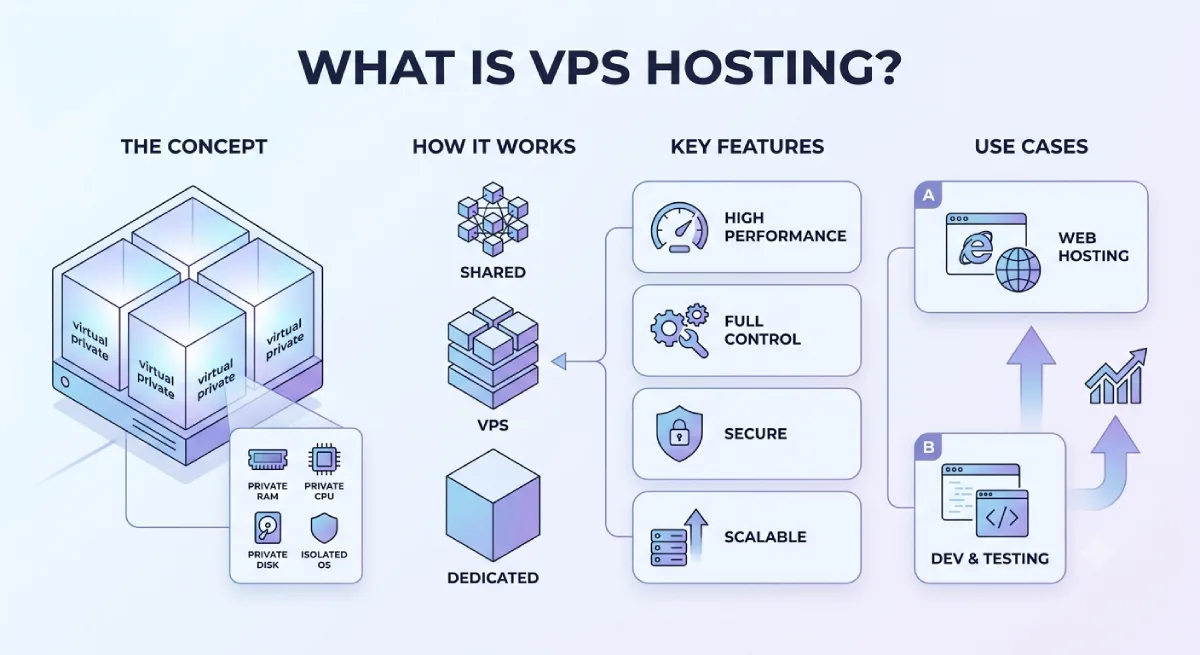
A Virtual Private Server (VPS) gives you a private virtual environment on a physical server. You share the underlying machine with other users, but your VPS has its own allocated resources, operating system, and settings. This gives you more control than traditional shared hosting without the cost of renting an entire physical server.
For example, imagine you run a WordPress website. Shared hosting might be enough when you have a few pages and a small number of visitors. As your content grows, you may need more memory, better control over server settings, or the ability to install additional software. A VPS can provide that extra flexibility.
In this guide, you will learn what a VPS server is, how VPS hosting works, what you can use it for, how it compares with other hosting types, and how to decide whether it is right for you.
What Is a VPS Server?
A VPS server is a virtual machine that runs on a physical server and provides a user with an allocated share of computing resources. These resources commonly include CPU power, RAM, storage, and network capacity.
VPS stands for Virtual Private Server.
The word “virtual” means the server is created using software rather than being a separate physical machine. The word “private” refers to its isolated operating environment and allocated resources, not to owning the entire physical hardware.
A hosting company can use one powerful physical server to create multiple VPS environments. Each VPS operates as a separate virtual server, allowing customers to configure and run their own websites, applications, and software.
A simple example of a VPS
Think of a physical server as an apartment building.
The entire building is one physical machine. Each apartment is a separate VPS. Residents share the building’s foundation and main infrastructure, but each apartment has its own private space.
In the same way, multiple VPS customers can use the same physical server while keeping their virtual environments separate.
A VPS plan might include resources such as:
- CPU: Processing power used to handle requests and run applications.
- RAM: Short-term working memory used by the operating system and applications.
- Storage: Space for website files, databases, applications, and other data.
- Bandwidth or data transfer: The amount of data your server can send and receive over a period.
- Operating system: The software environment, commonly Linux or Windows, that runs your applications.
The exact resources and limits depend on the hosting plan. Some plans also include backups, server monitoring, control panels, and technical support.
What does VPS mean in web hosting?
In web hosting, VPS means you rent a virtual server environment from a hosting provider instead of sharing one general hosting account with many websites or renting an entire physical server.
You usually receive more control over software and server settings than you get with basic shared hosting. Depending on the plan, you may also receive administrator or root access.
This makes VPS hosting useful for growing websites, developers, businesses, and applications that need more control over their hosting environment.
How Does a VPS Work?
A VPS works through a technology called virtualization.
Virtualization allows software to divide a physical server into multiple virtual machines. Each virtual machine operates as its own server environment, even though several machines may run on the same physical hardware.
Here is how the process works:
- The hosting provider operates a physical server. The machine has processors, memory, storage, and network connections.
- Virtualization software creates separate virtual machines. This software manages how the physical machine’s resources are assigned to each virtual environment.
- Each VPS receives allocated resources. Depending on the plan and technology, these may include specific CPU capacity, RAM, and storage limits.
- An operating system runs inside the VPS. You can then install or configure compatible applications, databases, web servers, and other software.
- Visitors or users connect to your application. When someone opens your website, the server processes the request and sends the required information back to their device.
For example, if you host a WordPress website on a VPS, the server can run Linux, a web server such as Nginx or Apache, PHP, and a database. When a visitor opens a page, these components work together to deliver the content.
The hosting provider manages the physical infrastructure. Your responsibility for the virtual server depends on whether you choose managed, semi-managed, or unmanaged VPS hosting.
Does a VPS share resources with other users?
Yes. A VPS normally shares the underlying physical hardware with other virtual machines.
However, each VPS has an isolated operating environment and defined resource allocations. This is different from traditional shared hosting, where many websites may compete for resources within a shared hosting environment.
The level of performance isolation depends on the provider, virtualization technology, and plan. For example, CPU resources may be allocated or shared differently across hosting services.
A VPS is therefore not the same as owning a physical server, and it does not guarantee unlimited resources or perfect performance.
What Is VPS Hosting?
VPS hosting is a web hosting service that gives you access to a virtual private server. Instead of purchasing and maintaining physical server hardware, you rent a virtual machine from a hosting company.
The provider maintains the physical infrastructure and network. Depending on your plan, the provider may also manage operating system updates, security patches, backups, monitoring, and technical support.
VPS hosting sits between shared hosting and dedicated server hosting in terms of control, resource allocation, and typical cost.
For example, a small blog may work well on shared hosting. A larger website with heavier traffic, custom software, or more demanding background tasks may benefit from a VPS.
If you are still deciding which type of hosting suits your website, read our guide to how to choose web hosting.
VPS server vs. VPS hosting: What is the difference?
These terms are closely related, but they describe slightly different things.
- VPS server: The virtual machine where your operating system, website, or application runs.
- VPS hosting: The service through which a hosting provider gives you access to that virtual machine and its resources.
In everyday conversations, people often use both terms to mean the same thing.
What Is a VPS Server Used For?
A VPS can run many types of websites, applications, and services. The best use depends on the resources included in your plan and your technical requirements.
1. Hosting websites and blogs
A VPS can host business websites, blogs, portfolios, membership websites, and content-heavy sites.
It may be a good option when a website has outgrown its current hosting plan or requires more control over server configuration.
For WordPress users, a VPS can support custom caching, server-level configuration, and other optimizations. However, a VPS does not automatically make a website faster. Website code, plugins, database performance, caching, and server configuration all matter.
2. Running online stores
Online stores may need to handle product pages, customer accounts, search requests, shopping carts, and database activity.
A VPS can offer additional resources and configuration options for an online store as its workload increases. The right plan depends on the number of visitors, product catalogue, software, and order volume.
For a WordPress-based store, compare your hosting requirements with our guide to best WordPress hosting.
3. Hosting web applications and APIs
Developers can use a VPS to run custom web applications, APIs, dashboards, and backend services.
A VPS may be useful when an application needs specific software versions, custom server settings, scheduled jobs, or background processes that a basic hosting account does not support.
4. Creating a development or testing environment
A VPS provides a separate environment where developers can test code, install packages, try server configurations, or run staging applications.
This can help keep experiments away from a live production website. However, a VPS used for testing still needs appropriate access controls and security updates.
5. Running databases and background tasks
Depending on the plan, a VPS can run a database, scheduled scripts, data-processing jobs, or other background services.
You should make sure the plan has enough RAM, CPU capacity, and storage for the workload. Resource-heavy applications may require a larger VPS or a different infrastructure design.
6. Hosting private services
A VPS can also run certain file services, monitoring tools, automation applications, or other private services.
Before storing sensitive information, check the provider’s security features, backup options, data location, access controls, and applicable legal requirements.
What Are the Different Types of VPS Hosting?
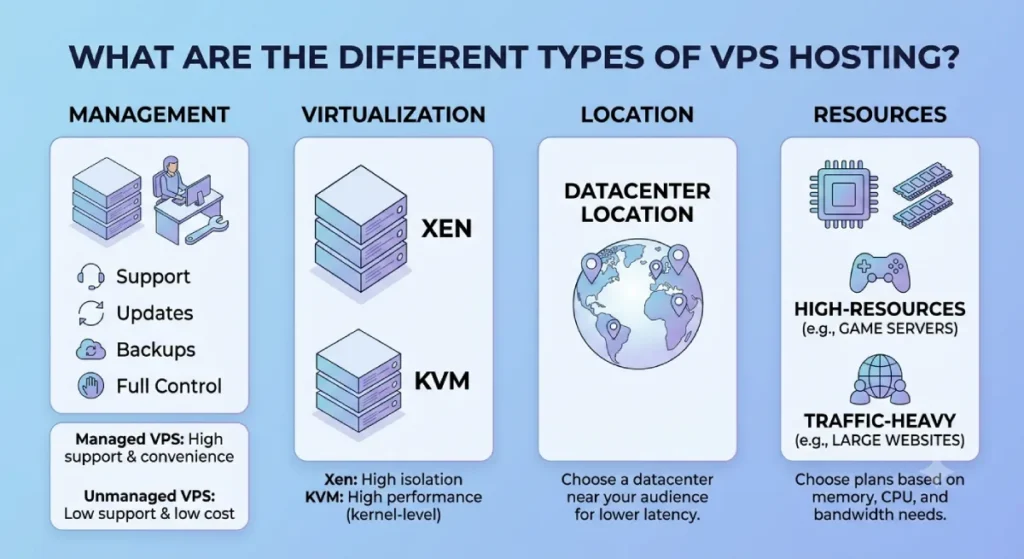
VPS hosting can be grouped by how much server management you receive and which operating system you use.
Managed VPS hosting
With managed VPS hosting, the provider takes responsibility for some or many routine server administration tasks.
Depending on the plan, this can include operating system updates, security patches, server monitoring, software configuration, backups, and technical assistance.
Managed VPS hosting is useful for business owners who need a VPS but do not want to handle every server maintenance task themselves.
Before purchasing, check exactly what “managed” includes. Some plans cover only basic maintenance, while others provide more comprehensive support.
Unmanaged VPS hosting
With unmanaged VPS hosting, the provider generally supplies the virtual server and infrastructure, while you handle most of the server administration.
You may need to install software, configure the firewall, update the operating system, manage applications, monitor resources, and troubleshoot problems yourself.
Unmanaged hosting can offer more flexibility and may cost less than a comparable managed plan. However, it is best suited to users who have the technical knowledge and time to maintain a server.
Semi-managed VPS hosting
Semi-managed VPS hosting sits between managed and unmanaged services.
The provider may help with basic server setup, operating system issues, or selected maintenance tasks, while you remain responsible for your applications and other administration work.
Because the meaning varies between providers, read the support terms before selecting a plan.
Linux VPS hosting
Linux VPS hosting runs a Linux-based operating system, such as Ubuntu, Debian, or AlmaLinux.
It is widely used for websites, WordPress, PHP applications, databases, and development tools. The best distribution depends on the software you want to run and your familiarity with Linux.
Windows VPS hosting
Windows VPS hosting runs a Windows-based server environment. It can be appropriate for applications that depend on Windows-specific software or technologies.
Check licensing, included remote access, application compatibility, and support costs before choosing a Windows VPS.
If your application needs Windows-specific features, explore our Windows hosting guide.
What Are the Benefits of VPS Hosting?
VPS hosting offers several advantages over basic shared hosting, although the actual benefits depend on the provider and configuration.
1. More predictable resource allocation
A VPS plan includes defined resources, which can help you plan for your website’s workload.
You still need to monitor usage, and the underlying hardware is shared. Nevertheless, an appropriately configured VPS can provide a more controlled environment than a basic shared hosting account.
2. Greater control over server settings
Many VPS plans let you install software, configure services, adjust server settings, and manage the operating system.
This is especially useful for developers and businesses with requirements that standard shared hosting cannot meet.
3. More flexibility
You can often choose the operating system, software stack, and configuration that match your application.
Some providers also let you upgrade your plan as your requirements grow, although the available upgrade options and migration process vary.
4. Better isolation than traditional shared hosting
A VPS normally runs in its own virtual environment. This helps separate your operating system and applications from other customers’ environments.
Isolation does not remove every risk. Security also depends on virtualization, configuration, software updates, access controls, and the hosting provider’s infrastructure.
5. Room for website growth
A VPS may support higher workloads than an entry-level shared hosting plan when configured with sufficient resources.
It can be a practical next step for a growing website, but you should compare the cost and performance of upgrading your existing plan with moving to a VPS.
6. Support for custom applications
A VPS can be useful when you need specific software, background processes, custom databases, or server-level access.
This makes it attractive to developers, agencies, and businesses with more advanced technical requirements.
What Are the Disadvantages of VPS Hosting?
VPS hosting is not the right choice for every website.
Higher costs than basic shared hosting
A VPS usually costs more than entry-level shared hosting. Managed services, backups, licences, control panels, and additional security tools can increase the total price.
More technical responsibility
With unmanaged VPS hosting, you may need to handle server updates, firewalls, software configuration, and troubleshooting.
A low-cost plan can become expensive in terms of time if you lack the necessary technical skills.
Security still requires attention
A VPS is not automatically secure simply because it is virtual and isolated. Weak passwords, outdated software, exposed services, and incorrect permissions can create security problems.
Resources are still limited
Your VPS has a defined amount of CPU capacity, memory, storage, and network resources. If your application outgrows those limits, you may need to upgrade or change your infrastructure.
Management quality varies
Not all hosting providers offer the same support, backup policies, monitoring, or performance. Compare what is included rather than choosing a VPS based only on its advertised price.
VPS vs. Shared Hosting vs. Cloud Hosting vs. Dedicated Hosting
Choosing the right hosting type depends on your budget, workload, technical skills, and need for control.
| Feature | Shared Hosting | VPS Hosting | Cloud Hosting | Dedicated Hosting |
|---|---|---|---|---|
| Infrastructure | Shared hosting environment | Virtual machine on shared physical hardware | Uses cloud infrastructure; design varies | Entire physical server |
| Resource control | Usually limited | Defined resources and greater control | Depends on service and architecture | High |
| Server access | Usually limited | Often root or administrator access | Depends on the plan | Usually extensive |
| Technical skill needed | Low | Moderate to high, unless managed | Varies | Moderate to high, unless managed |
| Typical cost | Low | Low to medium | Varies widely | Usually higher |
| Best suited for | Small sites and beginners | Growing sites and custom workloads | Applications needing cloud flexibility | Demanding workloads needing dedicated hardware |
VPS vs. shared hosting
Shared hosting is often the simplest option for beginners. The provider manages most server-level tasks, and several customers use a shared hosting environment.
A VPS provides a separate virtual machine, more configuration control, and defined resources. It may be a better fit when your website needs more flexibility or has outgrown its current plan.
However, if your website is small and performs well on shared hosting, you may not need to upgrade yet.
VPS vs. cloud hosting
VPS hosting describes a virtual server environment. Cloud hosting describes a broader range of services built on cloud infrastructure.
Some cloud hosting products provide virtual machines that function much like VPS plans. Other cloud platforms offer features such as managed databases, load balancing, automatic scaling, and distributed services.
The terms can overlap, so compare the actual architecture, resource limits, management responsibilities, and pricing rather than relying on the product name alone.
Read our guide to best cloud hosting services to explore cloud-based options.
VPS vs. dedicated server hosting
With VPS hosting, you rent a virtual machine that shares physical hardware with other virtual machines.
With dedicated hosting, you rent an entire physical server for your use. This can provide more direct control over the machine and its resources, but it often costs more and may require more management.
Dedicated hosting may suit demanding applications or workloads that need dedicated physical hardware. For other projects, a VPS may offer enough capacity at a lower cost.
Explore our guide to best dedicated hosting servers if you need more information about dedicated infrastructure.
How Much Does a VPS Server Cost?
The cost of a VPS depends on its resources, management level, billing period, location, and included features.
A basic VPS may cost relatively little, while a high-resource or fully managed VPS can cost considerably more. Prices change frequently, so compare current plans and renewal rates before purchasing.
The main factors that affect VPS server pricing include:
- CPU and RAM: Plans with more processing power and memory generally cost more.
- Storage: Storage capacity and technology, such as NVMe SSDs, can affect pricing.
- Management: Fully managed support may cost more than an unmanaged server.
- Operating system and licences: Certain operating systems, control panels, or commercial software may require additional fees.
- Backups and security: Automated backups, monitoring, and advanced security services may be included or charged separately.
- Billing term: A provider may advertise a lower monthly equivalent when you pay for a longer term upfront.
- Renewal pricing: The price after your introductory term may be higher than the promotional price.
Check VPS hosting deals before buying
If you are ready to compare providers, check our Hostinger VPS hosting coupon page for current offers and plan details.
You can also browse our web hosting deals and coupon codes to compare available hosting promotions.
Before paying, confirm the final checkout total, billing period, renewal price, included backups, resource limits, and refund policy. A large advertised discount does not necessarily mean a plan will be the cheapest over several years.
Is VPS Hosting Secure?
VPS hosting can provide a good level of isolation, but security depends on how the server and applications are configured.
If you choose an unmanaged VPS, you are generally responsible for much of its security. With managed VPS hosting, the provider may handle selected security tasks, but you should still understand what is covered.
Follow these best practices to improve VPS security:
- Use strong, unique passwords. Avoid reusing passwords across your hosting account and applications.
- Enable SSH keys where appropriate. For Linux servers, key-based access can reduce reliance on password-based SSH login.
- Install security updates. Keep the operating system, server software, and applications patched.
- Configure a firewall. Allow only the network connections your services need.
- Limit administrator access. Use separate accounts and the minimum permissions required for each task.
- Enable backups. Store backups separately when possible and test that you can restore them.
- Monitor server activity. Watch resource usage, login attempts, errors, and unusual traffic.
- Protect your website and applications. Use HTTPS, secure application settings, and regularly updated plugins or dependencies.
For business-critical services, also plan how you will recover from a failed update, compromised account, hardware issue, or accidental deletion.
How to Choose the Right VPS Hosting Plan
The best VPS plan is not necessarily the one with the most RAM or the lowest advertised price. It is the one that meets your needs without making management unnecessarily difficult.
Use these factors to compare plans.
1. Estimate your resource needs
Consider your website traffic, application requirements, database size, background tasks, and expected growth.
If you are moving from shared hosting, review your current resource usage and error logs where available. This gives you a better starting point than guessing.
2. Decide whether you need managed hosting
Choose managed VPS hosting if you want the provider to handle more server maintenance and you do not have an administrator available.
Choose unmanaged hosting only if you are comfortable maintaining the operating system, security, software, and backups—or have someone who can do it for you.
3. Check server location
A server located closer to your main audience may help reduce network latency. However, website performance also depends on caching, content delivery, server configuration, and the visitor’s connection.
If most of your audience is in India, compare data-centre locations and network performance for your target users.
4. Compare backups and recovery options
Check how often backups run, how long they are retained, whether restoration costs extra, and whether you can create snapshots before major changes.
A backup that cannot be restored when needed is not a reliable recovery plan.
5. Understand the support policy
Check whether support covers infrastructure only or also operating system problems, application configuration, migrations, and security incidents.
This is especially important for unmanaged and semi-managed plans.
6. Calculate the long-term cost
Compare the initial payment, renewal price, licences, backups, control panel, and management fees.
You can start with our best web hosting comparison or best web hosting in India guide to compare providers and decide which service deserves a closer look.
When Should You Upgrade to VPS Hosting?
You may want to consider a VPS when your current hosting service no longer meets your needs.
Possible signs include:
- Your website regularly reaches its resource limits.
- Pages become slow during traffic spikes, even after you have checked caching and other performance issues.
- Your application requires software or server settings that shared hosting does not support.
- You need greater control over the operating system or server environment.
- You need to run background services or custom applications.
- Your business needs more control over its hosting configuration.
Before upgrading, identify the actual problem. A slow website can also be caused by large images, inefficient plugins, poorly optimised databases, external scripts, or a lack of caching. Moving to a VPS will not automatically fix those issues.
If the main problem is a lack of server resources or configuration control, a VPS may be the appropriate next step.
How to Set Up a VPS Server
The exact setup process depends on the hosting provider, operating system, and application. However, the basic steps are similar.
Step 1: Choose a VPS plan. Select a suitable operating system, resource level, server location, and management option.
Step 2: Create your server. Use the provider’s dashboard to deploy the virtual machine and access its connection details.
Step 3: Secure the server. Configure administrator access, install updates, enable a firewall, and disable unnecessary services.
Step 4: Install the required software. This may include a web server, database, runtime environment, control panel, or application dependencies.
Step 5: Configure your website or application. Upload your files, migrate your database if needed, and adjust the software settings.
Step 6: Connect your domain. Update the required DNS records and configure HTTPS for your website.
Step 7: Set up monitoring and backups. Check resource usage, test the website, configure alerts, and verify that backups can be restored.
If you are new to server administration, a managed VPS or a provider with clear setup documentation may be easier than configuring every component yourself.
Frequently Asked Questions About VPS Hosting
What is a VPS server in simple words?
A VPS server is a virtual computer hosted on a physical server. It has its own operating environment and allocated resources, so you can run a website or application with more control than a typical shared hosting account.
What does VPS stand for?
VPS stands for Virtual Private Server. It is a virtual machine that works as a separate server environment on physical hardware.
What is VPS hosting used for?
VPS hosting is used for websites, online stores, web applications, databases, development environments, background tasks, and other services that need server resources or configuration control.
Is VPS hosting better than shared hosting?
VPS hosting can be better when you need more control, defined resources, or custom software. Shared hosting is often simpler and more affordable for beginners and small websites. The right option depends on your requirements.
Is VPS hosting good for WordPress?
Yes. A VPS can host WordPress and provide more control over server settings and resources. However, you may need to manage the server yourself unless you choose a managed service. A well-configured shared or managed WordPress plan can still be a better choice for a small website.
Is a VPS server suitable for beginners?
It can be, particularly if you choose a managed VPS with suitable support. An unmanaged VPS is more challenging because you may need to handle updates, security, configuration, and troubleshooting.
Is VPS hosting secure?
A VPS provides an isolated virtual environment, but it is not automatically secure. Security depends on the provider’s infrastructure, software updates, access controls, firewall configuration, backups, and application maintenance.
What is the difference between managed and unmanaged VPS hosting?
With managed VPS hosting, the provider handles selected server administration tasks. With unmanaged VPS hosting, you handle most server maintenance and configuration yourself. Always check the exact services included in the plan.
How much RAM do I need for a VPS?
The amount of RAM you need depends on your operating system, application, database, traffic, and background processes. Check your actual memory usage and leave enough room for traffic spikes and normal system operations rather than choosing a plan based only on website size.
Can I host multiple websites on one VPS?
Yes, a VPS can host multiple websites if it has sufficient resources and is configured correctly. You will need to manage domains, web server settings, databases, security, and resource usage for each website.
Can I upgrade my VPS later?
Many hosting providers let you upgrade CPU, RAM, storage, or other resources. The available options and whether downtime or migration is required depend on the provider and plan.
Where can I find VPS hosting deals?
You can compare current offers on our Hostinger VPS hosting coupon page and explore the wider hosting deals and coupon codes section. Always check the renewal price and full billing terms before ordering.
Final Thoughts: Is VPS Hosting Right for You?
A Virtual Private Server gives you a separate virtual environment, allocated resources, and more control over your hosting setup than traditional shared hosting. It can be a good choice for growing websites, developers, businesses, and applications that need additional flexibility.
However, VPS hosting also comes with responsibilities. You need to choose suitable resources, maintain security, plan backups, and understand how much server management your provider includes.
If your current hosting plan meets your needs, there may be no reason to upgrade yet. If you need more control or have outgrown your existing environment, compare VPS plans carefully and calculate the long-term cost.
Start by reviewing our web hosting comparison and hosting deals and coupon codes before choosing a provider. The right decision balances performance, management, security, support, and price—not just the biggest discount.
