


A shopper searches for a specific product, clicks a search result, and lands on your store. Within seconds, they want to know three things: Is this the right product? Can I trust this seller? Is it worth the price?
If your product page fails to answer those questions—or search engines cannot properly understand the page—the sale may go to a competitor.
Product page SEO is the process of optimizing individual ecommerce product pages so search engines can discover, understand, and present them for relevant searches. It combines keyword research, product content, technical SEO, structured data, internal linking, image optimization, and user experience.
But optimizing a product page is not simply a matter of adding keywords to a title and description. You need to make the product easy to find, give shoppers enough information to make a decision, and ensure that search engines receive accurate information about its price, availability, variants, and purpose.
This guide explains how to optimize product detail pages (PDPs), avoid common ecommerce SEO problems, and build a repeatable process for improving organic visibility and sales.
What Is Product Page SEO?
Product page SEO involves improving individual pages that describe and sell specific products on an ecommerce website. The goal is to make each page relevant to the searches potential customers perform while providing the information they need to purchase confidently.
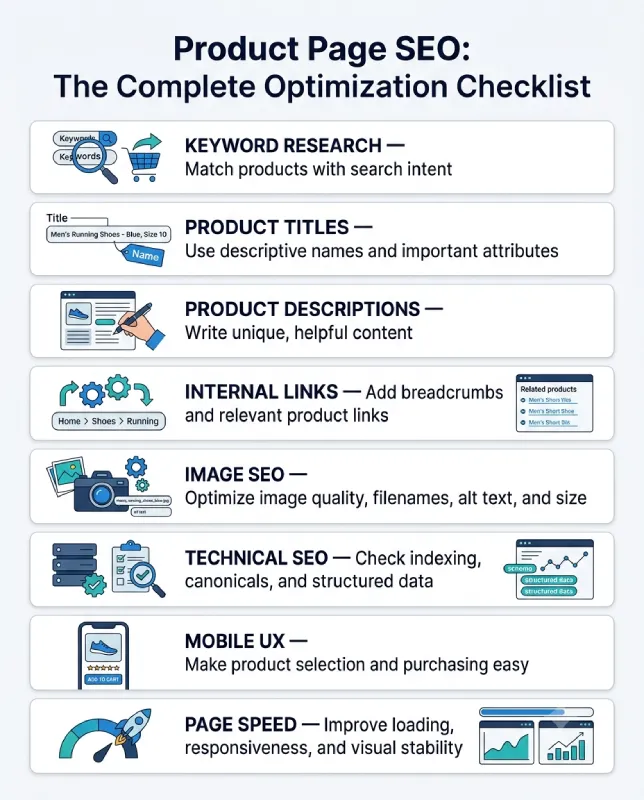
A well-optimized product page typically includes:
- A clear, descriptive product name.
- A unique SEO title and useful meta description.
- Original product descriptions and accurate specifications.
- High-quality images with meaningful alternative text.
- Clear pricing, availability, and product variants.
- Reviews and relevant trust information.
- Internal links and descriptive breadcrumbs.
- Appropriate Product structured data.
- A fast, accessible mobile experience.
- A straightforward path to purchase.
Product page SEO supports both search visibility and conversion optimization. A page might attract impressions but generate few clicks because its search snippet is unappealing. Another might receive organic traffic but produce few sales because the product details are incomplete or delivery costs are unclear.
These problems require different solutions, which is why rankings, clicks, and business outcomes should be measured separately.
Product Detail Page (PDP) vs. Product Listing Page (PLP)
Before optimizing an ecommerce website, distinguish between the main page types. Each serves a different purpose and should target an appropriate search intent.
| Page type | Primary purpose | Example |
|---|---|---|
| Product detail page (PDP) | Explain and sell one product or product family | A specific 256GB smartphone |
| Product listing page (PLP) | Display a group of products for browsing | Smartphones under $500 |
| Category page | Organize products within a broader topic | Smartphones |
| Buying guide | Help shoppers research and compare options | How to choose a smartphone |
A product page should answer questions about a particular item, including its features, price, compatibility, dimensions, and availability. A category or listing page helps visitors discover and compare several products.
This distinction matters for keyword targeting. If someone searches for a specific model, a detailed product page is often the most appropriate destination. If they search for the best smartphones under $500, a category page, comparison page, or buying guide may better match their intent.
There are exceptions, so examine the actual search results before deciding which page type to optimize.
15 Product Page SEO Best Practices
1. Research Keywords Based on Product-Specific Search Intent
Start by identifying the terms shoppers use when looking for your product. Avoid choosing keywords solely because they have high search volume.
For an ecommerce product page, relevant searches may include a brand name, model number, product type, material, size, color, compatibility requirement, or intended use.
For example, a store selling an ergonomic office chair might identify these search terms:
- Ergonomic office chair.
- Adjustable ergonomic office chair.
- Ergonomic office chair with lumbar support.
- Mesh office chair with adjustable armrests.
- Brand and model-specific searches.
These phrases express different levels of specificity. The best primary keyword depends on the actual product and the intent reflected in the search results.
A practical keyword research process:
- Start with the exact product name, model, SKU, and its main attributes.
- Use Google Search autocomplete and related searches to discover additional wording.
- Check Google Search Console for queries already generating impressions and clicks.
- Use keyword research tools to compare estimated demand, competition, and related terms.
- Review the pages currently ranking for your target query.
- Assign each keyword to the page type that best satisfies its intent.
You can use Google Search Console to identify queries for which existing pages receive impressions. For broader keyword discovery and competitor research, compare tools in our guide to the best SEO tools in 2026.
Do not assign a separate page to every minor keyword variation. A single product page can naturally address closely related searches when they describe the same item and satisfy the same intent.
For stores with extensive catalogs, maintain a keyword map containing the product URL, primary keyword, supporting attributes, search intent, and current performance.
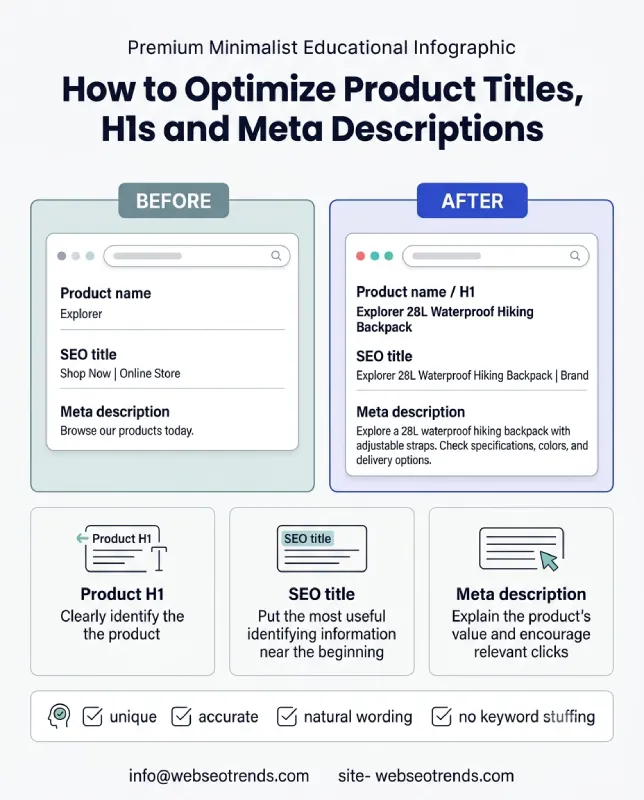
2. Write Descriptive Product Names and SEO Title Tags
Your product name should identify the item clearly, while the SEO title should communicate the page’s relevance to someone scanning search results.
A creative product name may work well for branding, but it may not explain what the product actually is.
For example:
Weak product name: The Explorer
More descriptive product name: The Explorer 28L Waterproof Hiking Backpack
The second version gives shoppers and search engines more useful information without requiring them to understand the brand’s naming system.
A useful product naming structure is:
Brand or model + product type + important differentiating attribute
Adjust the order according to what matters most to customers. A particular model number may be essential for electronics, while material, size, or color may be more important for apparel and home furnishings.
Your SEO title can include additional context where it fits naturally.
Example:
- Product name: Explorer 28L Waterproof Hiking Backpack
- SEO title: Explorer 28L Waterproof Hiking Backpack | Brand Name
Keep the most useful identifying information near the beginning. Google may rewrite title links, and the amount displayed varies by device and search result, so do not treat a particular character count as a guaranteed display limit.
Avoid creating hundreds of titles by inserting keywords into an automated template without checking the result. If every product has the same title except for a generic identifier, shoppers may struggle to distinguish between search results.
3. Create Unique, Helpful Product Descriptions
Product descriptions should explain what makes the item useful, who it is suitable for, and which details could affect a purchase decision.
Copying the manufacturer’s description is convenient, but the same text may appear on dozens of retailer websites. It also misses an opportunity to explain the product in the context of your customers’ needs.
Consider a store selling a compact desk lamp.
A generic description might say:
“This modern desk lamp features adjustable brightness and an elegant design.”
A more useful description would explain:
“This compact desk lamp fits comfortably on a small study desk. Its adjustable brightness settings let you switch between softer evening light and brighter illumination for reading or detailed work. Check the listed dimensions before ordering if you have limited desk space.”
The second version adds context that helps someone evaluate the product.
A strong product description should cover the following where relevant:
- What the product is and what it does.
- The main benefits and differentiating features.
- Materials, dimensions, weight, and technical specifications.
- Compatibility with other products or devices.
- Instructions, maintenance, or care requirements.
- Important limitations or suitability considerations.
- What is included in the package.
- Warranty, delivery, and return information, where applicable.
Place the most decision-relevant information near the beginning. Use bullets for specifications and headings for longer sections so shoppers can scan the page easily.
Do not add paragraphs merely to reach a word count. A simple product may need a concise description, while a technical product may require compatibility details, setup instructions, and a substantial specification table.
The right amount of content is the amount needed to explain the product accurately and help the shopper make an informed decision.
4. Optimize Meta Descriptions to Earn Relevant Clicks
A meta description is a short summary that may appear beneath the title in search results. Google can generate a different snippet from the page when it considers other content more useful for a particular query.
Although meta descriptions are not a direct ranking factor, a clear and relevant description can help users decide whether to visit your page.
A useful product meta description usually includes:
- The product’s identity or main benefit.
- One or two meaningful differentiators.
- Relevant information about the offer, if accurate.
- A natural reason to visit the page.
Example:
“Explore the Explorer 28L waterproof hiking backpack, with adjustable straps and organized storage. Check specifications, available colors, and delivery options.”
Write descriptions for the actual product rather than using the same generic text across the entire catalog.
Avoid unsupported claims such as “the best backpack in the world” or promotional details that do not match the current offer. If the product goes on sale or becomes unavailable, make sure any time-sensitive information is updated.
5. Build a Useful Product URL Structure
Product URLs should be descriptive, stable, and easy to understand.
For example:
example.com/backpacks/explorer-28l/
This is easier to interpret than a URL containing an unexplained sequence of parameters or identifiers.
When designing your URL structure:
- Use a readable product slug.
- Keep URLs consistent across the catalog.
- Avoid unnecessary parameters in indexable URLs.
- Ensure internal links point to the preferred URL.
- Redirect permanently moved products when an appropriate replacement exists.
- Avoid changing established URLs solely to add a keyword.
Product variants create additional complications. A color or size selector may generate URLs such as:
example.com/backpacks/explorer-28l/?color=blue
That URL does not automatically need to be indexed separately. If the variant has no meaningful standalone search value and substantially duplicates the main product page, a canonical strategy may be appropriate.
However, if variants have distinct demand, inventory, images, or genuinely useful product information, separate indexable pages may make sense.
Make this decision deliberately. The right approach depends on how variants work, how customers search, and whether each URL offers a distinct and useful experience.
6. Optimize Product Images for Search and Accessibility
Product images help shoppers evaluate appearance, materials, size, finish, and other details that written descriptions cannot fully communicate.
Poor images can make a good product page less convincing. Oversized image files can also slow down the experience, particularly on mobile connections.
Use images that help customers understand the item, such as:
- A clear primary product image.
- Multiple views from different angles.
- Close-ups of important details.
- Images showing the product in use.
- Size comparisons or dimension diagrams where useful.
- Packaging or included accessories, where relevant.
Image SEO checklist:
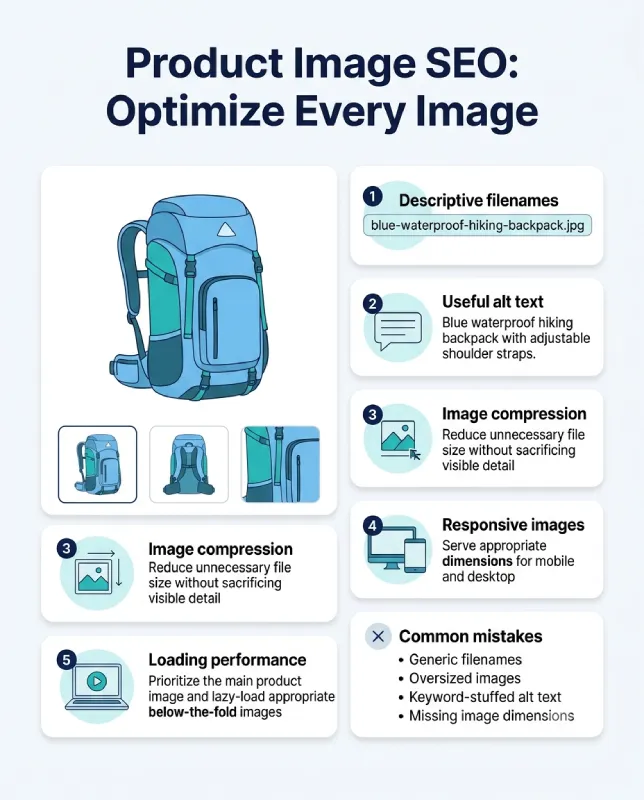
Use descriptive filenames. A filename such as blue-waterproof-hiking-backpack.jpg provides more context than IMG_4832.jpg. Rename files before uploading when practical.
Write meaningful alt text. Describe the image’s relevant visual information. For example, “Blue 28-liter hiking backpack with adjustable shoulder straps” is more useful than “backpack image SEO waterproof hiking backpack best backpack.”
Compress images appropriately. Use modern image formats where supported, resize files to the dimensions actually required, and avoid serving unnecessarily large assets.
Use responsive images. Provide appropriate image sizes for different screens instead of forcing mobile devices to download oversized desktop assets.
Protect the main product image’s loading priority. The image most likely to become the largest contentful paint element should not be delayed unnecessarily. Lazy-load images further down the page rather than automatically lazy-loading every image.
Add useful captions when needed. Captions can explain dimensions, product variations, or features that are not obvious from the image itself.
For image optimization, balance visual quality with file size. An image should remain clear enough to inspect important details without imposing an unnecessary performance cost.
7. Add Product Structured Data Correctly
Structured data helps search engines interpret information about a product and its offer. Depending on eligibility and Google’s presentation rules, correctly implemented markup can make a product eligible for enhanced search appearances.
For product pages, relevant properties may include:
- Product name and description.
- Brand and product identifiers.
- Product images.
- Offer price and currency.
- Availability.
- Applicable ratings and reviews.
- Product variants and their relationships.
Google documents the requirements and supported properties in its Product structured data guidelines.
A simplified example of Product and Offer markup is shown below. Replace the illustrative values with the actual product information and ensure that the visible page and structured data agree.
<script type="application/ld+json">
{
 "@context": "https://schema.org",
 "@type": "Product",
 "name": "Explorer 28L Hiking Backpack",
 "description": "A 28-liter hiking backpack with adjustable straps.",
 "sku": "EXP-28-BLU",
 "image": [
 "https://example.com/images/explorer-28l-blue.jpg"
 ],
 "brand": {
 "@type": "Brand",
 "name": "Example Brand"
 },
 "offers": {
 "@type": "Offer",
 "url": "https://example.com/backpacks/explorer-28l/",
 "priceCurrency": "USD",
 "price": "79.00",
 "availability": "https://schema.org/InStock"
 }
}
</script>
This is a starting example, not a complete production implementation. The image, URL, SKU, brand, currency, price, and availability must reflect the actual product. Additional properties should be included when relevant and supported.
If the product has multiple variants, review Google’s guidance for ProductGroup, hasVariant, and related properties rather than treating every variation as an unrelated item.
After implementation:
- Test the markup with Google’s Rich Results Test.
- Review structured data reports in Search Console.
- Check for missing required properties and invalid values.
- Confirm that prices and availability match the visible page.
- Recheck the markup when the catalog or ecommerce theme changes.
Valid markup does not guarantee a rich result or higher rankings. It makes the page eligible for supported search features when Google’s other requirements are met.
8. Strengthen Internal Links and Ecommerce Site Architecture
Internal links help customers discover related products and help search engines find and understand the relationships between pages.
A product page that is accessible only through an on-site search box may be difficult for crawlers to discover if there are no crawlable links leading to it.
Build clear paths from your homepage and category pages to important products. Use descriptive breadcrumbs, relevant category links, and related-product sections where they genuinely help customers.
For example:
Home → Backpacks → Hiking Backpacks → Explorer 28L Hiking Backpack
This structure helps shoppers understand where the product belongs and makes it easier to return to broader categories.
Useful internal linking opportunities include:
- Category and subcategory navigation.
- Breadcrumbs linking to relevant parent pages.
- Related products and compatible accessories.
- Best-selling or popular products, when relevant.
- Buying guides that link to the products they discuss.
- Comparison articles that help customers choose between models.
Use meaningful anchor text. “Waterproof hiking backpacks” tells users more than “click here” when the destination is a relevant collection.
Do not link every product to every other product. That creates clutter and weakens the usefulness of recommendations. Prioritize links based on relevance, navigation, and customer needs.
For a broader understanding of how technical and on-page improvements work together, read our guide to technical SEO vs. on-page SEO.
9. Make Mobile Usability a Priority
A product page should work well on small screens without forcing shoppers to zoom, struggle with selectors, or search for the purchase button.
Mobile optimization means more than fitting a desktop design into a narrower layout. It requires checking the complete shopping experience on real devices or representative test environments.
Focus on the following:
- Keep the product name, price, availability, and main image easy to find.
- Make variant selectors usable with touch.
- Ensure buttons have adequate size and spacing.
- Keep text readable without horizontal scrolling.
- Make shipping, returns, and product specifications accessible.
- Prevent pop-ups from obstructing essential content.
- Make image galleries and zoom controls work reliably.
- Keep navigation and cart access straightforward.
A sticky add-to-cart button can be useful on long product pages, provided it does not cover important content or interfere with other controls.
Do not remove useful information simply to make a mobile page shorter. Use expandable sections for secondary details, but ensure essential product information remains accessible.
Test the full journey: open a product page, choose a variant, add the item to the cart, and proceed toward checkout. A visually attractive page is not optimized if a critical interaction fails on mobile.
10. Improve Core Web Vitals and Page Performance
Page performance affects the shopping experience and is part of Google’s page experience considerations. It should be treated as an ongoing technical requirement, not a one-time score improvement exercise.
Google’s Core Web Vitals measure three important aspects of user experience:
| Metric | What it measures | Good threshold |
|---|---|---|
| Largest Contentful Paint (LCP) | Loading performance | 2.5 seconds or less |
| Interaction to Next Paint (INP) | Responsiveness | 200 milliseconds or less |
| Cumulative Layout Shift (CLS) | Visual stability | 0.1 or less |
These thresholds are assessed at the 75th percentile of real-user page visits, with appropriate segmentation by device where applicable. Lab tests are useful for diagnosis but do not replace field data.
Start by testing representative product pages with PageSpeed Insights. For larger sites, compare templates and page types rather than testing only the homepage.
Common performance improvements include:
- Compressing product images and serving responsive sizes.
- Reserving image dimensions to reduce layout shifts.
- Reducing unnecessary JavaScript and third-party scripts.
- Deferring nonessential functionality.
- Using browser caching and a content delivery network where appropriate.
- Removing unused fonts and loading necessary font files efficiently.
- Reducing slow server responses and unnecessary redirects.
- Avoiding heavy review widgets, chat tools, or pop-ups that block interaction.
Do not focus exclusively on achieving a perfect Lighthouse score. Investigate the actual bottleneck and prioritize improvements that make the shopping experience faster and more reliable.
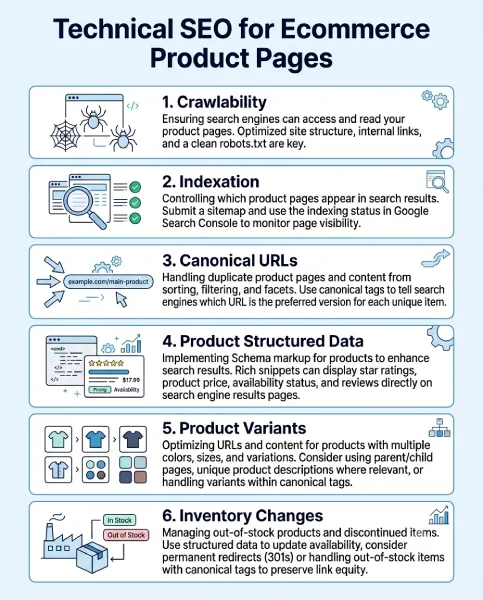
11. Handle Product Variants and Duplicate Content Carefully
Color, size, material, and configuration options can create hundreds of URLs from a relatively small catalog.
For example, one T-shirt might have five colors and six sizes. Depending on the platform, selecting each combination may generate a distinct URL, or the selection may happen dynamically on a single page.
The SEO decision is whether those URLs represent genuinely useful, distinct landing pages.
If variations are substantially identical and have no meaningful independent search purpose, consolidating signals through a canonical URL may be appropriate.
If a particular variant has distinct demand and deserves its own search result, it may warrant a separate indexable page with relevant content, imagery, and accurate availability.
Check these details:
- Which variant URLs can be crawled and indexed?
- Does each indexable URL have an appropriate canonical?
- Are internal links consistent with the preferred URL strategy?
- Are variant titles and images accurate?
- Does the selected variant’s price and availability match the page?
- Are filter and sorting parameters creating unnecessary URL combinations?
Canonical tags are signals, not an absolute guarantee of which URL Google will select. Google may choose a different canonical when other evidence conflicts with the declared preference.
Avoid blocking URLs in robots.txt as a substitute for understanding their indexation behavior. A blocked URL can still be discovered, and crawlers may not be able to read its canonical tag.
For large catalogs, review URL generation at the template level so a single mistake does not multiply across thousands of product variations.
12. Manage Out-of-Stock and Discontinued Products Properly
A product becoming unavailable does not automatically mean its page should be deleted.
The right action depends on whether the product is temporarily unavailable, permanently discontinued, or replaced by another item.
Temporarily out of stock: Keep the page available when the product is expected to return. Clearly display its current status, remove misleading purchase options, and consider useful alternatives or a restock notification.
Permanently discontinued with a suitable replacement: Consider a permanent redirect when the replacement genuinely serves the same purpose and is a reasonable destination.
Permanently discontinued without a relevant replacement: If the page no longer offers value and has no continuing demand or useful links, returning a proper 404 or 410 status may be appropriate.
Product still useful for research: A discontinued product page may remain valuable when people continue searching for its specifications, manuals, or compatibility information. In that case, clearly communicate its discontinued status and provide helpful alternatives where possible.
Do not redirect every unavailable product to the homepage or an unrelated category. Such redirects can confuse visitors and fail to satisfy the original intent.
Your inventory system, visible page, structured data, and product feed should communicate consistent availability information.
13. Use Genuine Reviews and Product-Specific Questions
Reviews can help shoppers understand what a product is like beyond its official specifications. Questions and answers can also address concerns that are not covered by the main description.
Encourage genuine customer feedback and display it in a format that is easy to read. Useful review information may include the customer’s experience with sizing, durability, installation, fit, performance, or compatibility.
Do not publish fabricated reviews or selectively present feedback in a way that misleads shoppers.
A review section should be relevant to the actual product or variant. Reviews about one model should not be presented as if they were necessarily written about a materially different model.
If you use rating markup, ensure it complies with Google’s structured data policies. Do not mark up ratings that are not visible to users or that do not genuinely apply to the product.
Customer questions can also reveal content gaps. If shoppers repeatedly ask whether a charger supports a particular device, add a clear compatibility explanation to the page when the answer can be verified.
This creates a useful feedback loop: customer questions improve the page, while the improved page may reduce uncertainty for future buyers.
14. Keep Product Data Consistent Across Your Store and Google Merchant Center
Product information often exists in several places: the ecommerce database, the rendered product page, structured data, and a product feed submitted to Google Merchant Center.
When these sources disagree, the result may be confusing for shoppers and problematic for product listings.
For example, a feed might advertise a product at $79 while the landing page shows $89. A product might be marked as available in structured data even though the purchase button indicates that it is sold out.
Build a process to keep the following information synchronized:
- Product title and description.
- Price and currency.
- Availability and inventory status.
- Brand and product identifiers.
- Product variant attributes.
- Landing page URL.
- Primary image and supporting images.
- Shipping and return information where required.
Use Google’s product data and ecommerce SEO documentation to review supported ways of sharing product information.
For stores with large inventories, automated feeds and regular validation can reduce manual errors. However, automation should not replace monitoring. Changes to product variants, pricing rules, inventory systems, or themes can introduce inconsistencies.
Review feed diagnostics, landing page errors, and structured data after significant catalog changes. The goal is to make the product information accurate everywhere it appears.
15. Measure Product Page SEO Beyond Rankings
Rankings are useful, but they do not tell you whether product page SEO is generating meaningful business results.
A page may rank well for a broad query that attracts visitors who are unlikely to buy. Another may receive fewer visits but convert highly relevant searches into sales.
Use Google Search Console, analytics data, ecommerce reports, and crawl data together to understand performance.
Track these metrics where applicable:
- Search impressions and organic clicks.
- Click-through rate for relevant queries.
- Organic landing-page sessions.
- Add-to-cart rate.
- Checkout initiation and purchase conversion rate.
- Revenue from organic landing sessions.
- Average order value.
- Product availability and feed errors.
- Organic performance by product category and device.
Segment results by product, category, brand, and query intent where the data permits.
For example, if a product page has many impressions but a low click-through rate, investigate whether the title and snippet accurately communicate its value and match the search intent.
If organic visits increase but add-to-cart events remain flat, inspect the page’s pricing, product imagery, specifications, delivery information, and purchase interactions.
If add-to-cart activity is healthy but completed purchases decline, the problem may lie in checkout, shipping costs, payment options, or another part of the customer journey rather than the product page itself.
Make changes based on evidence, and compare performance over a suitable period. Account for seasonality, inventory changes, promotions, and other factors that could affect results.
Product Page SEO Audit Checklist
Use this checklist to review individual product pages or audit an entire ecommerce catalog.
Keyword targeting and content
- Each important product page has a clear search intent.
- The product name identifies the item accurately.
- The SEO title is descriptive and distinct.
- The meta description accurately summarizes the offer.
- Product descriptions provide useful, original information.
- Specifications, compatibility, and limitations are accurate.
- Product variants are described clearly.
Technical SEO and indexation
- Important product pages return the correct HTTP status.
- Indexable pages are not blocked accidentally.
- Canonical URLs reflect the intended indexation strategy.
- Product pages are reachable through crawlable internal links.
- Breadcrumbs and category paths are useful and consistent.
- Variant, filter, and sorting URLs are handled deliberately.
- Discontinued products follow an appropriate URL and status strategy.
Images and user experience
- Product images are clear and relevant.
- Meaningful images have appropriate alt text.
- Image files are sized and compressed appropriately.
- Mobile navigation and variant selectors work.
- Price, availability, and purchase options are easy to find.
- Delivery and return details are accessible.
- Important content is not obscured by intrusive overlays.
Structured data and product feeds
- Product structured data is valid where implemented.
- Offer price, currency, and availability are accurate.
- Product identifiers and brand information are correct.
- Variant markup matches the actual product relationships.
- Ratings and reviews comply with applicable requirements.
- Product feed information agrees with the landing page.
- Search Console and Merchant Center issues are monitored where relevant.
Measurement and improvement
- Search impressions and clicks are monitored.
- Organic landing-page performance is measured.
- Add-to-cart and purchase events are tracked correctly.
- Product pages with declining performance are investigated.
- Significant changes are documented and evaluated.
- Audit findings are prioritized by impact and effort.
How to Prioritize Product Page SEO Improvements
If your store has thousands of products, optimizing every URL individually is rarely the best starting point. Begin with the problems that affect the most valuable pages or prevent search engines from accessing important products.
A practical prioritization framework has four stages.
Stage 1: Fix critical technical problems. Investigate important pages that are accidentally noindexed, blocked, returning errors, or canonicalized incorrectly. Confirm that key products can be discovered through internal links.
Stage 2: Improve high-opportunity pages. Use Search Console and business data to identify products with meaningful impressions, declining clicks, poor conversion rates, or strong commercial value. Improve their titles, descriptions, imagery, and purchase information.
Stage 3: Improve templates and catalog-wide consistency. Address repeated problems such as duplicate titles, missing product attributes, oversized images, weak breadcrumbs, or incorrect structured data. Fixing the underlying template can improve many URLs at once.
Stage 4: Test and refine. Compare the effects of significant changes using appropriate performance metrics. Expand successful improvements to similar pages, while accounting for differences between product categories.
Do not prioritize solely by traffic potential. A low-traffic product may have high margins or strategic importance, while a popular product may be unavailable or unsuitable for further investment.
Combine search data with inventory, revenue, and customer demand to decide what deserves attention first.
Frequently Asked Questions About Product Page SEO
What is product page SEO?
Product page SEO is the process of optimizing individual ecommerce product pages to improve their discoverability, relevance, and search performance. It includes keyword research, titles, descriptions, images, internal links, structured data, technical SEO, and user experience.
What are the most important product page SEO best practices?
Start with a descriptive product name, unique and helpful content, relevant keywords, clear product attributes, accurate structured data, useful internal links, optimized images, mobile usability, and reliable page performance. Then measure whether the changes improve relevant organic traffic and business outcomes.
How long should an SEO product description be?
There is no universally correct word count. The description should contain enough information to explain the product, its main benefits, important specifications, and relevant limitations. Simple products may need only a concise description, while complex products may require more detail.
Should every product page have a unique meta title and description?
Important indexable product pages should generally have descriptive titles and page-specific meta descriptions. They should distinguish the product and reflect the information users will find on the page. Automated templates can help at scale, but their output should be reviewed for duplication and poor wording.
Do product reviews help SEO?
Genuine reviews can provide useful product-specific information, build shopper confidence, and help customers evaluate an item. Eligible review markup may also support enhanced search appearances when Google’s requirements are met. Reviews do not guarantee higher rankings.
How do you handle duplicate product pages?
First, determine why the duplication exists. If several URLs represent essentially the same product and do not need separate search results, a canonical strategy may be suitable. If variants have distinct search intent and useful independent content, separate indexable pages may be justified. Internal links, redirects, canonicals, and variant markup should support the chosen approach.
Should out-of-stock product pages remain indexed?
Temporarily unavailable products can often remain accessible, especially when they are expected to return. Permanently discontinued products need a decision based on replacement availability, continuing usefulness, demand, and existing links. Keep availability information accurate and avoid redirecting every unavailable product to an unrelated destination.
Does Product schema guarantee rich results?
No. Structured data helps Google interpret product information and can make eligible pages qualify for supported search appearances, but Google does not guarantee that rich results will be displayed.
How can I check whether my product pages are optimized?
Combine Google Search Console, PageSpeed Insights, a technical crawler, structured data validation, and ecommerce analytics. Review indexation, titles, descriptions, canonicals, image performance, mobile usability, structured data, organic clicks, add-to-cart events, and completed purchases.
How can ecommerce websites optimize thousands of product pages?
Start by auditing page templates and grouping products by category, value, search demand, and technical issues. Fix widespread template problems first, then prioritize individual pages using search and business data. Automate repetitive tasks where possible, but review the generated content and product data for accuracy.
Final Thoughts
Product page SEO works best when search visibility and the buying experience are treated as connected goals. A page needs to identify the product clearly, provide accurate and useful information, remain accessible to search engines, and make purchasing straightforward.
Begin with the products that matter most. Check their indexation, keyword targeting, descriptions, images, internal links, structured data, and mobile experience. Then use actual search and ecommerce performance data to decide what to improve next.
There is no single optimization that guarantees a top ranking. Consistent technical maintenance, accurate product information, useful content, and ongoing measurement give ecommerce pages a stronger foundation for sustainable organic growth.
