

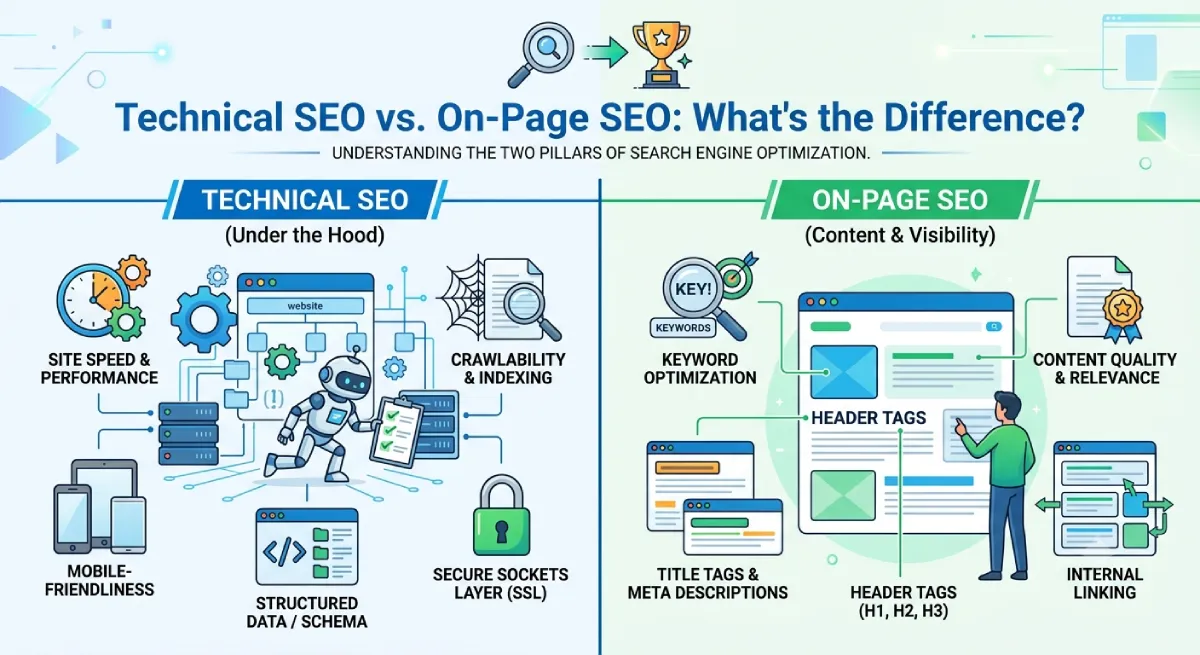
Quick answer: Technical SEO is about how your website works: whether search engines can find, read, and store your pages. On-page SEO is about what each page says: whether the content, title, headings, and links answer the searcher’s question. Off-page SEO is about what the rest of the web says about you. Technical SEO vs. on-page SEO isn’t a contest. A page needs both to rank.
I’ve lost count of how many site owners have told me, “I wrote great content, so why isn’t it showing up?” Nine times out of ten, the answer sits in one of two places. Either the site has a technical problem that stops Google from seeing the page, or the page doesn’t match what searchers actually want.
That’s the whole difference between technical SEO and on-page SEO, and it’s easier to grasp than most guides make it sound. If you’re still deciding whether SEO deserves your time, start with why SEO is important and come back.
Technical SEO helps search engines crawl, understand, and index your website. On-page SEO helps search engines and real people understand what each page is about, and whether it answers their question.
Picture your website as a house. Technical SEO is the foundation, wiring, doors, and plumbing. On-page SEO is the rooms, signs, and labels that tell visitors what’s inside. A beautiful house with a locked front door gets no visitors. A house with the doors wide open and nothing inside gets visitors who leave straight away.
In this guide, you’ll see what technical SEO and on-page SEO mean, how each one works, where they overlap, and how off-page SEO completes the picture. You’ll also get checklists and a simple order for deciding what to fix first.
Technical SEO vs. On-Page SEO: Understanding the Basics
Here’s the simplest test I use. Before you change anything on your site, ask: “Am I changing how my site works, or what my page says?”
Technical SEO focuses mainly on how your website works. It’s about access, speed, structure, and clean signals for search engines.
On-page SEO focuses mainly on what your pages say and how that information is shown. It’s about content, intent, clarity, and layout.
Two quick examples make this concrete. Fixing a wrong canonical tag (the tag that tells Google which URL is the “main” one) is technical SEO. Rewriting a page title so it matches what people really type into Google is on-page SEO.
Beginners often compare on-page vs. technical SEO as if you had to pick a side. You don’t. They solve different problems, and the problems show up at different stages. Technical issues stop a page from being found. On-page issues stop a found page from being chosen.
What Is Technical SEO?
Technical SEO is the work of setting up and maintaining your website so search engines can discover, crawl, render, understand, and index your pages. In short, it makes your site easy for search engine bots to use.
The work usually falls into a few groups:
- Access: crawling and indexing fixes, XML sitemaps, robots.txt, and server errors
- Speed and experience: page speed, Core Web Vitals (Google’s page experience scores), mobile-friendliness, and HTTPS
- Structure: site architecture, URL structure, internal paths between pages, and fixing broken links and redirects
- Clean signals: canonical URLs, duplicate pages, structured data, and JavaScript rendering
You don’t need to be a developer for every task. Plenty of problems show up in Google Search Console, in a site crawler, or in an SEO platform, and some fixes are as simple as changing a setting in your CMS. The bigger fixes, like server speed, crawl budget, or JavaScript rendering, are often worth handing to a developer or a specialist team that offers technical SEO services.
The goal is simple: make it easy for search engines to reach and understand your website, while giving visitors a smooth experience.
What Is On-Page SEO?
On-page SEO is the practice of improving what’s on a page so it helps people and clearly matches the searches you want to appear for. If technical SEO gets the page seen, on-page SEO gets it understood and chosen.
It covers three layers:
- The content itself: the topic, depth, accuracy, examples, and how well it answers the question
- The page elements: title tag, meta description, headings, URL, image alt text
- The connections: internal links to and from related pages
Take a page about website hosting. Repeating “web hosting” thirty times isn’t on-page SEO. It’s keyword stuffing, and it reads badly.
A better approach is to think like your reader. What is web hosting? Which type fits a beginner? What does it cost? What should you avoid? Answer those honestly and keywords appear naturally.
Good on-page SEO ties together keywords, search intent, helpful information, and a clear page layout. When you’re ready to speed up the research and checking side of this work, the best on-page SEO tools can help with keywords, content scoring, and page analysis.
How Technical and On-Page SEO Work Together
Technical SEO and on-page SEO aren’t rivals. They’re two halves of the same job, and some tasks sit right on the line between them.
That overlap is sometimes called technical on-page SEO or on-page technical SEO. It covers page-level elements that need both skills: title tags and meta robots tags written in the page’s HTML, canonical tags, image compression, schema markup, and internal links that crawlers follow. You write them like content, but they behave like code.
Here’s how the two fail in real life.
Scenario one: great page, locked door. You publish an excellent article. It has the right topic, clear headings, and strong internal links. But a setting on your site accidentally blocks search engines from crawling it. The on-page work is good, yet nobody can find the page.
Scenario two: open door, empty room. Your site is fast, well organized, and fully indexed, with a perfect XML sitemap. But the page is a few thin paragraphs that don’t answer the question. Google can reach it. Searchers just don’t get anything useful, so they leave.
The fix in both cases is the same: treat technical SEO and on-page SEO as one plan, not two separate projects.
What Is Technical SEO?
Technical SEO is the foundation that lets your website and its content work properly for search engines and visitors. It covers far more than speed, and it’s the part of SEO most beginners ignore until something breaks.
The Foundation of Technical SEO
A healthy website makes it easy for search engines to do six things:
- Discover your important URLs, usually through links and sitemaps.
- Crawl those URLs, which means visiting the pages.
- Render pages when needed, which means loading them the way a browser does, including JavaScript.
- Understand what each page is about.
- Index the pages worth showing in search results.
- Pick a preferred version when several URLs show the same content.
If a page fails at step one or two, nothing else matters. That’s why technical checks come first in most audits.
Your site should also give visitors a fast, safe, mobile-friendly experience. Google’s guidance focuses on good overall page experience rather than one magic score. Core Web Vitals, mobile usability, security, and plain ease of use all count.
So treat technical SEO as regular maintenance, like servicing a car, not a one-time repair. Sites change, plugins update, and developers push new code. Each change can quietly break something.
Key Elements of Technical SEO
Crawling and Indexing
Search engines must find your pages before they can show them. Crawling means a search engine bot visits a page. Indexing means it stores the page and understands it well enough to show it in results. A page can be crawled but not indexed, and that’s a common source of confusion.
Typical problems include:
- Important pages blocked from crawling
- Noindex tags added by mistake (this tag tells Google to leave the page out)
- Broken internal links
- A messy site structure
- Wrong canonical tags
- Duplicate URLs
- Orphan pages, which are pages no other page links to
- Server errors
Google Search Console is the best free place to investigate. Its page indexing report tells you which pages are indexed and gives reasons for the ones that aren’t.
A sitemap helps search engines find your key pages, but it doesn’t promise they’ll be indexed. If your site is brand new, learn how to submit your website to search engines so they discover it sooner.
Website Speed and Core Web Vitals
A slow site frustrates people before they read a word, and many will simply leave. Technical SEO for speed usually means working through:
- Server response time
- Page loading time
- Image file sizes
- CSS and JavaScript delivery
- Browser caching, which lets returning visitors load pages faster
- Scripts you don’t need
- Layout stability, so content doesn’t jump around while loading
- How quickly the page reacts to taps and clicks
Core Web Vitals turn those ideas into real-world measurements of how a page feels. They’re useful, but they’re not the whole story. I’ve seen people spend weeks chasing a perfect speed score while their content didn’t answer the searcher’s question. A fast page with poor content is still a poor result.
Mobile SEO and Website Security
Most people search on their phones, so your site has to work well there. Check that:
- Text is easy to read without zooming
- Buttons are easy to tap
- Menus work properly
- Content doesn’t spill off the screen
- Important information isn’t hidden on mobile
- Pages load quickly on a mobile connection
Security matters too. HTTPS protects the connection between your visitors and your site, and browsers warn people when it’s missing. Today it’s standard for any modern website.
Site Structure and URL Optimization
Site structure is how your pages are organized and connected. A clear structure helps visitors find things and helps search engines see which pages matter most.
For example:
Homepage → Services → SEO Services → Technical SEO Services
is far easier to follow than a pile of unrelated URLs. Each level narrows the topic, so both people and bots can tell how the pages relate.
A good structure also spreads internal links, and with them authority, across related pages. A good rule of thumb is that your important pages should be only a few clicks from the homepage.
URLs should be short, readable, and descriptive. A reader should be able to guess the topic from the URL alone.
XML Sitemaps and Robots.txt
An XML sitemap is a file that lists the URLs you want search engines to find. A robots.txt file is a set of crawling instructions for search engine bots.
They do different jobs. The sitemap says, “These pages matter.” Robots.txt says, “Please don’t crawl these areas.”
One mistake I see often is thinking robots.txt removes a page from Google. It doesn’t. A blocked page can still be indexed if other sites link to it, and Google just can’t read it. To keep a page out of search results, use a noindex tag instead. Also, never block a page with robots.txt and add noindex to it, because Google can’t see the noindex if it can’t crawl the page.
Canonical Tags and Redirects
Many sites have several URLs leading to similar or identical content, such as versions with and without “www”, tracking parameters, or filtered product pages.
A canonical tag tells search engines which URL is the preferred one. A redirect sends visitors and search engines from an old URL to a new one, which is how you keep your traffic when a page moves.
Common redirect problems include:
- Redirect chains, where one redirect leads to another, then another
- Redirect loops, where pages send visitors in circles
- Sending every old URL to the homepage
- Redirecting to an unrelated page
- Leaving valuable old URLs broken
These mistakes waste crawl time, confuse search engines, and annoy visitors. The golden rule is to send each old URL to the closest matching new page.
Structured Data and Schema Markup
Structured data is extra code that tells search engines what’s on a page in a format they read easily, such as an article, a product, an organization, or an event. Schema.org is the shared vocabulary most sites use for it.
A question I get a lot: is schema markup an on-page factor or technical SEO? The honest answer is both. Adding and testing the code (usually JSON-LD) is technical work. But the markup lives on the page and has to match the content people can see, which makes it an on-page matter too. Most SEOs file it under technical SEO, and it’s a good example of technical on-page SEO overlap.
Schema isn’t a magic ranking button, though. It doesn’t guarantee a rich result or higher rankings. It works best when it accurately describes the visible content and follows Google’s guidelines. Marking up information that isn’t on the page can cause problems rather than fix them.
Technical SEO Best Practices
Technical SEO works best as a routine. A realistic schedule looks like this:
- Monthly: check Google Search Console for indexing errors, and fix broken pages, links, and redirects
- After any big site change: re-crawl the site, test mobile usability, and check robots.txt, canonical tags, and sitemaps
- Every quarter: run a full technical audit, review page speed and Core Web Vitals, and check structured data
- Always: keep HTTPS set up correctly and keep your site structure clean
A routine catches small problems before they grow into traffic drops. If you want one place to keep technical, on-page, and other tasks organized, this SEO cheat sheet is a handy reference.
What Is On-Page SEO?
On-page SEO covers the things visitors see on a page, plus the page details search engines use to work out what the page is about and how relevant it is. It’s far more than adding keywords. It’s about being the page that best answers the question.
The Foundation of On-Page SEO
Strong on-page SEO starts with one question: what does the searcher actually want? That’s called search intent, and it usually falls into one of four types:
- Informational: they want to learn something (“what is technical SEO”)
- Commercial: they’re comparing options (“technical SEO vs on-page SEO”)
- Transactional: they’re ready to act or buy
- Navigational: they’re looking for a specific site or page
Someone searching “technical SEO vs on-page SEO” wants a comparison. They probably want to know what each term means, how they differ, which matters more, and how they work together. A page that answers those directly beats a page that just repeats the keyword.
That’s why search intent comes before keyword placement. If you get the intent wrong, perfect keyword use won’t save the page.
Key Elements of On-Page SEO
Search Intent and Keyword Optimization
Keywords show you how people search, but they shouldn’t control every sentence. Start by listing:
- The main topic and primary keyword
- Related terms and questions people ask
- The search intent
- Important subtopics
- Related entities, meaning the people, tools, and concepts linked to your topic
For this article, the main topic is technical SEO vs. on-page SEO. Related ideas include crawling, indexing, Core Web Vitals, title tags, headings, internal linking, content SEO, and structured data. Using these terms naturally and accurately shows search engines (and AI search tools) that your page covers the topic fully.
Beginners often ask which keyword tool to use. This breakdown of Ubersuggest vs. Ahrefs can help you choose based on your budget and needs.
Title Tags and Meta Descriptions
Your title tag is the clickable headline in search results. It tells search engines and people what the page is about. A good title is clear, accurate, relevant, short, and useful to the searcher. Put the main topic near the front, and keep it short enough that it isn’t cut off.
The meta description is the short summary under the title. It may not directly boost rankings, but it can help people decide to click, which matters.
Don’t turn either one into a list of keywords. Write them for humans first.
Headings and Content Structure
Headings make long content easy to scan, and most readers scan before they read. A good structure follows a logical order:
H1 → H2 → H3 → H4
The H1 states the main topic. H2 headings split the article into major sections. H3 and H4 headings break those sections into smaller points. Don’t skip levels, and don’t use headings just to make text bigger.
Clear headings also help AI search tools lift the right answer from your page, because each section has an obvious topic. And they let readers jump straight to what they need.
Content Quality and Relevance
Useful content answers the question completely, without filler. For an article like this one, that means explaining the difference clearly, giving examples, showing where the two overlap, and helping readers decide what to work on first.
A few habits make content better:
- Lead with the answer, then explain
- Use simple words and short sentences
- Add examples, because they make ideas stick
- Be accurate, and update facts that go stale
Don’t write just to hit a word count. A short page that answers the question well can beat a long page full of repetition.
Internal Linking
Internal links connect related pages on your website. They help readers find more useful information, and they help search engines see how your pages relate and which ones matter most.
For this article, natural internal links might point to your pages on SEO tools, off-page work, link building, SEO services, or AI SEO. Use descriptive anchor text, meaning words that tell the reader what the next page is about. “Click here” tells nobody anything.
Don’t add twenty links just because you can. A few highly relevant ones work better than a pile of unrelated ones.
Image SEO
Images help both visitors and SEO. They break up text, show examples, and can bring extra traffic from image search. Use:
- Descriptive file names, such as
technical-seo-checklist.pnginstead ofIMG_2041.png - Alt text that describes the image for people who can’t see it
- The right image size, not a huge file squeezed into a small space
- Compressed files, so pages load fast
- Modern image formats like WebP when they suit your site
Notice that image compression is also a speed fix. That’s another small example of how on-page and technical work overlap. And don’t use alt text to stuff in keywords.
URL Optimization
A good URL is simple and descriptive. For this article, something like:
/blog/technical-seo-vs-on-page-seo/
tells the reader the topic right away. Use lowercase letters, separate words with hyphens, and avoid long URLs with repeated keywords or random numbers. Once a URL is live, avoid changing it unless you have to, and if you do, set up a proper redirect.
On-Page SEO Best Practices
Here’s the order I follow when I optimize a new page:
- Work out the search intent first
- Pick one clear main topic and a handful of related terms
- Create original content that answers the question better than what’s ranking
- Write a descriptive title and meta description
- Organize the page with logical headings
- Optimize images and the URL
- Add useful internal links
- Read it out loud and cut anything confusing
- Answer related questions that readers are likely to ask next
- Update outdated information regularly
If you’d rather have experts handle this, our on-page SEO services cover titles, content, headings, internal links, and other page-level improvements.
Technical SEO vs. On-Page SEO: What’s the Difference?
The short answer: technical SEO makes a website easier to crawl, access, understand, and use. On-page SEO makes each page more useful and relevant to a searcher’s query.
Here’s a quick comparison:
| Factor | Technical SEO | On-Page SEO |
|---|---|---|
| Main focus | Website infrastructure | Page content and elements |
| Main goal | Better crawling, indexing, performance, and accessibility | Better relevance, clarity, and search intent satisfaction |
| Examples | Sitemaps, canonicals, redirects | Titles, headings, content, internal links |
| Main scope | Often site-wide, but can be page-specific | Usually page-specific |
| Common tools | Search Console, Screaming Frog, PageSpeed Insights | Semrush, Ahrefs, content tools, Search Console |
| Typical problems | Crawl errors, indexing issues, slow pages | Weak content, poor titles, missing intent |
| Primary question | Can search engines access and understand the site? | Does this page answer the searcher’s question? |
The table shows the main contrast: technical SEO is usually about the whole site, while on-page SEO is about one page at a time. Not sure which tools fit each job? This roundup of the best SEO tools covers options for both.
Technical SEO vs. On-Page SEO Compared
Let’s walk through one blog post and sort each issue into the right bucket.
The post has a useful title, clear headings, strong information, images, and internal links. Those are on-page SEO strengths.
Now suppose the page carries a noindex tag. That’s a technical SEO problem, and it will keep a perfectly good page out of search results. Or suppose the page loads slowly because of unneeded scripts. That’s technical too.
Flip it around. The page loads fast and is fully indexable, but it has 300 words of generic information when readers expect a detailed comparison. That’s an on-page and content problem.
A simple way to spot the difference when you’re diagnosing a page: if the page isn’t showing up at all, look at technical SEO first. If it shows up but doesn’t get clicks or rankings, look at on-page SEO first.
The best SEO plan fixes both, in that order.
Technical SEO vs. Content SEO
Many people ask about technical SEO vs. content SEO, and the two are often mixed up. They’re related but different.
Technical SEO focuses on your website’s foundation: whether pages can be found, loaded, and indexed.
Content SEO focuses on creating and improving useful content that matches what people search for: topics, depth, quality, and freshness.
So what’s the difference between technical SEO and content SEO? Technical SEO helps search engines reach your pages. Content SEO gives them something worth showing. One is about access, the other is about value.
Content SEO overlaps heavily with on-page SEO because both deal with the content and layout of individual pages. On-page SEO is a little wider, since it also includes page elements like title tags and URLs. Here’s how common tasks sort out:
- Keyword research → content/on-page SEO
- Search intent → content/on-page SEO
- Title optimization → on-page SEO
- Internal links → on-page SEO
- Crawlability → technical SEO
- Canonicals → technical SEO
- XML sitemap → technical SEO
- Server response problems → technical SEO
When you weigh content SEO vs. technical SEO for your own site, remember that strong content still needs a healthy technical foundation to be seen, and a healthy foundation still needs strong content to be chosen.
Which Is More Important: Technical or On-Page SEO?
Neither wins every time. It depends on where your problem is.
If Google can’t crawl or index your important pages, fix the technical issue first. Nothing else you do will matter until the page can be seen.
If your pages are indexed but don’t satisfy search intent, improve the content and on-page SEO.
If both are weak, work on both, starting with the technical blockers.
A simple order to follow:
1. Make important pages easy to reach.
2. Make sure search engines can understand and index them.
3. Make the content useful and relevant.
4. Build authority and visibility.
5. Measure results and keep improving.
Can You Have Good On-Page SEO Without Technical SEO?
You can do good on-page work on a technically weak site, but that doesn’t mean your overall SEO is healthy. A page can have excellent content, great headings, a strong search intent match, and useful internal links, and still be held back by indexing problems, broken URLs, poor site structure, slow performance, or wrong canonical tags.
Think of it as a leaky pipe. The water (your content) is good, but a lot of it never reaches the tap.
The reverse is true as well. Technical SEO can’t turn weak content into the best answer for a search. A site can have flawless code and still lose to a messy competitor whose content simply helps people more.
So yes, you can do good on-page work without technical SEO, but you’ll never see its full results.
Technical, On-Page, and Off-Page SEO Explained
Technical SEO and on-page SEO aren’t the whole picture. A complete SEO plan usually has three parts:
Technical SEO + On-Page SEO + Off-Page SEO
People often search for this as “on-page, off-page, and technical SEO,” because search engines judge your site on all three: whether it works, whether it helps, and whether others trust it.
What Is Off-Page SEO?
Off-page SEO means the actions and signals that happen outside your own website, which show search engines that other people trust and recommend you.
Think of it as reputation. Your website can say it’s great, but search engines also pay attention to what others say about you. A restaurant that claims to be the best in town is less convincing than one that other diners keep recommending.
The best-known example is link building, which means earning links to your site from other trusted websites. Those links work like votes of confidence, and relevant, high-quality ones count most.
Other off-page activities include:
- Digital PR: getting your brand or research featured in news and articles
- Brand mentions: being talked about, even without a link
- Relationships: building real connections with other sites, creators, and communities
- Content promotion: sharing your best resources so the right people find them
The goal is to build trust, visibility, and authority beyond any single page. It’s slower than technical or on-page work, and it can’t be faked, which is exactly why it carries weight.
How Technical, On-Page, and Off-Page SEO Differ
Here’s an easy way to remember the three:
| Type | Where it happens | Key question |
|---|---|---|
| Technical SEO | Your website’s setup | Can search engines reach and understand your website? |
| On-page SEO | Your individual pages | Does the page clearly answer the searcher’s needs? |
| Off-page SEO | Other websites and platforms | Does your website earn trust and recognition from other sources? |
Another way to see it: technical SEO is under your control, on-page SEO is under your control, and off-page SEO is only partly under your control, because it depends on other people choosing to mention you. None of the three should work alone.
How the Three Work Together
Imagine you launch a new service page.
First, you make sure the page is technically easy to reach: it loads fast, it’s indexable, and it’s linked from your main menu.
Next, you shape the page around your audience and their search intent, with a clear title, helpful content, and strong internal links.
Then you promote it and work to earn relevant links and mentions.
That gives you:
Technical foundation → Relevant content → External authority
This beats chasing backlinks while ignoring technical problems or weak content. Links pointing at a page that can’t be indexed, or that doesn’t help anyone, are mostly wasted. If you want help with the third part, our off-page SEO services can support your authority-building.
Which Part of SEO Should You Focus on First?
Let the problem decide.
New website: Start with technical basics, site structure, keyword research, and useful content. Authority comes later.
Website with indexing problems: Fix technical SEO first. Nothing else will show results until pages can be indexed.
Website with traffic but poor rankings: Review search intent, content quality, internal linking, and on-page SEO. Your pages are being seen but not chosen.
Website with strong content but little authority: Look at digital PR, link building, and brand visibility.
Large website: Technical SEO matters even more, because one small problem can affect thousands of URLs at once.
Competitive search results: You’ll likely need all three working together, because rivals have usually covered the basics.
Working with a small budget? These affordable SEO services for small businesses show how to match your SEO priorities to your stage and spending.
How to Improve Your Technical and On-Page SEO
You don’t have to fix everything at once. Start with the problems that can make the biggest difference, usually the ones that stop pages from being found, then move on to the ones that improve how pages perform.
Technical SEO Checklist
Use this list for your own audit. Check whether:
- Important pages can be crawled
- Important pages can be indexed
- XML sitemaps work correctly
- Robots.txt isn’t blocking important resources
- Canonical tags point to the right URLs
- Broken links are fixed
- Redirects work correctly and go to the closest matching page
- HTTPS is set up properly
- Pages work well on mobile
- Core Web Vitals are monitored
- Page speed problems are being handled
- Site structure is logical
- Structured data is accurate where used
- Important pages are linked together
Use Google Search Console throughout. It’s free, and it shows you the same indexing and performance data Google sees.
On-Page SEO Checklist
Run this for each important page. Check whether:
- The search intent is clear
- The main topic is clearly defined
- The title describes the page accurately
- The meta description is useful
- The H1 matches the main topic
- Headings organize the content logically
- The content answers the main question
- Related questions are covered
- Keywords appear naturally
- Related concepts and entities are covered
- Internal links point to useful pages
- Images are optimized
- URLs are clear
- Outdated information is updated
- The page is easy to read on mobile
Start with your most important pages first, such as the ones that earn leads or sales, rather than working through the whole site.
Common Technical SEO Mistakes to Avoid
Watch out for these, and notice that most come from small oversights, not big strategy errors:
- Blocking important pages with robots.txt. This often happens when a developer blocks a site during testing and forgets to remove it at launch.
- Adding noindex to valuable pages by accident. One wrong checkbox can hide a page.
- Building a confusing site structure. If visitors can’t find a page, bots struggle too.
- Ignoring broken links and redirects. They waste crawl time and frustrate visitors.
- Using wrong canonical tags. You might tell Google to ignore the very page you want to rank.
- Treating a perfect speed score as your whole SEO plan. Speed supports content, it doesn’t replace it.
- Adding schema markup that doesn’t match what’s visible on the page. That can lead to penalties or lost rich results.
- Ignoring mobile users. Most searches now happen on phones.
Technical SEO should serve your visitors and your business goals, not become a technical exercise with no purpose.
Common On-Page SEO Mistakes to Avoid
Avoid:
- Keyword stuffing. It reads badly and can hurt trust.
- Writing only for search engines. People are the ones who buy, subscribe, and share.
- Copying competitor content. You can learn from it, but yours has to add something new.
- Ignoring search intent. A well-written page that answers the wrong question won’t rank.
- Using vague titles. “Our Blog Post” says nothing.
- Publishing very thin pages. A few lines rarely satisfy anyone.
- Overusing headings. Too many break the flow instead of helping it.
- Adding irrelevant internal links. They distract readers and dilute your structure.
- Writing long, complicated sentences. Simple wording wins.
- Publishing without checking facts. One wrong claim can cost you trust.
- Updating pages just to change the date. Real updates add real value.
The goal isn’t to make a page look optimized. The goal is to make it the clearest and most useful answer you can give.
Building a Complete SEO Strategy
The strongest SEO strategy connects all the pieces. Here’s the order I’d follow for most sites:
Start with your technical foundation. Make sure important pages can be found, crawled, indexed, and used easily. Fix the blockers first.
Then improve your on-page SEO. Learn what your audience wants, create useful content, organize it clearly, and connect related pages with meaningful internal links.
Finally, build authority. Earn relevant links, promote your best resources, grow your brand, and give other people good reasons to mention your work.
And don’t stop after publishing. SEO is ongoing. Use analytics and search data to find pages that need work, then update them based on what people actually need. The sites that win usually aren’t the ones that did one big push, but the ones that keep improving.
If you’re also aiming to appear in AI-powered search results, remember that AI SEO doesn’t replace the basics. Easy access for search engines, useful content, clear structure, and trustworthy information still matter most, because AI tools draw on the same pages that search engines trust.
Final Takeaway: Technical SEO and On-Page SEO Work Together
So, what is the difference between technical SEO and on-page SEO?
Technical SEO focuses on the technical health of your website and how easily search engines can reach it. On-page SEO focuses on the content and page details that help people and search engines understand what a page offers. Off-page SEO adds the trust that comes from other websites.
Neither replaces the other. A technically perfect website with poor content will struggle to satisfy searchers. Great content on a site with serious crawling or indexing problems may never reach the people searching for it.
The best approach is to build from the foundation up:
Technical SEO → On-Page SEO → Off-Page SEO → Continuous Improvement
Fix the technical foundation. Create genuinely useful content. Shape each page around search intent. Connect related resources with helpful internal links. Build authority naturally. Then measure what happens and keep improving.
That’s how technical SEO and on-page SEO become parts of one complete search strategy instead of two separate checklists.
