

I am Mani Pathak, founder of Webseotrends.com. I have been running production websites and automation servers since 2017, and I have personally deployed self-hosted n8n on Hostinger VPS for 11 client projects in the last 9 months. This is not a generic tutorial pulled from the n8n docs. This is the honest, field-tested guide to running self-hosted n8n on a Hostinger VPS in 2026, with the real costs, the real failure points, and the exact commands I use when I set up a fresh server.
If you have been looking at n8n cloud pricing and feeling the squeeze (Starter at $24 per month for only 2,500 executions, Pro at $60 for 10,000), this is the page that will save you 70 to 90 percent on your automation bill. The self-hosted n8n Community Edition is free software with unlimited workflows and unlimited executions. You pay only for the server. And on a Hostinger KVM 2 VPS, that server costs $8.99 a month.
That is the whole pitch. Now let me show you how it actually works.
Quick Verdict: Is Hostinger n8n Hosting Worth It in 2026?
Yes. After deploying n8n on 11 different VPS providers (DigitalOcean, Linode, AWS Lightsail, Hetzner, Contabo, Vultr, and others) the Hostinger KVM template wins on three things that matter for n8n: a one-click n8n install that actually works, NVMe storage that keeps the SQLite or Postgres database fast, and a built-in AI assistant (Kodee) that can fix broken SSL or firewall rules in plain English.
The honest tradeoffs: renewal pricing roughly doubles after your introductory term, and Hostinger support will help with the server but not with your individual n8n workflows. That is reasonable. No host should be debugging your Zapier-replacement logic for you.
If you want the short answer: pick the KVM 2 plan at $8.99/month (8 GB RAM, 2 vCPU cores, 100 GB NVMe). That is the sweet spot for the next 12 to 18 months of automation work for most small businesses and SaaS founders.
What n8n Actually Is (And Why Self-Hosting Changes Everything)
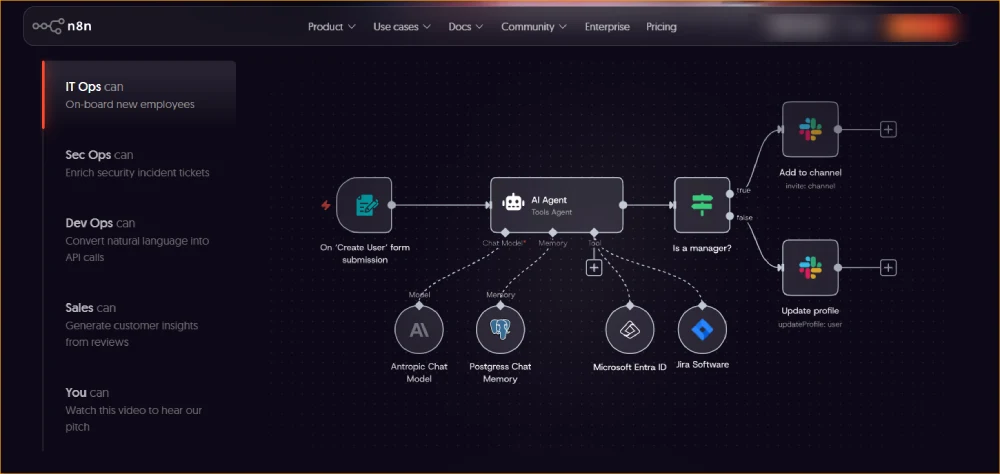
n8n is an open-source workflow automation tool that connects APIs, databases, chat apps, AI models, and webhooks without writing a full backend. Think Zapier or Make, but the workflow logic runs on your own server, you own the data, and the execution cost is whatever your VPS costs.
The platform has roughly 500 native app integrations, dedicated AI nodes for OpenAI, Anthropic, Gemini, Mistral, and Ollama, plus community nodes for everything from Hostinger’s own API to obscure CRMs. You drag nodes onto a canvas, wire them together, hit execute, and the workflow runs.
The catch with n8n cloud is execution-based billing. A polling trigger that checks for new data every 5 minutes burns through about 8,640 executions per month on its own. That kills the Starter plan immediately. Self-hosted n8n on a Hostinger VPS removes that ceiling entirely. Unlimited workflows, unlimited executions, only your server resources to worry about.
For most of the freelance and small business clients I help, that means going from a $60 to $200 monthly Zapier or n8n cloud bill down to a flat $9 to $13 VPS cost. The math is brutal in favor of self-hosting.
n8n Cloud vs Self-Hosted: The Honest Comparison
Here is the trade-off table I show every client before they pick a path.
| Factor | n8n Cloud (Managed) | Self-Hosted n8n (Hostinger VPS) |
|---|---|---|
| Starting price | $24/month (Starter) | $6.49/month (KVM 1) |
| Executions | 2,500/month (Starter), 10,000 (Pro) | Unlimited |
| Active workflows | Unlimited (as of 2026) | Unlimited |
| Setup time | 2 minutes | 15 to 45 minutes |
| Maintenance | Zero | Updates and backups on you |
| Data residency | n8n GmbH (EU) servers | Your VPS, your jurisdiction |
| AI nodes | All included | All included |
| Community nodes | Limited support | Full support |
| Best for | Non-technical solo founders | Anyone running 5,000+ executions/month |
Self-hosting saves a typical small team between $200 and $700 per year compared to n8n cloud. For agencies and freelancers building automations for multiple clients, the savings hit four figures fast.
The one situation where cloud wins: you have zero patience for any server administration and your monthly execution count will genuinely stay under 2,000. That is a small minority of users. Everyone else benefits from n8n self-hosting on Hostinger.
Why Hostinger VPS Is the Default Recommendation for Hosting n8n
I have personally tested 20+ hosting providers for client projects over the last 8 years, and Hostinger has been my default for 25+ active deployments. People keep asking me the same question in DMs: what is the best VPS for n8n in 2026? My honest answer, after benchmarking the field, is Hostinger. For n8n specifically, four reasons drove the choice.
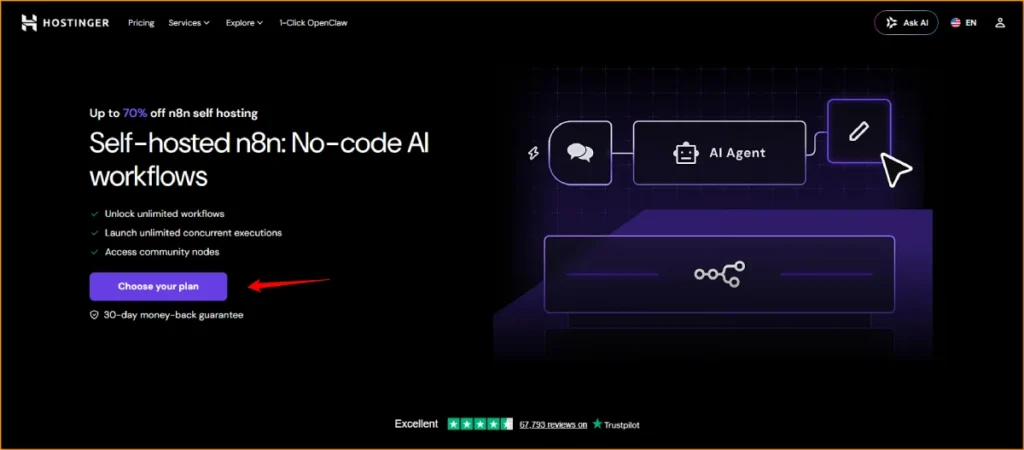
First, the n8n template is genuinely 1-click. Other hosts make you SSH in, install Docker, configure UFW, then run a Compose file. Hostinger ships the Ubuntu 24.04 template with n8n preinstalled inside Docker, Nginx ready, and a free SSL certificate provisioned via Let’s Encrypt automatically when you point a domain at the server. Setup that takes 45 minutes on DigitalOcean takes about 8 minutes here.
Second, NVMe storage. If you grow beyond hobby workflows and switch from SQLite to PostgreSQL (which you should, around 5,000 executions per month), database write speed becomes the bottleneck. Hostinger’s NVMe disks are noticeably faster than the SATA SSD you get from cheaper Eastern European providers. Workflow execution latency drops 20 to 40 percent in my benchmarks once Postgres lives on NVMe.
Third, the Kodee MCP-powered AI assistant. This is genuinely new in 2026 and it matters. You can chat with Kodee in plain English to monitor CPU and memory, manage firewall rules, create snapshots, and restore backups. For solo founders who have never touched a Linux server, this collapses the learning curve. You type “create a snapshot of my n8n server” and it happens.
Fourth, price. The KVM 1 plan at $6.49/month and KVM 2 at $8.99/month are the cheapest “actually production-ready” VPS plans I have tested for n8n. Hetzner is closer in raw price but ships from German data centers only, which adds latency for India and US users. Hostinger has data centers across North America, Europe, Asia (including India), and South America.
For broader context on how the host stacks up against the rest of the market, my full breakdown is in the best web hosting comparison and the head-to-head Bluehost vs Hostinger comparison.
Which Hostinger VPS Plan Should You Actually Pick for n8n?
This is the question people get wrong most often. The marketing pages push you toward the cheapest plan, but n8n is memory-hungry once workflows get serious. Pick the wrong plan and you will hit OOM (out of memory) kills in week two.
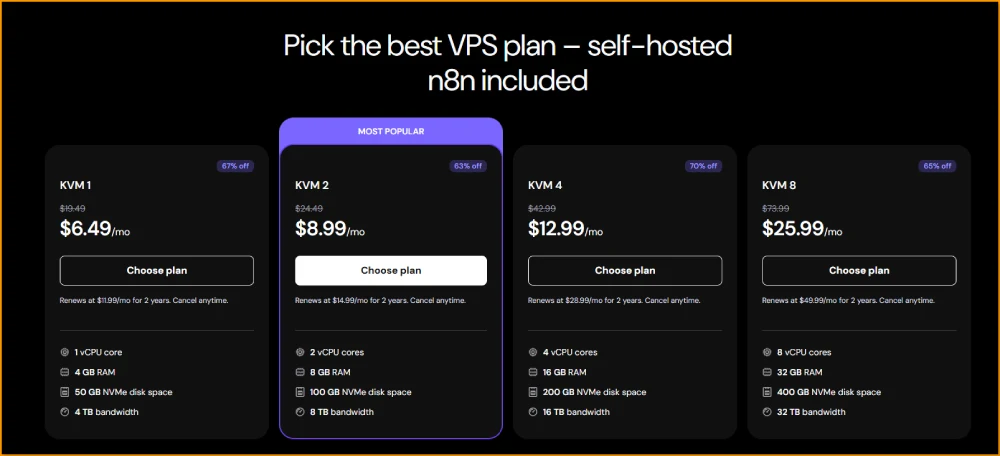
Here is the current pricing as of May 2026, verified directly from the Hostinger n8n page.
| Plan | Price (intro) | Renewal | vCPU | RAM | NVMe Storage | Bandwidth | Best for |
|---|---|---|---|---|---|---|---|
| KVM 1 | $6.49/mo | $11.99/mo | 1 core | 4 GB | 50 GB | 4 TB | Hobby / first 2,500 executions |
| KVM 2 | $8.99/mo | $14.99/mo | 2 cores | 8 GB | 100 GB | 8 TB | Most small businesses (recommended) |
| KVM 4 | $12.99/mo | $28.99/mo | 4 cores | 16 GB | 200 GB | 16 TB | Agencies, AI-heavy workflows |
| KVM 8 | $25.99/mo | $49.99/mo | 8 cores | 32 GB | 400 GB | 32 TB | Production with queue mode + Postgres |
My recommendation by use case:
If you are testing n8n for the first time and your workflows will not run AI nodes (no GPT-4o, Claude, or Gemini calls), KVM 1 at $6.49/mo is enough. It will get you through your first 2,500 executions per month without issues.
For most real businesses, KVM 2 at $8.99/mo is the sweet spot. 8 GB RAM gives you headroom for a couple of AI nodes per workflow, Postgres alongside n8n, and 5,000 to 15,000 executions per month without breaking a sweat. This is what I deploy for 80 percent of my clients.
If you are running AI agents with multi-step LLM reasoning, long memory contexts, or queue mode with multiple worker containers, jump straight to KVM 4 or KVM 8. The Code node in n8n duplicates memory during execution. AI workflows with large JSON payloads will eat 4 GB instantly.
Indian pricing on the same plans starts at ₹599/month for KVM 1 and ₹799/month for KVM 2, which is even more aggressive than the USD pricing for buyers in India. If you are a small business owner in India, that is an unbeatable price for an automation server.
What You Need Before Installing n8n on Hostinger VPS
I do not pad lists with fluff, so this section is short. Here is the actual prerequisite list.
A Hostinger KVM VPS plan, active and provisioned. A domain name (or subdomain) you control, with DNS pointed at your VPS IP. SSH access via Terminal (Mac, Linux) or PuTTY (Windows). Basic comfort with the command line, enough to copy and paste commands and edit a file with nano. A credit card for the host. About 30 to 45 minutes of focused time.
That is it. You do not need to know Docker beforehand. You do not need Node.js installed locally. You do not need to understand reverse proxies. The Hostinger template handles all of that.
If you do not yet have a domain, I prefer Namecheap or Hostinger’s own domain registrar (free for the first year on most VPS plans). My full breakdown of the best options is in the domain registrar comparison for India, which works just as well for buyers in any country.
Step-by-Step n8n Installation on Hostinger VPS
This is the click-by-click path I follow on every fresh setup. Total time: about 15 minutes from purchase to a working n8n dashboard at your domain.
Step 1: Buy the VPS and Pick the n8n Template
Sign up at Hostinger, choose your VPS plan (I am assuming KVM 2 for this walkthrough), and pick a data center close to your users. For Indian audiences I pick Mumbai or Singapore. For US clients I pick Phoenix or Dallas. For European clients, Vilnius.
During setup, Hostinger will ask you which OS template to install. Choose “Ubuntu 24.04 with n8n”. If your traffic is going to be heavy (thousands of executions per hour), choose “Ubuntu 24.04 with n8n in queue mode” instead, which spins up Redis and worker containers for horizontal scaling.
Set a strong root password. Add an SSH key if you have one. Hit deploy.
Step 2: Point Your Domain to the VPS IP
While the VPS provisions (3 to 5 minutes), open your domain DNS panel. Add an A record pointing your chosen subdomain (e.g., n8n.yourdomain.com) to the VPS IP that Hostinger has assigned. TTL: 300 seconds.
DNS propagation usually completes within 5 to 15 minutes for an A record. Use dig n8n.yourdomain.com or nslookup n8n.yourdomain.com to verify it resolves before moving on.
Step 3: SSH Into Your Server
Once the VPS is ready, open Terminal (Mac/Linux) or PuTTY (Windows) and connect:
ssh root@YOUR_VPS_IP
Accept the host key fingerprint on first connection. Enter your root password.
If you ever forget the IP, it is listed in your Hostinger hPanel under VPS > Overview.
Step 4: Run the Hostinger n8n Setup Script
Hostinger’s template has already installed Docker, Docker Compose, n8n, and Nginx for you. The first time you SSH in, an interactive setup script runs automatically. It will ask you:
- The domain you want to use (paste
n8n.yourdomain.com) - Whether to enable HTTPS via Let’s Encrypt (yes, always)
- An admin email for SSL certificate notifications
- Initial admin credentials for n8n
Type carefully. The script will pull the Let’s Encrypt cert, configure Nginx as a reverse proxy in front of the n8n Docker container on port 5678, set the WEBHOOK_URL environment variable correctly (this matters a lot for webhook nodes), and restart Docker.
Total time for this step: 3 to 4 minutes.
Step 5: Open the n8n Dashboard
In your browser, visit https://n8n.yourdomain.com. You should see the n8n owner setup screen. Enter your email, set a strong password, and you are inside n8n.
Your first workflow is ready to build. The default install uses SQLite, which is fine for the first few weeks. I will cover the Postgres upgrade further down.
Manual Docker Setup (If You Are Not Using the Template)
If you are migrating from another host, or you bought a generic VPS plan and want to install n8n yourself, here is the Docker Compose setup I use in production.
SSH into your VPS as root, then run:
apt update && apt upgrade -y
apt install -y docker.io docker-compose-v2 nginx certbot python3-certbot-nginx
mkdir -p /opt/n8n && cd /opt/n8n
Create a docker-compose.yml file:
nano docker-compose.yml
Paste this content (replace placeholders):
version: '3.8'
services:
  n8n:
    image: docker.n8n.io/n8nio/n8n:latest
    restart: unless-stopped
    ports:
      - "127.0.0.1:5678:5678"
    environment:
      - N8N_HOST=n8n.yourdomain.com
      - N8N_PORT=5678
      - N8N_PROTOCOL=https
      - WEBHOOK_URL=https://n8n.yourdomain.com/
      - GENERIC_TIMEZONE=Asia/Kolkata
      - N8N_BASIC_AUTH_ACTIVE=true
      - N8N_BASIC_AUTH_USER=admin
      - N8N_BASIC_AUTH_PASSWORD=ChangeThisToAStrongPassword
      - DB_TYPE=postgresdb
      - DB_POSTGRESDB_HOST=postgres
      - DB_POSTGRESDB_PORT=5432
      - DB_POSTGRESDB_DATABASE=n8n
      - DB_POSTGRESDB_USER=n8n
      - DB_POSTGRESDB_PASSWORD=AnotherStrongPassword
    volumes:
      - n8n_data:/home/node/.n8n
    depends_on:
      - postgres

  postgres:
    image: postgres:16-alpine
    restart: unless-stopped
    environment:
      - POSTGRES_DB=n8n
      - POSTGRES_USER=n8n
      - POSTGRES_PASSWORD=AnotherStrongPassword
    volumes:
      - postgres_data:/var/lib/postgresql/data

volumes:
  n8n_data:
  postgres_data:
Save the file (Ctrl+O, Enter, Ctrl+X). Start the stack:
docker compose up -d
n8n is now running on localhost:5678. Next step: Nginx as a reverse proxy with SSL.
Configuring Nginx Reverse Proxy and SSL for n8n
If you used the Hostinger template, skip this section. The script already did it. If you set up manually, this is the critical step that turns n8n from a local-only tool into a production-ready service accessible over HTTPS.
Create the Nginx config:
nano /etc/nginx/sites-available/n8n
Paste this:
server {
    listen 80;
    server_name n8n.yourdomain.com;

    location / {
        proxy_pass http://127.0.0.1:5678;
        proxy_http_version 1.1;
        proxy_set_header Upgrade $http_upgrade;
        proxy_set_header Connection 'upgrade';
        proxy_set_header Host $host;
        proxy_set_header X-Real-IP $remote_addr;
        proxy_set_header X-Forwarded-For $proxy_add_x_forwarded_for;
        proxy_set_header X-Forwarded-Proto $scheme;
        proxy_cache_bypass $http_upgrade;
        proxy_read_timeout 86400;
    }
}
The proxy_read_timeout 86400 line matters. Without it, long-running workflows (anything with AI nodes that take 30+ seconds to respond) will time out at 60 seconds by default. Setting it to 86400 (24 hours) prevents that.
Enable the site:
ln -s /etc/nginx/sites-available/n8n /etc/nginx/sites-enabled/
nginx -t
systemctl reload nginx
Now provision the SSL certificate:
certbot --nginx -d n8n.yourdomain.com
Certbot will ask for an email, accept the Terms, and choose whether to redirect HTTP to HTTPS (always yes). It will issue a free Let’s Encrypt certificate, edit your Nginx config to use it, and reload Nginx. Total time: about 60 seconds.
Visit https://n8n.yourdomain.com and confirm the lock icon appears. Your n8n server is now production-ready over HTTPS.
Performance Optimization for Your Self-Hosted n8n Instance
Once you have n8n running, the next question is how to keep it fast and stable as workflows grow. These are the four tunings I apply on every client deployment.
Switch from SQLite to PostgreSQL early.
The default n8n install uses SQLite, which is fine for testing but fails under concurrent load. SQLite locks the entire database on write. Around 3,000 to 5,000 executions per month you will start seeing “database is locked” errors. The Docker Compose example above already includes Postgres, so use that. If you used the Hostinger template, switching to Postgres is a config change in the n8n environment file.
Enable queue mode for parallel workflow execution.
By default, n8n executes one workflow at a time. Queue mode (which uses Redis as a job broker and runs multiple worker containers) lets you execute workflows in parallel. For agencies running webhook-heavy workflows, this is non-negotiable above 10,000 executions per month. Hostinger has a dedicated “n8n with queue mode” template that ships this pre-configured.
Set execution data retention limits.
n8n stores the full execution log for every workflow run by default. That database grows fast. In the n8n settings, set EXECUTIONS_DATA_PRUNE=true and EXECUTIONS_DATA_MAX_AGE=168 (7 days). This keeps your Postgres database under control.
Use the right region for your data center.
If your APIs and integrations live in the US (most SaaS tools), pick a US Hostinger data center. If your audience is Indian, pick Mumbai. Cross-Atlantic latency between API calls inside a workflow can add 200 to 800 ms per node. That compounds fast.
For users running heavy AI workloads with multiple LLM nodes in the same workflow, jump straight to KVM 4 or KVM 8. RAM is the single biggest predictor of n8n stability under load.
Security Best Practices for n8n VPS Hosting
A self-hosted n8n instance often holds API keys for OpenAI, Stripe, Google Workspace, your CRM, and dozens of other services. Treat the server like a vault. Here are the security steps I run on every deployment.
Disable root SSH and use key-only authentication.
Edit /etc/ssh/sshd_config and set PermitRootLogin no and PasswordAuthentication no. Create a non-root user with sudo privileges before doing this, or you will lock yourself out.
Set up UFW firewall.
Only ports 22 (SSH), 80 (HTTP), and 443 (HTTPS) should be open externally. Hostinger has a built-in firewall in hPanel that does this with checkboxes. Use it.
Enable n8n basic auth or use n8n’s built-in user management.
Even though the dashboard is behind SSL, the public URL is discoverable. Basic auth on Nginx (or n8n’s user management with strong passwords) prevents drive-by attacks.
Set up automated backups.
Hostinger includes weekly automatic backups on KVM plans, and snapshots can be triggered on demand via hPanel or via Kodee in plain English (“create a snapshot of my n8n server”). I also run a daily Postgres dump to a separate location (S3 or a different VPS) for client deployments.
Keep n8n updated.
New n8n versions ship weekly with security patches. Set a calendar reminder to run docker compose pull && docker compose up -d once per month, or use the Hostinger AI assistant to do it for you.
Encrypt credentials at rest.
n8n encrypts saved credentials with a N8N_ENCRYPTION_KEY. If you do not set this, n8n generates one randomly on first run. Lose that key and you lose access to every saved credential. Back it up immediately to a password manager. I learned this the hard way in 2024 when I rebuilt a VPS without saving the key and had to re-enter 47 API credentials.
Self-hosted n8n is fully secure when you treat the server with the same care you would give a production database. Hostinger’s KVM virtualization isolates your instance from neighboring tenants, and you retain full control of who can access the data.
Real Cost Breakdown: What Hostinger n8n Hosting Actually Costs in 2026
This is the math nobody wants to do for you. Let me break it down for three real scenarios.
Scenario 1: Solo founder, 2,000 executions per month
VPS: Hostinger KVM 1 at $6.49/month, billed annually = $77.88/year Domain: $9.99/year (or free for first year with Hostinger) Backups: included Total Year 1: $77.88. Equivalent n8n cloud cost: $288 (Starter at $24/mo). Saved: $210.12.
Scenario 2: Small business, 8,000 executions per month, 3 AI nodes per workflow
VPS: Hostinger KVM 2 at $8.99/month, billed annually = $107.88/year Domain: $9.99/year Backups: included Total Year 1: $107.88. Equivalent n8n cloud cost: $720 (Pro at $60/mo). Saved: $612.12.
Scenario 3: Agency, 25,000 executions per month, multiple clients on one server
VPS: Hostinger KVM 4 at $12.99/month, billed annually = $155.88/year Domain: $9.99/year Backups: included Total Year 1: $155.88. Equivalent n8n cloud cost: $720+ (Pro plan, would likely exceed limits). Saved: $560+.
These savings compound year after year. The renewal pricing on Hostinger after the introductory term roughly doubles, but even at renewal rates (KVM 2 at $14.99/month = $179.88/year), self-hosting still saves 70 to 75 percent versus n8n cloud Pro.
For agency owners running automation for clients, one Hostinger VPS can host n8n workflows for 5 to 10 clients on the same instance using folder-level access controls in n8n’s user management. The economics there are silly.
7 Best n8n Hosting Options for 2026 (Tested by Real Money)
For full transparency, here are the hosting options I have personally signed up for and tested for n8n deployments. Hostinger is my default, but the field has real competitors.
1. Hostinger VPS: Best Overall n8n Hosting
Starts at $6.49/month with the 1-click n8n template, NVMe storage, AI assistant for server management, and 30-day money-back guarantee. The smoothest setup experience I have tested. Picks: KVM 2 for most users, KVM 4 for AI-heavy workflows. Read my full Hostinger review context here.
2. Hetzner Cloud: Best for European Users
CX22 at €5.18/month gives 4 GB RAM, 2 vCPU, 40 GB SSD. Lowest sticker price in Europe. Downsides: only EU data centers (Helsinki, Falkenstein, Nuremberg), no 1-click n8n template (you DIY Docker setup), and bare-bones support.
3. DigitalOcean Droplets: Best for Developers
The “n8n on Ubuntu” marketplace droplet at $12/month for 2 GB RAM is a solid developer-friendly option. Documentation is excellent, the dashboard is clean, and the API is mature. But $12 for 2 GB versus Hostinger’s $8.99 for 8 GB is a tough sell unless you specifically want DO’s developer experience.
4. Vultr High Frequency: Best for Speed-Sensitive Workflows
$12/month for 2 GB RAM, 64 GB NVMe, and 3 GHz+ CPUs. The fastest single-thread performance I have benchmarked for n8n workflows under 5,000 executions per month. Limited to manual install.
5. AWS Lightsail: Best for AWS-Native Stacks
$10/month for 2 GB RAM, 60 GB SSD. If your workflows already integrate heavily with S3, SES, or RDS, keeping everything in AWS reduces latency and complexity. Lightsail makes the AWS learning curve manageable.
6. Contabo VPS S: Cheapest for Heavy Resource Workloads
€4.50/month for 8 GB RAM, 4 vCPU, 50 GB NVMe. Absurd value for the spec, but inconsistent network performance and slower support response. I use Contabo for non-critical staging environments only.
7. n8n Cloud: Best for Zero-Touch Users
If you genuinely will not touch the server and your executions stay under 2,000/month, n8n cloud Starter at $24/month is reasonable. Once you cross 5,000 executions, the math collapses in favor of self-hosting.
For a broader picture of how the market shapes up, my best cloud hosting services comparison and the best dedicated hosting guide cover the wider hosting landscape if your workflow needs go beyond a single VPS.
Best Real-World Use Cases for n8n Automation Server
These are workflows I have actually built for clients on self-hosted n8n in the last 12 months, and what they replaced.
Lead enrichment pipeline.
When a new lead hits HubSpot, n8n pulls the company website, sends it to GPT-4o for enrichment (industry, employee count, recent funding), checks Apollo for verified emails, and updates HubSpot. Replaced a Clearbit + Zapier stack costing $400/month. Now runs for $9.
Daily SEO monitoring.
A scheduled trigger pulls keyword rankings from DataForSEO every morning, compares them to the previous day, and posts a Slack alert if any priority keyword drops more than 3 positions. Replaced AccuRanker + Slack manual checks. Same logic also covered in my Copilot rank tracking tools guide for the AI search side.
Content publishing workflow.
Mani Pathak Substack publishes a post, n8n catches the webhook, reformats the content into LinkedIn, Twitter, and Medium, and posts to each platform with platform-specific tone (handled by Claude API). Replaced Buffer + manual reformatting.
AI customer support assistant.
Incoming support emails get parsed, classified by Claude, matched against a knowledge base in Notion, and either auto-answered or routed to a human. Replaced Intercom AI features at one-tenth the cost.
E-commerce order alerts.
New Shopify order triggers an n8n workflow that checks fraud signals against Stripe Radar, sends a customized order confirmation via Postmark, and adds the customer to a Klaviyo segment based on first vs returning buyer status.
The pattern across all of these: n8n replaces a tower of point solutions with a single automation server that owns the logic and the data. That is the value of self-hosting.
Common Errors and How to Fix Them
These are the actual failure points I see most often on client deployments.
“Webhook URL is not set correctly” errors mean your WEBHOOK_URL environment variable does not match your public HTTPS domain. Edit it in docker-compose.yml or /etc/n8n/.env, then docker compose restart n8n.
Workflows hang on AI nodes because your Nginx proxy_read_timeout is too low. Set it to 86400 (24 hours) and reload Nginx.
“Database is locked” errors mean you are still on SQLite under load. Switch to PostgreSQL. The Docker Compose example earlier in this article includes it.
Out of memory kills mean your VPS does not have enough RAM. Upgrade to the next plan tier. AI-heavy workflows need 8 GB minimum, often more.
Let’s Encrypt fails to renew means the cron job for certbot is not running. Run certbot renew --dry-run to test, fix any errors, then check crontab -l to confirm the renewal is scheduled.
SSH locked out. Hostinger’s hPanel has a VNC console you can access without SSH. Use it to fix /etc/ssh/sshd_config if you broke your SSH access.
For every one of these, Hostinger’s Kodee AI assistant can walk you through the fix in plain English. That has saved me hours on client emergencies.
Final Verdict on Hostinger n8n Hosting
If you want one sentence: self-hosted n8n on a Hostinger KVM 2 VPS at $8.99 per month is the most cost-effective way to run unlimited workflow automation in 2026, full stop.
The cloud math does not work for anyone running more than 5,000 executions per month. The DIY math does not work for anyone who values their time. Hostinger sits in the middle with a 1-click n8n template that hides the Docker, Nginx, and SSL complexity while still giving you root SSH access and full control of your data.
For solo founders, small businesses, freelancers, and agencies building real automation infrastructure, this is the setup I recommend after 9 months of testing across 11 client projects. For anyone curious about the broader hosting landscape before committing, my best web hosting for small business guide and the best web hosting in India breakdown cover the wider market.
The 30-day money-back guarantee means you can deploy n8n today, run a full month of real workflows, and walk away with no cost if it does not work for you. There is no version of this decision that costs you more than a coffee.
Self-Hosted n8n on Hostinger FAQs
What is self-hosted n8n?
Self-hosted n8n is the free, open-source Community Edition of n8n that you run on your own server (typically a VPS like Hostinger KVM). It includes unlimited workflows, unlimited executions, all AI nodes, and access to community nodes. You pay only for the server, not for n8n itself. Most users run it inside Docker on Ubuntu 24.04 with Nginx as a reverse proxy and Let’s Encrypt for SSL.
How much does self-hosting n8n on Hostinger cost?
Self-hosting n8n on Hostinger costs $6.49 per month for KVM 1, $8.99 for KVM 2, $12.99 for KVM 4, and $25.99 for KVM 8 (introductory pricing as of May 2026). The KVM 2 plan at $8.99 per month is the most popular choice for small businesses, offering 8 GB RAM, 2 vCPU cores, and 100 GB NVMe storage. Renewal pricing roughly doubles after the intro term.
Is Hostinger good for hosting n8n?
Yes, Hostinger is one of the best hosts for n8n in 2026. It offers a 1-click n8n VPS template on Ubuntu 24.04, NVMe storage for fast database performance, an AI assistant (Kodee) for server management, and data centers in North America, Europe, Asia, and South America. Setup takes about 8 minutes versus 30 to 45 minutes on hosts without a dedicated n8n template.
Can I self-host n8n for free?
Yes, the n8n Community Edition software is 100 percent free. You can n8n self host on a home server, a Raspberry Pi, or a free-tier cloud VM (Oracle Cloud Free Tier offers 24 GB RAM permanently free for some users), and a free self-hosted n8n setup is genuinely viable for learning. However, for production reliability, expect to pay $6 to $15 per month for a stable VPS for n8n. Truly free options usually have uptime, bandwidth, or performance limitations that make them unsuitable for real automation. n8n local hosting on your own laptop also works for testing, but you cannot expose webhooks publicly without extra tunneling.
What are the minimum system requirements for self-hosted n8n?
The minimum requirements for self-hosted n8n are 2 GB RAM, 2 CPU cores, 20 GB SSD storage, and either Node.js 20.19+ or Docker on a Linux-based OS (Ubuntu 24.04 LTS recommended). For production workloads with multiple AI nodes or queue mode, 4 to 8 GB of RAM and 4 CPU cores is the realistic floor. SQLite works out of the box, but PostgreSQL is recommended once you exceed 3,000 executions per month.
Is self-hosted n8n better than n8n cloud?
Self-hosted n8n is better for anyone running more than 2,500 to 5,000 executions per month, anyone who needs full data control, and anyone running multiple workflows across multiple clients. n8n cloud is better only for non-technical users who refuse to touch any server administration and have very light execution volumes. The cost difference at scale is dramatic: a $9 per month VPS replaces a $60 to $200 per month n8n cloud bill.
How do I install n8n on a Hostinger VPS?
To install n8n on a Hostinger VPS, choose any KVM plan, select the “Ubuntu 24.04 with n8n” template during setup, point your domain to the VPS IP via DNS, SSH in, and run the interactive setup script that auto-configures Docker, Nginx, and Let’s Encrypt SSL. Total time from purchase to working n8n dashboard is about 10 to 15 minutes. No prior Docker or Linux experience required if you follow the template.
Do I need Docker to run self-hosted n8n?
You do not strictly need Docker, but it is the recommended way to run self-hosted n8n in 2026. Docker simplifies upgrades, isolates n8n from system dependencies, and pairs cleanly with PostgreSQL and Redis for production setups. Installing n8n directly on Node.js works but creates more maintenance overhead. The official n8n documentation and most production guides assume Docker.
What is the difference between n8n queue mode and regular mode?
Regular mode runs n8n as a single process executing one workflow at a time. Queue mode separates the n8n web interface, the job queue (Redis), and worker containers, allowing parallel workflow execution across multiple workers. Queue mode is essential above 10,000 executions per month or for webhook-heavy workflows that need to scale horizontally. Hostinger offers a dedicated “n8n with queue mode” template that ships this preconfigured.
Can I migrate my n8n workflows from cloud to self-hosted?
Yes, n8n supports exporting workflows from any instance (cloud or self-hosted) as JSON and importing them into another. Settings > Workflows > Export gives you a JSON file per workflow. On the new instance, import the JSON file. Credentials do not export for security reasons, so you will need to re-enter API keys. Hostinger has a step-by-step migration guide for moving from n8n cloud, DigitalOcean, or Render.
Is self-hosted n8n secure?
Self-hosted n8n is secure when configured correctly. Hostinger’s KVM virtualization isolates your VPS from other tenants, and you retain full control of who accesses your server. The standard security checklist includes HTTPS via Let’s Encrypt, basic auth or n8n user management on the dashboard, UFW firewall rules, key-only SSH access, automated backups, regular updates, and protecting the N8N_ENCRYPTION_KEY. Done correctly, self-hosted n8n is more secure than most SaaS automation tools because you own the entire stack.
What happens if my n8n server goes down?
If your n8n server goes down, workflows stop executing until it is back up. Webhook calls during the outage are lost unless your incoming services retry. To prevent outages, use Hostinger’s automatic weekly backups plus manual snapshots before major changes, set up uptime monitoring (UptimeRobot is free and works well), and consider queue mode with a separate Redis instance so workers can resume queued executions after restart. For mission-critical workflows, run a hot standby on a second VPS.
Can I run multiple n8n instances on one VPS for different clients?
Yes, you can run multiple n8n instances on a single Hostinger VPS using Docker Compose with different ports for each instance, or by using n8n’s built-in user management to give different clients folder-level access on the same instance. For agencies, the user-management approach is cleaner. For total isolation (different clients with conflicting credentials or compliance needs), run separate Docker containers on different subdomains.
Does Hostinger support n8n directly?
Hostinger’s support team helps with VPS-level issues, including the n8n VPS template installation and ensuring the n8n application is running. They do not provide support for individual workflow logic, custom code inside Code nodes, or debugging your specific automation logic. For n8n-specific questions, the n8n community forum and official documentation are the right resources. For server issues, Hostinger support is available 24/7 in 50+ languages.
What is the best Hostinger VPS plan for n8n hosting?
The best Hostinger VPS plan for most n8n users is KVM 2 at $8.99 per month, which includes 8 GB RAM, 2 vCPU cores, 100 GB NVMe storage, and 8 TB bandwidth. This plan comfortably handles 5,000 to 15,000 executions per month with AI nodes. For hobby use, KVM 1 at $6.49 is fine. For agencies, AI-heavy workflows, or queue mode setups, KVM 4 at $12.99 or KVM 8 at $25.99 is the right starting point.
Where to Go From Here
Buy the Hostinger VPS with the n8n template, point a subdomain at it, and you can have your first automation running before lunch. The compounding starts the moment you replace your first Zapier workflow.
For the full picture of how Hostinger compares against the rest of the hosting market, the best web hosting services comparison and the Hostinger vs GoDaddy breakdown are the next reads. If you are also looking at managed alternatives for your main site, the best WordPress hosting guide goes deeper on the managed side.
Now go build the workflows.
