(Complete Step-by-Step Guide)
- Step 1: Set Up Google Search Console
- Step 2: Verify Your Website Ownership
- Step 3: Find Your XML Sitemap URL
- Step 4: Submit Your Sitemap and Website to Google (Submit Your Website to Search Engines)
- Step 5: Submit Individual URLs with the URL Inspection Tool
- What About Google News?
- Step 1: Access Bing Webmaster Tools
- Step 2: Add and Verify Your Website
- Step 3: Submit Your Site’s Sitemap to Bing (and Your URL to Search Engines)
- IndexNow: Bing’s Real-Time Submission Protocol
- Yandex: If You’re Targeting Russian or Eastern European Audiences
- Baidu: For Targeting the Chinese Market
- Method 1: The site: Operator (Quick Check)
- Method 2: Google Search Console Index Coverage Report (Most Accurate)
- Method 3: URL Inspection Tool (Individual Pages)
- How Long Does Indexing Take?
- 1. robots.txt Is Blocking Google
- 2. Noindex Tags Are Blocking Indexation
- 3. Your Site Has No Inbound Backlinks
- 4. Thin or Duplicate Content Is Being Excluded
- 5. Core Web Vitals Issues Are Wasting Crawl Budget
- 6. Your Sitemap Contains Errors or Broken URLs
- 7. Your Domain Is Too New
- 1. Content Quality and E-E-A-T
- 2. Backlinks Still Matter (A Lot)
- 3. Technical SEO Foundations
- How do I submit my website to search engines? (Quick Guide)
- Do I need to submit my website to search engines? (Short Answer)
- How long does it take for Google to index my website after submission?
- How do I submit my website to Google for free? (Step by Step)
- Why is my website not showing up on Google after I submit my website to search engines?
- Does submitting to Bing also submit to Yahoo?
- How do I check if my website is indexed after I submit my website to search engines?
- What is the best free website submission tool?
- How do I register my URL with search engines?
- Should I use a free website submission service?
- Can I submit my blog to search engines the same way?
I’ve been doing SEO for over 8 years, and if I had to pick the single most overlooked step that new website owners skip, it’s this: they build a beautiful site, hit publish — and then just wait. They assume Google will find them eventually. Sometimes it does. But I’ve watched too many sites sit in obscurity for months simply because the owner never took 15 minutes to properly submit their website to search engines.
This guide fixes that.
Here’s something most guides skip about how to submit your site to search engines: over 70% of all web traffic comes from organic search. And Google alone processes more than 8.5 billion searches every single day. But none of that traffic reaches your site if search engines haven’t been told it exists. The process of
submitting your website to search engines isn’t complicated — but it does need to be done correctly. I’ll walk you through every step.
| ⚡ What You’ll Learn in This Guide ✅ Whether you actually need to submit your site (and the real reason to do it anyway) ✅ The 5-point pre-submission checklist — don’t skip this before you submit your website to search engines ✅ How to submit your website to Google via Google Search Console (with screenshots) ✅ How to submit your website to Bing — and why that also covers Yahoo + DuckDuckGo ✅ What to do for Yandex and Baidu if you target international audiences ✅ How to check whether your website is actually indexed ✅ Why your site might not be showing up — and exactly how to fix it ✅ What happens after submission: the real road to rankings |
Do You Actually Need to Submit Your Website to Search Engines? (Honest Answer)
Technically? No. Search engines will eventually find your site on their own. Google’s crawlers — known as Googlebots — constantly roam the web following links from one page to the next. If even one external website links to yours, Google will discover it.
But here’s the honest answer from someone who’s helped hundreds of sites get found online: registering your website with search engines manually — getting your website on search engines through official tools — isn’t just about being discovered — it’s about being discovered fast, and unlocking the tools that give you real control over how search engines see your site.
There are three reasons I always recommend manual submission:
1. Speed — Days vs. Weeks
Without manual submission, Google may take anywhere from a few days to several weeks to find a brand-new site, especially if it has no incoming backlinks. When you submit your site to search engines directly through Google Search Console, you’re essentially handing Google a roadmap and saying ‘here, start here.’ In my experience, submitted sites get crawled significantly faster.
2. Free Diagnostic Tools You’d Be Crazy to Skip
The real prize of submitting your site to search engines isn’t just indexing — it’s access to Google Search Console and Bing Webmaster Tools. These are the most powerful free tools available to any website owner. They show you exactly which pages are indexed, which are being blocked, what keywords you’re appearing for, and whether there are any technical errors hurting your visibility.
3. Faster Updates for New Content
Every time you submit your site content — a new blog post, landing page, or product page — you want search engines to know about it fast. When your sitemap is already submitted, Google and Bing re-crawl it regularly and pick up new content much quicker than if they were finding it organically.
| 💡 Quick Fact Google currently indexes over 50 billion web pages. Without manual submission, your new site is competing for crawler attention against the entire internet. Getting your website on search engines quickly requires manual action. Manual website submission tells Google exactly where to look — and when. |
One more thing I want to address: search engine submission sites and services that claim to submit your site to search engines or register your URL with ‘hundreds of search engines’ for a fee. These are outdated, mostly useless, and in the worst cases, they can trigger spam penalties. Google, Bing, and Yahoo collectively drive over 95% of all search traffic in English-speaking markets. Those are the only three that matter — and I’ll show you how to submit your website to all three for free.
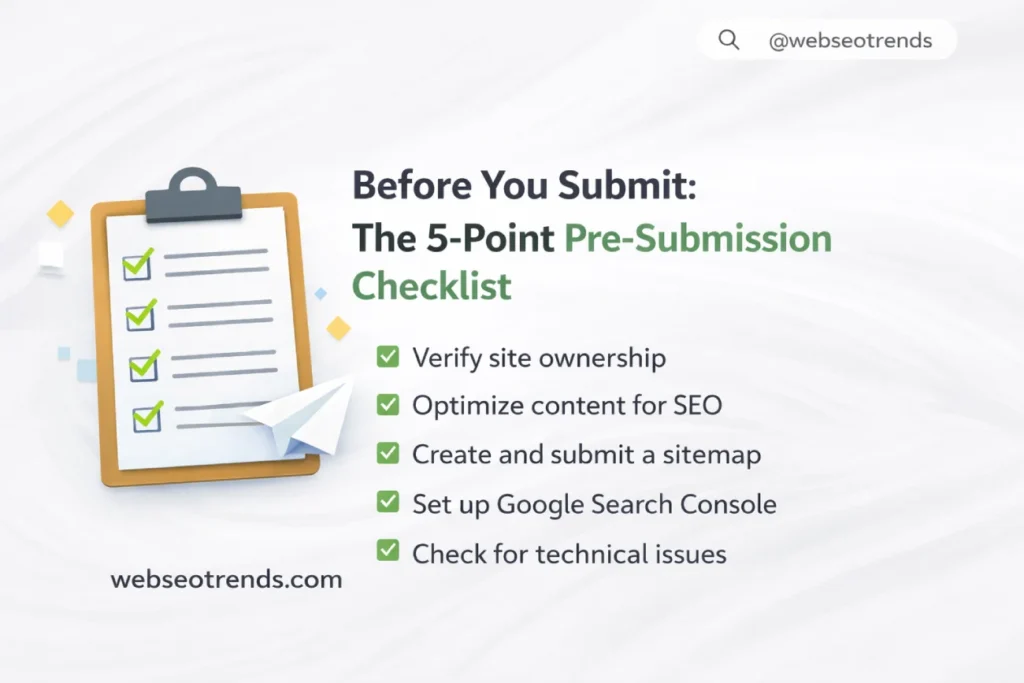
Before You Submit: The 5-Point Pre-Submission Checklist
I learned this the hard way early in my career. I submitted a client’s site to Google only to discover — after the fact — that their robots.txt file was blocking all crawlers. Their site sat invisible in Google’s queue for weeks before we caught it. Don’t make the same mistake. Run through these five checks before you submit anything.
- Your site is live and returning HTTP 200. Type your domain into a browser and confirm it loads normally. Also use a tool like httpstatus.io to verify the server is returning HTTP 200 (OK) — not a redirect loop, 404, or 503 error.
- Your robots.txt file is not blocking crawlers. Visit yourdomain.com/robots.txt. If you see Disallow: / under User-agent: * you are blocking ALL bots from crawling your entire site. This is the most common cause of indexing failure I see. Fix it before submission.
- No ‘noindex’ meta tags on your important pages. In your page source (Ctrl+U in Chrome), search for noindex. If it appears in your page’s <head> section, Google will crawl the page but refuse to index it. Remove the noindex tag from any page you want appearing in search results.
- Your XML sitemap exists and is valid. Visit yourdomain.com/sitemap.xml. You should see a structured list of all your URLs. If nothing appears, generate one using a plugin like Yoast SEO or RankMath (WordPress), or a free sitemap generator tool. Your sitemap is the single most important file in the website submission process.
- Your site has an active SSL certificate (HTTPS). Check for the padlock icon in your browser’s address bar. Google has confirmed HTTPS as a ranking signal, and Chrome flags non-HTTPS sites as ‘Not Secure’ — which kills trust and conversions before they start. If you’re still on HTTP, fixing this before submission is non-negotiable. Look at choosing the right web hosting provider if your current host doesn’t include free SSL.
| ✅ Pre-Submission Quick Check ⇢ Site is live — HTTP 200 confirmed ⇢ robots.txt — NOT blocking Googlebot or Bingbot ⇢ No noindex tags on key pages ⇢ Sitemap exists at yourdomain.com/sitemap.xml ⇢ HTTPS / SSL certificate activeAll five checked? Good. Now let’s submit your site. |
How to Submit Your Website to Google (Step-by-Step)
Google owns roughly 91% of the global search engine market as of 2026. Search engine registration — getting your site into Google’s index — is by far the most important step in any search engine registration process. Here’s exactly how to do it.
Step 1: Set Up Google Search Console
Google Search Console (GSC) is Google’s free webmaster tool — and the official gateway for submitting your site. If you haven’t set it up yet, do it now. It’s completely free and takes about 10 minutes.
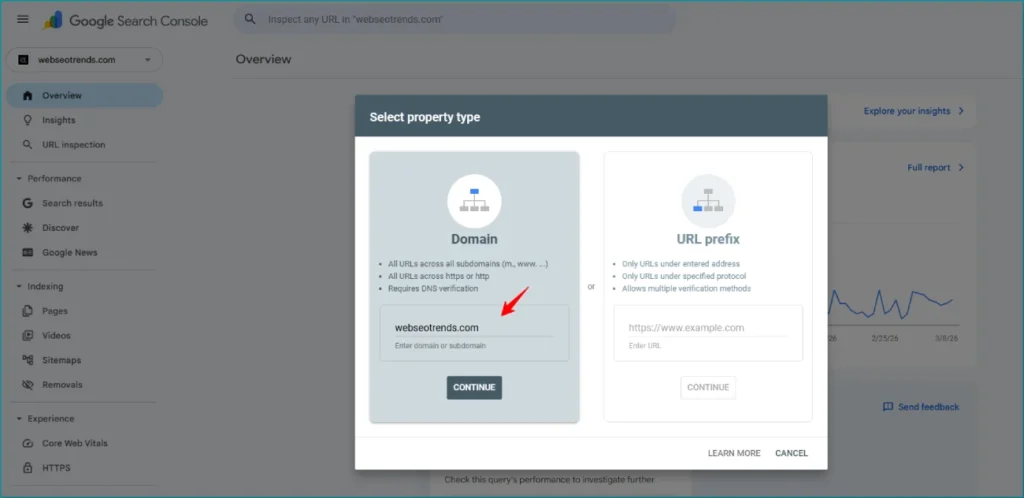
- Go to search.google.com/search-console and sign in with your Google account.
- Click ‘Add Property‘ in the top-left dropdown.
- Domain property (recommended): Enter your domain without any prefix — e.g., yourdomain.com. This covers all variations (www, non-www, HTTP, HTTPS) in one property.
- URL Prefix property: Enter the exact URL — e.g., https://www.yourdomain.com. Easier to verify but only tracks that specific URL variation.
Step 2: Verify Your Website Ownership
Google won’t let you access data for a site you don’t own, so ownership verification is required. There are several methods — I’ll walk you through the two most reliable ones.
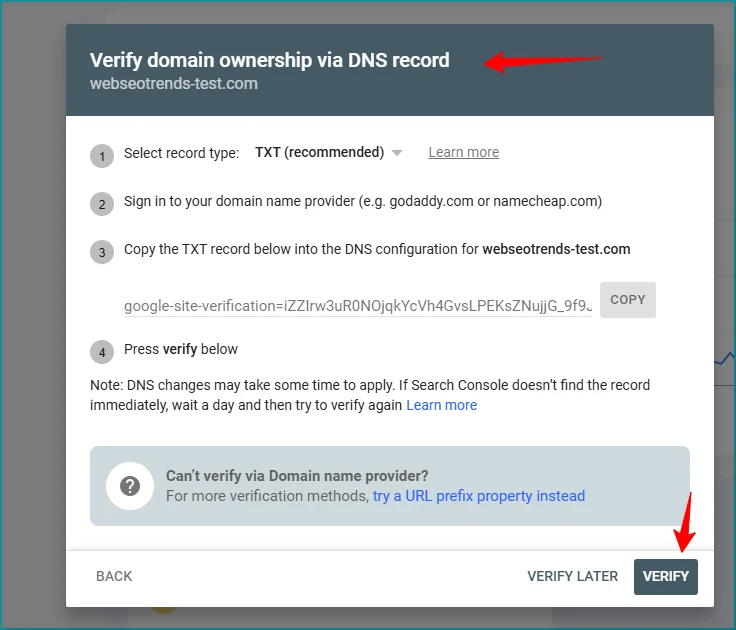
Method A: DNS Verification (Best for Domain Properties)
- Copy the TXT record Google provides (it looks like: google-site-verification=XXXXX).
- Log into your domain registrar (GoDaddy, Namecheap, Cloudflare, etc.).
- Navigate to your DNS settings and add a new TXT record.
- Paste the verification code in the value field. Save.
- Return to Google Search Console and click ‘Verify’. DNS propagation can take a few minutes to a few hours.
Method B: HTML File Upload
- Download the HTML verification file Google provides.
- Upload it to the root directory of your website (via FTP or your hosting file manager).
- Confirm it’s live by visiting the URL Google gives you (e.g., yourdomain.com/google1234abcd.html).
- Click ‘Verify’ in Search Console.
| 💡 Pro Tip: DNS Verification Is Permanent I always recommend DNS verification. Unlike the HTML file method, DNS verification survives site migrations, CMS changes, and theme updates. You set it once and it stays verified indefinitely — even if you rebuild your site from scratch. |
Step 3: Find Your XML Sitemap URL
Before you can submit your sitemap, you need to know where it lives.
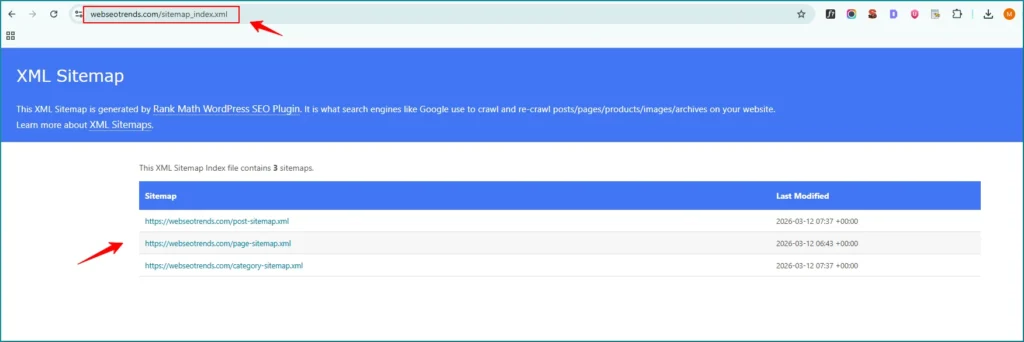
In most cases it’s straightforward:
- WordPress with Yoast SEO: yourdomain.com/sitemap_index.xml
- WordPress with RankMath: yourdomain.com/sitemap_index.xml
- Shopify: yourdomain.com/sitemap.xml
- Squarespace: yourdomain.com/sitemap.xml
- Wix: yourdomain.com/sitemap.xml
- Custom-built sites: Check with your developer, or visit yourdomain.com/sitemap.xml
If none of those work, use an online XML sitemap generator (like xml-sitemaps.com) to create one, then upload it to your server and note the URL.
Step 4: Submit Your Sitemap and Website to Google (Submit Your Website to Search Engines)
This is the core step — the actual sitemap submission to Google that puts your entire website on Google’s radar in one move.
- In Google Search Console, look at the left sidebar and click ‘Sitemaps’ (under the ‘Indexing’ section).
- In the ‘Add a new sitemap’ field, enter your sitemap URL — just the path, e.g., sitemap.xml or sitemap_index.xml.
- Click ‘Submit’.
- Google will immediately begin processing your sitemap. Within a few seconds you should see it listed with the status ‘Success’.
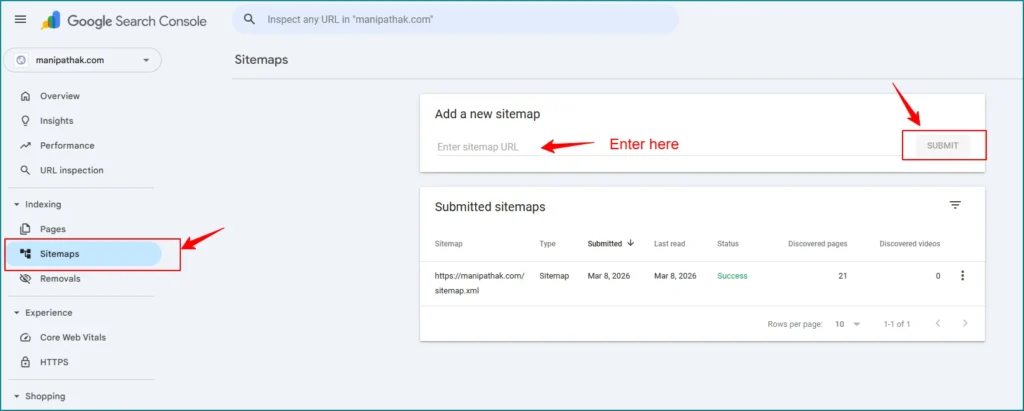
| Navigate to Indexing > Sitemaps in GSC, enter your sitemap URL, and click Submit |
Once the status shows ‘Success’, Google has your sitemap. It knows every URL on your site. From here, Google’s crawlers will start working through your pages — typically within 24–72 hours for most sites.
Step 5: Submit Individual URLs with the URL Inspection Tool
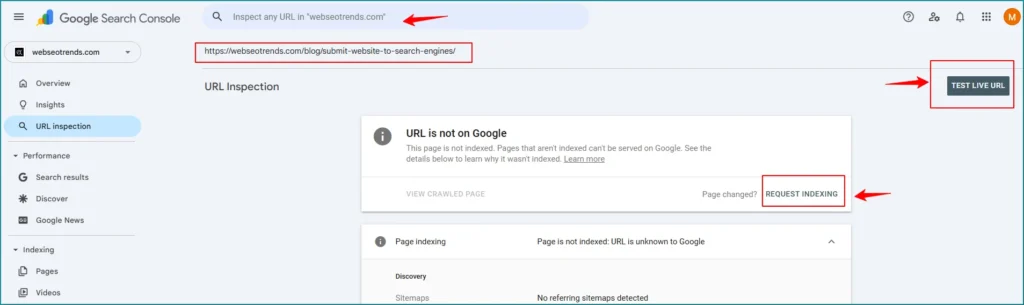
Submitting your sitemap covers your whole site, but if you want Google to prioritize a specific page — like your homepage or a new blog post — you can submit individual URLs to Google directly — this is the best way to submit your URL to search engines for time-sensitive pages.
- In Google Search Console, paste the specific page URL into the search bar at the top (it says ‘Inspect any URL in [your site]’).
- Press Enter. Google will check the URL’s current index status.
- If the page isn’t indexed yet, you’ll see an option to ‘Request Indexing’. Click it.
- Google will add the URL to its priority crawl queue.
| ⚠️ Important Limits to Know: The URL Inspection Tool lets you submit your URL to search engines for up to 50 requests per week. Use this strategically — save it for your most important new pages, recent updates, or pages that aren’t appearing in Google despite sitemap submission. Also: submitting a URL doesn’t guarantee immediate indexing. It requests priority crawling, but Google still makes the final call based on quality and crawl budget. |
What About Google News?
Good news: when you submit your site via Google Search Console’s sitemap tool, your site is automatically considered for Google News. Google evaluates every publisher you register with search engines based on content quality and its News content policies. There’s no separate submission process. If your content is fresh, newsworthy, and high-quality, Google News will start picking it up.
How to Submit Your Website to Bing (And Why It Covers Yahoo + DuckDuckGo)
Here’s a fact that surprises most people: when you submit your site to search engines like Bing — which is the standard way to submit your site to search engines in the Microsoft ecosystem —, you’re simultaneously covering Yahoo AND DuckDuckGo. Bing powers Yahoo’s search results entirely, and DuckDuckGo heavily relies on Bing’s index. One submission, three search engines. Here’s how to do it.
Step 1: Access Bing Webmaster Tools
- Go to bing.com/webmasters and click ‘Get Started’.
- Sign in with a Microsoft account (Outlook or Hotmail). If you don’t have one, create one free.
- You’ll be taken to your Bing Webmaster Tools dashboard.
Step 2: Add and Verify Your Website
- Click ‘Add a Site’ or ‘Add your site to Bing’ — this is how you add your site to search engines in the Bing ecosystem.
- Enter your full site URL (e.g., https://www.yourdomain.com) and click ‘Add’.
- Choose a verification method. I recommend the XML file verification — download the BingSiteAuth.xml file, upload it to your domain root, then click ‘Verify’. Or, if you’ve already verified via Google Search Console, Bing offers a one-click import that auto-verifies based on your existing GSC property.
| 🚀 Bing’s GSC Import FeatureOne of Bing Webmaster Tools’ best-kept secrets: if you’re already verified in Google Search Console, Bing lets you import your entire GSC property in one click — no re-verification needed. In Bing Webmaster Tools, look for ‘Import from Google Search Console’ on the welcome screen. You’ll import your verified site, your sitemap, and even some of your GSC data simultaneously. It’s the fastest way to submit your website to Bing. |
Step 3: Submit Your Site’s Sitemap to Bing (and Your URL to Search Engines)
- In Bing Webmaster Tools, click ‘Sitemaps’ in the left navigation.
- Click ‘Submit sitemap’.
- Enter your sitemap URL (e.g., yourdomain.com/sitemap.xml) in the pop-up field.
- Click ‘Submit’. Done.
Bing will begin processing your sitemap immediately. You can monitor progress in the Sitemaps section — it shows the number of URLs submitted, discovered, and indexed.
IndexNow: Bing’s Real-Time Submission Protocol
Beyond the standard sitemap submission, Bing supports a powerful protocol called IndexNow — an open-source standard that lets you submit your URL to search engines (Bing + Yandex) the instant new content goes live — no waiting for crawls. Instead of waiting for Bing’s crawlers to find your new content, IndexNow pushes the URL directly to Bing in real time — effectively letting you submit your URL to search engines the instant content goes live.
If you’re using WordPress, plugins like Yoast SEO and RankMath now include IndexNow support — it’s automatic once enabled. For custom sites, the implementation is a simple API call. In my experience, sites using IndexNow see new pages appearing in Bing search results within hours of publishing.
| ✅ Bing Submission = 3 Search Engines Covered ✅ Bing — Direct submission via Bing Webmaster Tools ✅ Yahoo — Powered entirely by Bing’s index (no separate submission needed) ✅ DuckDuckGo — Heavily uses Bing’s index (auto-covered by Bing submission) After submitting to Google and Bing, you’ve covered the search engines used by over 95% of all searchers in English-speaking markets. |
Other Search Engines: DuckDuckGo, Yandex, Baidu, and More
Once you’ve submitted to Google and Bing, you’ve done the heavy lifting. But depending on your audience, there are a few other engines worth considering. Here’s the complete picture:
| Search Engine | Submission Method | When You Need It | Manual URL Limit |
| Google Search Console → Sitemaps | Always — #1 priority | Submit your URL to search engines this way for up to 50 URLs/week via inspection | |
| Bing | Bing Webmaster Tools → Sitemaps | Always — covers Yahoo + DuckDuckGo | IndexNow: unlimited real-time |
| Yahoo | Auto-covered by Bing | No action needed | N/A |
| DuckDuckGo | Auto-covered by Bing index | No action needed | N/A |
| Yandex | Yandex Webmaster (webmaster.yandex.com) | Only if targeting Russia/CIS audiences | Via sitemap + IndexNow |
| Baidu | Baidu Webmaster (ziyuan.baidu.com) | Only if targeting China | Manual URL form (Chinese UI) |
| Ecosia | Auto-discovered (powered by Bing) | No action needed | N/A |
| Brave Search | No submission tool — auto-discovered | No action needed | N/A |
Yandex: If You’re Targeting Russian or Eastern European Audiences
Submitting your website to Yandex only makes sense if a meaningful portion of your audience is based in Russia, Ukraine, Belarus, or other CIS countries. The process is similar to Google’s:
- Go to webmaster.yandex.com and create a Yandex account.
- Add your site to search engines like Yandex by verifying ownership via meta tag, HTML file, or DNS TXT record.
- Under ‘Indexing’ → ‘Sitemap files’, add your sitemap URL and submit.
- Yandex also supports IndexNow, so if you’ve already enabled it for Bing, Yandex receives updates simultaneously.
Baidu: For Targeting the Chinese Market
Baidu is China’s dominant search engine with over 70% market share in the country. Submitting your website for search on Baidu is significantly more complex than other engines, primarily because the platform is in Chinese. The process:
- Visit ziyuan.baidu.com and create a Baidu account (requires a Chinese phone number for verification in most cases).
- Add your site to Baidu’s search engine — the main way to add your website to search engines in China — and complete their verification process.
- Submit your sitemap or individual URLs through their Webmaster platform.
Honestly, unless China is a primary market for your business, Baidu is not worth the friction. For global English-language sites, Google + Bing is all you need.
| 💡 The 95% Rule: Google + Bing together cover over 95% of all search queries in the US, UK, Australia, and Canada. If you run an English-language website targeting these markets, submitting to Google and Bing is the complete answer. Everything else is marginal. |
How to Check If Your Website Is Indexed
After going through the submission process, the natural question is: did it actually work? Here’s how to verify that your site is genuinely getting onto search engines the way it should be.
Method 1: The site: Operator (Quick Check)
The fastest way to check whether Google has indexed your site is with the site: search operator:
- For your whole site: Go to Google and type site:yourdomain.com — this shows all indexed pages from your domain, confirming whether getting your website on search engines worked. Every URL you submitted to search engines should appear here.
- For a specific page: Type site:yourdomain.com/specific-page — confirms whether that individual page is in Google’s index.
If you see results, your pages are indexed. If you see nothing, either the pages haven’t been indexed yet or there’s a problem. I’ll cover the problems in the next section. Note that the site: operator can undercount — Google doesn’t show every indexed page this way. For an accurate count, use Search Console.
Method 2: Google Search Console Index Coverage Report (Most Accurate)
This is the gold standard for checking indexing status. In Google Search Console:
- Go to ‘Indexing’ → ‘Pages’ in the left sidebar.
- You’ll see four status categories: Valid (indexed), Error, Excluded, and Warning.
- ‘Valid’ pages are successfully indexed. ‘Excluded’ pages are being intentionally or unintentionally kept out of the index. ‘Error’ pages have crawling or indexing problems.
- Click any status category to see the individual URLs — and the specific reason for each status.
Method 3: URL Inspection Tool (Individual Pages)
For checking any specific URL, the URL Inspection Tool is the most precise method. Paste any URL — this is how you submit your URL to search engines individually — into the GSC search bar and hit Enter.
Google tells you in real time: is this page indexed? When was it last crawled? What did Google see when it visited? Is it eligible to appear in search? For recent pages, this is the fastest way to confirm they’re appearing in search engines.
How Long Does Indexing Take?
This is the most common question I get after people submit their sites. The honest answer:
| New site, zero backlinks | 1–4 weeks (sometimes longer) |
| Sitemap submitted via GSC | 3–7 days typically |
| URL Inspection request | 24–72 hours typically |
| URL on a high-authority site | Hours to 1–2 days |
| Via IndexNow (Bing) | Often same day |
These are averages from my experience managing hundreds of site launches. Results vary based on domain age, content quality, and crawl budget.
Why Is My Website Not Showing Up on Google? 7 Reasons and Fixes
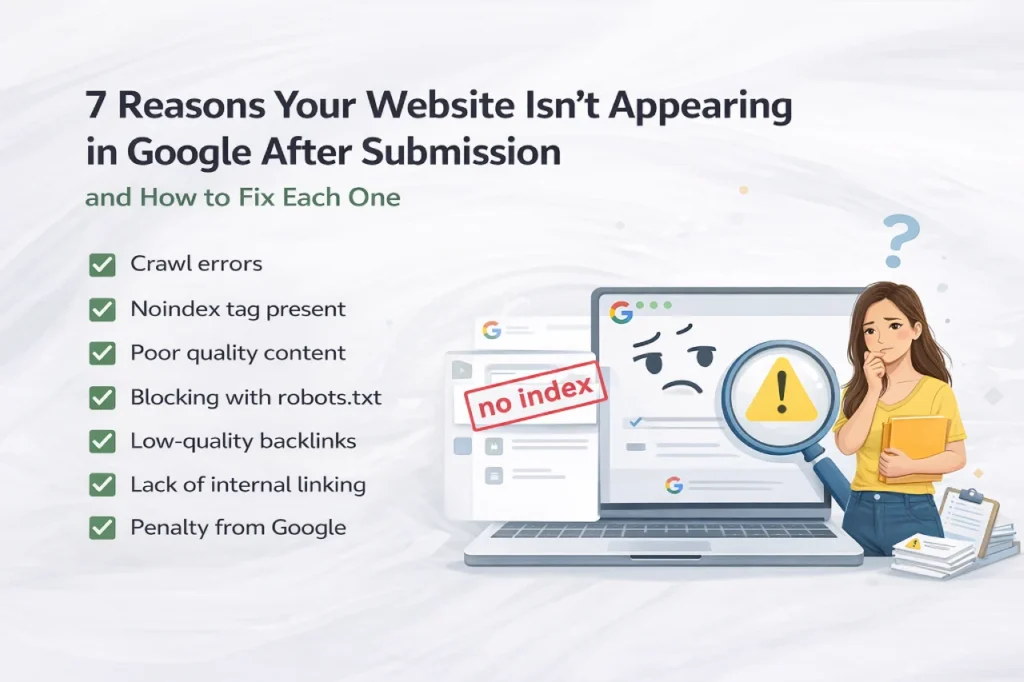
This is the section I wish existed when I started. Even after you correctly submit your website to search engines, things can go wrong. Here are the seven most common reasons a site fails to appear in Google — ranked by how often I see them — and exactly what to do about each one.
1. robots.txt Is Blocking Google
The most common reason I see. A single line in your robots.txt file can lock Google out of your entire site. Check yourdomain.com/robots.txt immediately.
The dangerous line looks like:
🚫  WRONG robots.txt (blocks everything)User-agent: *Disallow: /
The single forward slash after Disallow means: don't crawl anything on this site. Ever. Google obeys this instruction — it won't index a single page.
✅ CORRECT robots.txt (allows crawling)
User-agent: *Disallow:
Or alternatively:User-agent: *Allow: /Sitemap: https://yourdomain.com/sitemap.xml2. Noindex Tags Are Blocking Indexation
A noindex meta tag tells Google: ‘crawl this page, but don’t put it in the index.’ Check your page source (Ctrl+U) and look in the <head> section for:
<meta name=’robots’ content=’noindex’>
If this appears on any page you want indexed, remove it immediately. This often happens accidentally after a site migration or when WordPress’s ‘Discourage search engines’ setting gets left on during development.
3. Your Site Has No Inbound Backlinks
Google’s crawlers discover new pages by following links. A brand-new site with no external links pointing to it is essentially invisible to Google’s organic crawling process. This is why submitting your sitemap via Search Console is so important — it’s an alternative discovery path.
But even after submission, having at least a few quality backlinks dramatically speeds up the indexing and ranking process. I’d recommend starting with building quality backlinks from industry directories, relevant forums, and your own social profiles as step one after submission.
4. Thin or Duplicate Content Is Being Excluded
Getting your website on search engines depends on content quality — Google actively filters out low-quality, thin, or duplicate content from its index. If your pages have less than 300 words, are substantially similar to other pages on your site, or closely mirror content that exists elsewhere online, Google may crawl them but choose not to index them.
The fix: create original, substantive content that genuinely serves the user’s search intent. This is non-negotiable for
5. Core Web Vitals Issues Are Wasting Crawl Budget
Google allocates a crawl budget to every site — essentially, a limit on how many pages Googlebot will crawl in a given period. If your pages are extremely slow to load (poor Core Web Vitals scores), Google may crawl fewer of them, meaning new or updated pages take much longer to get indexed.
Use Google Search Console’s Core Web Vitals report to identify pages with ‘Poor’ LCP, CLS, or INP scores, and fix them. A faster site is a better-indexed site. Creating SEO-optimized content goes hand-in-hand with technical performance.
6. Your Sitemap Contains Errors or Broken URLs
If your sitemap lists URLs that return 404 errors, redirect chains, or blocked pages, Google will flag errors in your GSC Sitemaps report and may deprioritize processing your sitemap. Audit your sitemap regularly using Google Search Console or a tool like Screaming Frog. Every URL in your sitemap should return HTTP 200 and be indexable.
7. Your Domain Is Too New
This one is simply about patience — but it’s real. Completely new domains (especially those with no historical data and no backlinks) often face what I call a ‘trust delay’ where Google takes longer to fully index and rank their pages. This is not a penalty — it’s Google’s way of naturally evaluating new sites. The solution is consistent publishing, building legitimate links, and staying technically clean. Most new sites begin ranking consistently within 3–6 months of proper setup.
| 🛠️ Still Stuck? Get a Free Technical SEO Audit If you’ve checked everything above and your site still isn’t appearing in Google, there may be a deeper technical issue — a misconfigured redirect, a crawl trap, canonicalization errors, or a manual penalty. At Webseotrends, we offer a free technical SEO audit that identifies exactly what’s blocking your site from being indexed and ranked. Claim yours at webseotrends.com/contact-us/ — we’ll find the issue and show you how to fix it. |
What Happens After Submission: The Real Road to Rankings
I want to be direct with you about something: submitting your website to search engines is the starting line, not the finish line. Submission gets you discovered and indexed. Rankings are a completely different game — and they’re determined by three things that no submission tool can give you.
1. Content Quality and E-E-A-T
Google’s ranking systems evaluate content based on Experience, Expertise, Authoritativeness, and Trustworthiness (E-E-A-T). After 15 years in SEO, I can tell you this is the single most important factor for sustainable rankings. Thin, generic, or AI-spun content might get indexed, but it won’t rank. What ranks in 2026 is original, expert-written content that genuinely solves the reader’s problem better than any competing page. Every article on this site is written from real experience — not just theory.
2. Backlinks Still Matter (A Lot)
Despite everything that’s changed in search over the years, high-quality backlinks remain the most powerful external ranking signal. Think of backlinks as votes of confidence — each link from a reputable, relevant site tells Google that your content is worth ranking. After submitting your site and getting indexed, your next priority should be building quality backlinks from authoritative domains in your niche. If you’re not sure where to start, we offer affordable SEO services and premium link building for exactly this purpose.
3. Technical SEO Foundations
Rankings require a technically clean site. This means fast page load times (Core Web Vitals), proper internal linking, schema markup, mobile responsiveness, canonical tags to prevent duplicate content, and a logical site structure. These aren’t optional extras — they’re the foundation everything else is built on. If you’ve never run a proper technical SEO audit, now is the time. Get your free SEO audit here.
| 📈 The Real Timeline for Rankings After Submission • Week 1–2: Site gets indexed after submission • Month 1–2: Pages start appearing for long-tail, low-competition searches • Month 3–4: With consistent content and backlinks, broader keyword rankings begin • Month 6+: Competitive keywords start moving — domain authority compounds SEO is a long game. But every day you wait to submit your website and start building is a day your competitors are moving ahead. |
Frequently Asked Questions
These are the questions I get most often about website submission — answered directly.
How do I submit my website to search engines? (Quick Guide)
To submit your website to search engines, start with Google Search Console at search.google.com/search-console, register your website with search engines by verifying ownership, then navigate to Indexing → Sitemaps and enter your sitemap URL. For Bing, do the same via Bing Webmaster Tools at bing.com/webmasters. Both processes are free and take under 15 minutes combined. Submitting to Google and Bing covers over 95% of all search traffic — Yahoo and DuckDuckGo are automatically covered by the Bing submission.
Do I need to submit my website to search engines? (Short Answer)
You don’t have to — Google will eventually find your site through crawling. But submitting your site to search engines manually is strongly recommended. The process of submitting your site to search engines this way cuts indexing time dramatically because it speeds up discovery from weeks to days, gives you access to free diagnostic tools (GSC and Bing Webmaster Tools), and ensures new content gets crawled faster. The process is free and takes 15 minutes. There’s no reason not to do it.
How long does it take for Google to index my website after submission?
After you submit your website to search engines via sitemap in Google Search Console, most sites see their pages indexed within 3–7 days. Using the URL Inspection Tool to request indexing for specific pages speeds this up to 24–72 hours in most cases.
Completely new domains with no backlinks can take 2–4 weeks regardless of submission. IndexNow (for Bing) often indexes new content on the same day it’s published.
How do I submit my website to Google for free? (Step by Step)
The completely free way to submit your site to Google is through Google Search Console (search.google.com/search-console). Set up your property, verify ownership, then submit your XML sitemap under Indexing → Sitemaps. You can also use the URL Inspection Tool to request indexing of individual pages (limit: 50 per week). Google Search Console itself is entirely free — there’s no paid option or premium tier for basic submission and indexing.
Why is my website not showing up on Google after I submit my website to search engines?
The most common reasons a site isn’t appearing in Google’s search results after submission are: a robots.txt file blocking crawlers (check yourdomain.com/robots.txt for Disallow: /), a noindex meta tag on your pages, no incoming backlinks to signal the site’s credibility, thin or duplicate content being excluded, sitemap errors causing crawl failures, or simply a new domain in Google’s trust-building phase. Check Google Search Console’s Pages report under Indexing for the specific reason Google is excluding your pages.
Does submitting to Bing also submit to Yahoo?
Yes — when you submit your site to search engines like Bing, you automatically cover Yahoo and DuckDuckGo. Yahoo has used Bing’s search index since 2010 under a partnership agreement, meaning every website in Bing’s index appears in Yahoo search results without any separate search engine registration. DuckDuckGo also draws heavily from Bing’s index. One Bing Webmaster Tools submission = three search engines covered.
How do I check if my website is indexed after I submit my website to search engines?
To check whether your site is indexed on Google, type site:yourdomain.com into Google’s search bar — any results confirm indexed pages. For a more accurate check, use Google Search Console: go to Indexing → Pages and look at the ‘Valid’ count. The URL Inspection Tool lets you check any specific page’s index status in real time. For checking how your website appears in search engines beyond Google, use Bing Webmaster Tools’ URL Inspection feature for Bing’s index.
What is the best free website submission tool?
The best free search engine submission sites and tools for submitting your website to search engines are Google Search Console (for Google) and Bing Webmaster Tools (for Bing, Yahoo, and DuckDuckGo).
These let you register your website with search engines officially. Avoid services that claim to submit your site to search engines automatically at scale — those are largely ineffective.Go).
Both tools let you register your website with search engines officially, making both tools the authoritative way to register your website with search engines. Both are completely free, official, and far more powerful than any third-party search engine submission site or paid service.
Avoid services that claim to register your URL with search engines automatically for a fee — these are outdated, provide no real value, and can sometimes harm your site’s reputation with low-quality link signals.
How do I register my URL with search engines?
To register your URL with search engines, the most effective method is:
(1) Submit your full XML sitemap via Google Search Console — use the URL Inspection Tool to submit your URL to search engines for any individual priority page for comprehensive Google coverage;
(2) Use the URL Inspection Tool in GSC to request indexing of specific high-priority pages;
(3) Submit your sitemap in Bing Webmaster Tools to cover Bing, Yahoo, and DuckDuckGo. For completely new sites, also ensure at least one external website links to you — this gives crawlers an organic path to follow in addition to the submission.
Should I use a free website submission service?
I’d advise against it. Free website submission services and search engine submission sites that claim to submit your site to search engines automatically — particularly those submitting to hundreds of search engines — are largely ineffective and potentially harmful. The only search engines that drive meaningful traffic (Google, Bing, Yahoo, DuckDuckGo) either require official webmaster tool submissions (Google, Bing) or are automatically covered by those submissions (Yahoo, DuckDuckGo). Using third-party submit site to search services adds no value and risks associating your site with low-quality link patterns.
Can I submit my blog to search engines the same way?
Yes — submitting your blog to search engines follows the same process as submitting any other site to search engines. Set up Google Search Console, verify your domain, and submit your blog to search engines via the sitemap to submit your blog to search engines (most blogging platforms like WordPress generate sitemaps automatically). For each new post you publish, you can additionally use the URL Inspection Tool to request priority indexing and get your new content into Google faster. The process is identical whether you’re running a personal blog or a business website.
Final Thoughts: Your 5-Step Submission Checklist
Submitting your website to search engines is free, takes under 15 minutes, and is the most important first step, and is the essential first step to building organic traffic in 2026. Here’s the complete process summarised:
- Run the pre-submission checklist — confirm your site is live and crawlable before you submit your site to search engines. It must have a valid sitemap and run on HTTPS.
- Set up Google Search Console — verify ownership, then submit your website to search engines by submitting your sitemap under Indexing → Sitemaps.
- Submit your site to search engines via Bing Webmaster Tools — this covers Bing, Yahoo, and DuckDuckGo at once. Use the GSC import shortcut to save time.
- Check your indexing status — use the site: operator or GSC’s Pages report to confirm the URLs you submitted to search engines are being indexed.
- Troubleshoot anything that’s missing — check robots.txt, noindex tags, and content quality — these block your site even after you submit your site to search engines.
Remember: how to submit your website to search engines — and how to submit your URL to search engines for priority pages — is a skill Submitting your URL to search engines this way is faster than crawls — is a process you’ll repeat every time you launch a new site. Bookmark this guide and use it whenever you need to add your website to search engines again. The process to add your website to search engines is the same each time.e and use it as your go-to reference whenever you need to add your website to search engines.
And once you’re indexed — that’s when the real work begins. Rankings require excellent content, quality backlinks, and a technically sound site. Submitting your site to search engines is step one. If you’re ready to move from ‘indexed’ to ‘ranking’, we’re here to help.
| 🚀 Ready to Rank Higher? Let’s Talk. At Webseotrends, we’ve helped 60+ B2B and SaaS companies reach Google’s first page — and we’d love to do the same for you. → Free SEO Audit: We’ll analyse your site, find what’s blocking your rankings, and give you a clear action plan — no strings attached. → Full SEO Services: From technical audits to content strategy and link building, we handle it all. Visit contact-us to claim your free audit today. |
Related reading on Webseotrends:
- How to Start a Blog — webseotrends.com/blog/how-to-start-a-blog/
- SEO Content Writing: How to Write Content That Ranks — webseotrends.com/blog/seo-content-writing/
- Best Places to Buy Backlinks — webseotrends.com/blog/best-places-to-buy-backlinks/
- Affordable SEO Services for Small Business — webseotrends.com/blog/affordable-seo-services-for-small-business/