
Low competition keywords are a game-changer for smaller websites trying to break through in search results. Many new blogs struggle to rank for high-competition keywords dominated by older sites with higher domain authority. That is where finding low competition keywords becomes critical.
- What Are Low Competition Keywords?
- Understanding Keyword Difficulty Metrics
- Low Hanging Fruit in SEO
- Why Low Competition Doesn’t Mean Low Value
- How To Find Low Competition Keywords?
- Choose a Seed Keyword
- Use Google Autocomplete
- Check “People Also Ask”
- Explore Related Searches
- Use Keyword Research Tools
- Focus on Long-Tail Keywords
- Analyze the Search Results (SERP)
- Check Keyword Difficulty and Intent
- Step 1: Analyze Your Competitors’ Keywords
- Using Competitor Domain Analysis
- Finding Keywords Your Competitors Rank For
- Identifying Keyword Gaps and Opportunities
- Step 2: Use Keyword Research Tools to Find Low Competition Keywords
- Setting Up Keyword Difficulty Filters
- Sorting by Search Volume and Competition
- Finding Question-Based Keywords
- Step 3: Discover Emerging and Niche Keywords
- Mining Reddit and Quora for Real Queries
- Using Google Autocomplete and People Also Ask
- Analyzing Long-Tail Keyword Variations
- Step 4: Evaluate and Prioritize Your Keywords
- Matching Keywords to Search Intent
- Checking Cost Per Click for Commercial Value
- Creating a Keyword Scoring System
- Building Your Content Calendar
- How to Use Low Competition Keywords That Actually Rank
- Creating High-Quality Content Around Keywords
- Building Topical Authority Through Keyword Clusters
- Optimizing On-Page Elements
- Tracking Rankings and Performance
- Conclusion
- Frequently Asked Questions (FAQs) About Low-Competition Keyword Research
Low hanging fruit keywords might not look glamorous, but they move the needle. I’ll show you how to find low competition keywords that drive traffic and help you build topical authority without competing against the big players in this piece.
What Are Low Competition Keywords?
Low competition keywords are search terms you can rank for without battling established websites that have massive domain authority and extensive backlink profiles. These are phrases where the playing field is more level.
Understanding Keyword Difficulty Metrics
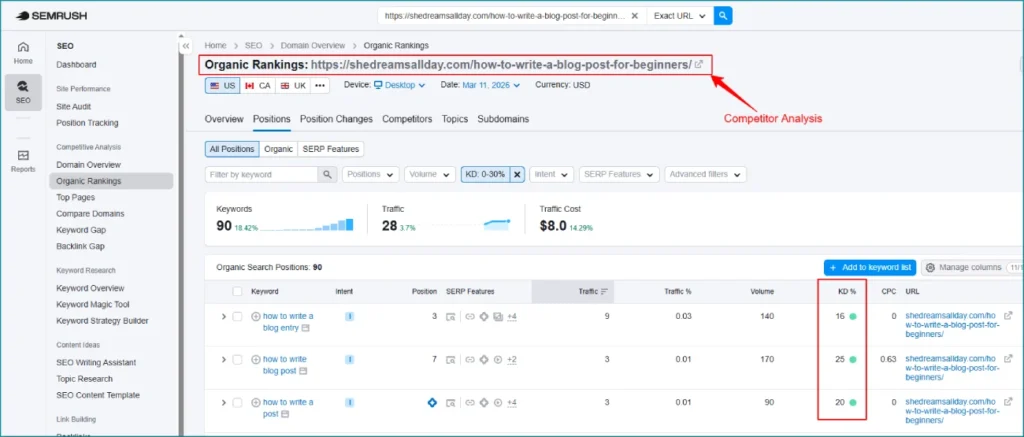
Keyword difficulty measures how challenging it is to earn a top position in search results for a specific term. Most SEO tools display this as a percentage from 0 to 100. A 100% score indicates the highest level of difficulty. 0% represents the easiest.
Keywords with search volumes over 100,000 have around 76% difficulty, while keywords with volumes of 11-100 have around 39% difficulty. New websites or those with lower domain authority should target keywords with a difficulty score of 30 or less.
Tools like Semrush, Ahrefs, and SE Ranking calculate difficulty based on the top 10 search results. They consider domain quality and backlink profiles. Different tools yield different results because they operate on different algorithms.
Personal keyword difficulty (PKD) reveals another layer. This metric measures how difficult it is for your specific website to rank in the top 10 for a keyword. Keywords with low PKD but higher general KD indicate opportunities that appear competitive overall but are achievable for your domain.
Low Hanging Fruit in SEO
Low hanging fruit refers to keywords that many people search for but that not many websites are trying to rank for. These represent easy wins that can drive traffic without requiring deep pockets or months of effort.
Low hanging fruit keywords provide momentum. Your website on the first page of Google for any relevant term proves your SEO efforts are working. You get a foundation of traffic to build upon. This early traffic can lead to your first sales or leads.
These aren’t broad, one-word keywords like ‘shoes’ or ‘marketing.’ They’re more specific, longer phrases that indicate a user is further along in their experience. Rather than targeting ‘running shoes,’ a low competition alternative might be ‘best running shoes for flat feet under $100’.
Focusing on these terms is a chance to attract visitors organically, especially if you’re launching a new website or entering a new market. As Mani Pathak emphasizes in my work with clients, finding low competition keywords creates a smarter and more sustainable SEO strategy from the ground up.
Why Low Competition Doesn’t Mean Low Value
Many people assume low search volume means low value. That assumption is wrong. Rank for 20 keywords with 200 monthly searches each and that’s 4,000 potential monthly visitors. These visitors are more targeted than those from broad terms.
Check the average cost per click (CPC) for keywords with low competition and low search volumes. A high CPC indicates strong commercial value because advertisers are willing to pay more for that term. Advertisers are unlikely to pay more for terms that don’t drive results.
Long-tail keywords convert better because they more accurately reflect a person’s needs. Someone searching for ‘best waterproof hiking shoes under $100’ is ready to purchase. A broader term like ‘hiking shoes’ may attract users still in the research phase.
Ranking well for multiple low-volume keywords generates more traffic than ranking badly for high-volume ones. More than that, keyword research tools underestimate search volume because most blog posts rank for multiple keywords.
Traffic from low competition keywords is more targeted. You’re more apt to rank in top positions since fewer sites compete for them. These rankings help you build topical authority and set you up to compete for more sought-after terms down the line.
How To Find Low Competition Keywords?
Finding low competition keywords requires a systematic approach that combines free tools with strategic analysis. Here’s how to uncover opportunities your competitors are missing.
Choose a Seed Keyword
A seed keyword is a fundamental term representing the core topic of your research. It serves as the foundation from which you branch out to find related keywords and ideas. To name just one example, see ‘exercise routines’ as your seed keyword for a fitness website.
Compile a list of obvious variations and synonyms related to your topic. Get into the keywords related websites currently rank for if you’re unfamiliar with the industry. Products or services linked to your keyword also serve as straightforward sources to find seed keywords.
Use Google Autocomplete
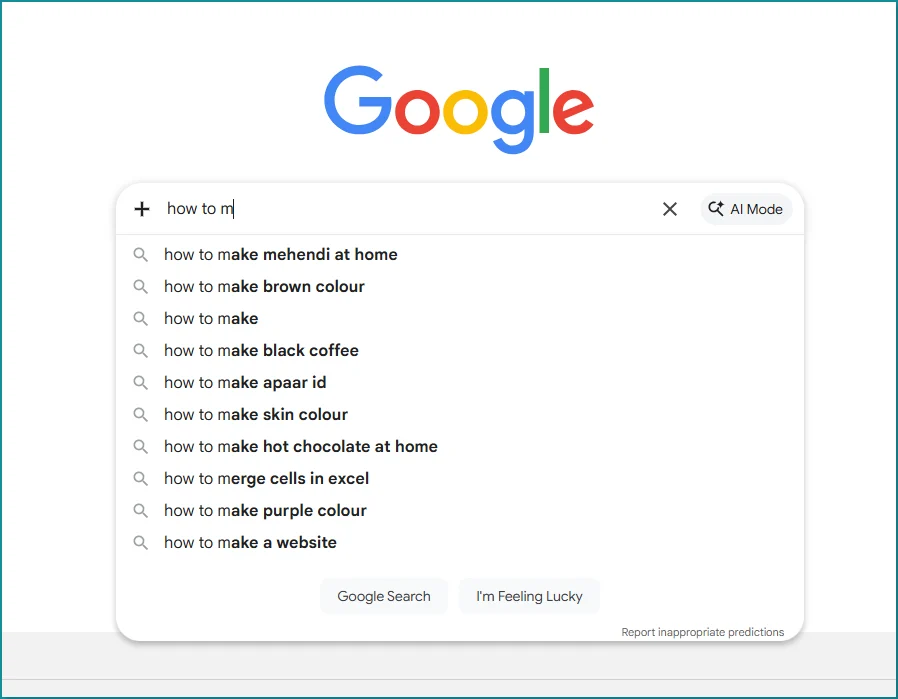
Google Autocomplete functions as a free tool to ideate keywords. It suggests search terms as you type and offers a glimpse into what people are looking for. Several paid tools use this exact data to generate their results.
Try the alphabet soup technique. Enter your main keyword followed by each letter of the alphabet to trigger different suggestions. Typing “working capital financing a” reveals one set of suggestions for “working capital financing,” while “working capital financing b” produces another.
Use underscores as wildcards. Google fills in the blank with terms people commonly search when you type “Chicago _ photographer”. This works for any part of the query, not just the end.
Check “People Also Ask”
People Also Ask (PAA) boxes appear in over 80% of search queries on Google. These questions provide direct insight into what users want to know about your topic.
Semrush’s Keyword Magic Tool uncovers PAA questions for terms you haven’t created content for yet. Enter a broad keyword and apply the PAA filter under Advanced Filters. You’ll see only terms that trigger PAA boxes. Click the icon in the SF column to view actual questions appearing in search results.
AlsoAsked is designed for finding PAA questions. Enter your topic and the tool generates a visual map of related questions. Each node represents a question you can expand to reveal more associated queries.
Explore Related Searches
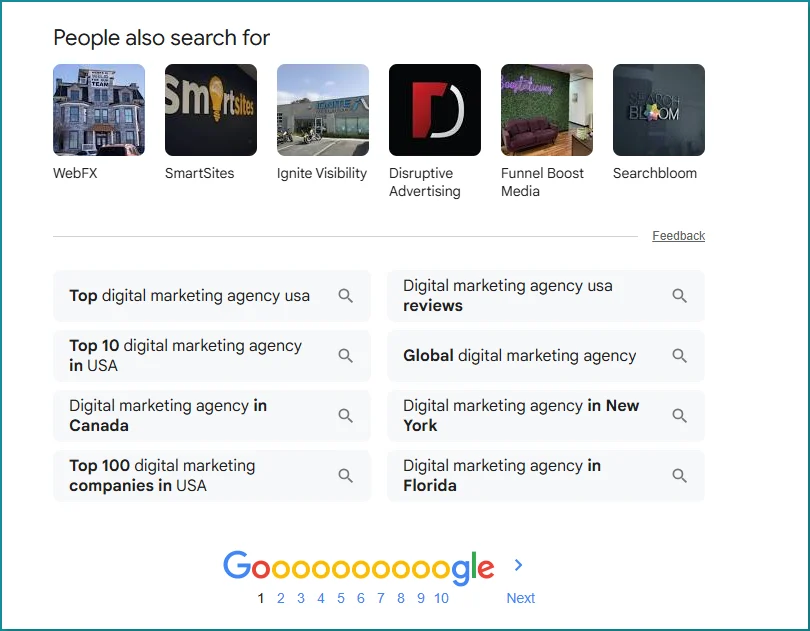
Related searches appear at the bottom of Google search results. They reveal what Google’s algorithm considers topically connected to any query. These suggestions come from actual search behavior, unlike third-party tools that estimate patterns.
These keywords often have long-tail variations with specific intent. They have less competition and higher conversion rates. Feed these results back as new seeds for exponential keyword discovery at scale.
Use Keyword Research Tools
LowFruits uses a proprietary algorithm to locate weak spots on the SERP where you can outrank competitors. The Weak Spots column shows low-domain-authority websites ranking on the first page. More green icons signal easier ranking opportunities.
KWFinder offers up to 5 searches per day on the free plan. Each search has searcher intent for each keyword and the type of content ranking, such as listicle, homepage, or blog. The keyword opportunities column identifies weak points in the top five results and suggests how you can capitalize on them.
Focus on Long-Tail Keywords
Long-tail keywords are longer, more specific search queries ranging from 3-8+ words. Seed keywords have too much competition, so use them as a starting point to find related keywords that are less competitive and more rankable.
Analyze the Search Results (SERP)
SERP analysis gets into the top-ranking pages to review whether a particular keyword is relevant and determine how hard it would be to outrank your competitors. Look at domain authority, page authority, and the number of external backlinks.
Check Keyword Difficulty and Intent
Target keywords with difficulty scores under 50 to find opportunities where you can rank without extensive backlink building. Keywords in the 0-29 range might show results in weeks, while those in the 70-100 range could take months or years. Match keywords to search intent by getting into the top 10 results to understand what searchers are looking for.
Step 1: Analyze Your Competitors’ Keywords
Competitor keywords reveal what’s already working in your niche when you analyze them. These keywords represent terms that drive traffic and conversions for other businesses in your space. Understanding where your competitors rank helps you uncover profitable low competition keywords they might be overlooking.
Using Competitor Domain Analysis
Your SEO competitors aren’t always your business rivals. SEO competitors are websites that appear in search results for the same keywords you target, while business rivals sell similar products or services to the same audience. Media sites, educational resources and industry publications often capture search traffic in your space without competing for customers.
Domain overview tools identify SEO competitors based on keyword overlap. Sites that share many keywords with you make ideal comparison targets. They cover similar topics, have comparable organic traffic and possess Authority Scores within your range. Studying these competitors reveals keyword opportunities you’ve missed.
The Competitive Positioning Map shows which sites overlap with your keyword strategy. Domain Authority predicts how well a domain will rank based on link metrics. The Overlap score represents the percentage of keywords you share with a competitor in the top 10 results. The Rivalry metric combines your Domain Authority, competitor DA, keyword overlap, keyword volume and rankings to identify your biggest rivals.
Finding Keywords Your Competitors Rank For
Check organic rankings by entering a competitor’s homepage URL into keyword research tools. You’ll see total keywords they rank for and top keywords generating the most visibility. Keywords broken down by search intent appear as well. Reviewing their best keywords provides data on position, estimated monthly clicks, traffic percentage, search volume and keyword difficulty.
Product-related and blog topic keywords where competitors win reveal relevant opportunities for your site when you examine them. Keywords at the page or subfolder level uncover tangential content ideas and reveal their overall strategy.
Manual research complements tool-based analysis. Visit competitor websites and examine keywords in titles, content, headings, meta descriptions and URLs. Pay attention to keyword placement throughout articles and the number of keywords targeted per page.
Identifying Keyword Gaps and Opportunities
Keyword gap analysis helps you discover keywords competitors rank for while you don’t. Enter your domain and up to five competing websites to display all keywords your competitors rank for but you currently don’t. The Missing tab filters results to topics where you lack rankings but competitors succeed.
Traffic Lift represents your expected gain in traffic if you overtake your top competitor’s ranking position. This metric appears in descending order and helps prioritize which gaps to address first. Filter for keywords where competitors rank in the top 10 results to reveal high-impact opportunities.
New keywords that competitors recently started ranking for provide insights into emerging trends and potential content opportunities. Monitor these terms to stay ahead and identify high volume low competition keywords before they become saturated.
Step 2: Use Keyword Research Tools to Find Low Competition Keywords
Keyword research tools transform raw data into something useful. You’ve gathered competitor intelligence. The next step involves filtering through thousands of potential keywords to identify genuine opportunities.
Setting Up Keyword Difficulty Filters
Most platforms allow you to filter keywords by difficulty scores before you waste time analyzing unsuitable targets. Go to Site Explorer in Ahrefs and enter your domain. Click “Organic keywords” under the Organic search section. Click the “KD” filter dropdown in the filter toolbar and set your “From” and “To” values to define your desired range. Apply the filter.
The keyword difficulty scale varies across platforms. Ahrefs uses a 0-100 scale. Scores between 0-10 are considered easy and require fewer than 10 domains to link to you for top 10 rankings. Scores of 71-100 are super hard and may require more than 200 linking websites. Semrush categorizes scores into six difficulty levels: 0-29 for newer websites where you can rank quickly without building backlinks, 30-49 with some competition that requires quality content, 50-69 with moderate competition that needs well-laid-out content, 70-84 with strong competition that requires quality backlinks, and 85-100 with very high competition that demands high-authority referring domains.
Target keywords with difficulty scores under 50 to locate opportunities where you can rank without extensive backlink building. Keywords in the 0-29 range might show results in weeks. Those in the 70-100 range could take months or years of consistent effort.
Sorting by Search Volume and Competition
Sorting mechanisms help prioritize your targets after you apply difficulty filters. Keyword lists automatically sort by search volume in descending order. The most popular searches appear at the top by default. Sorting by competition helps locate keywords you may be able to rank well for with relatively small effort. You’re looking for keywords with some competition, as this indicates market activity.
KEI (Keyword Effectiveness Index) automates the process. It reveals keywords with higher search volume and less competition. A higher KEI figure indicates the keyword has potential. Combine difficulty scores with search volume and competition data to prioritize the right keywords based on ranking effort.
Finding Question-Based Keywords
Question keywords capture users at different stages of the buyer trip. Semrush’s Keyword Magic Tool provides access to more than 26.4 billion keywords with a Questions filter that displays only question-based queries. Each result shows intent type (informational, navigational, commercial, or transactional), volume, trend graphs that show 12-month fluctuations, and KD percentage scores.
Online communities like Reddit and Quora contain emerging or overlooked question keywords. People ask questions there when they can’t locate suitable answers through Google. AnswerThePublic collects autocomplete data in bulk and allows three searches per day with a free account.
Step 3: Discover Emerging and Niche Keywords
Emerging trends and niche queries often hide in plain sight on community platforms. Traditional keyword tools suggest the same terms to everyone, but Reddit and Quora reveal low competitive keywords nobody else is targeting yet.
Mining Reddit and Quora for Real Queries
Reddit and Quora function differently from search engines. People speak in everyday language that isn’t filtered by algorithms or autocomplete suggestions. You can find the keywords you didn’t know you didn’t know.
Quora’s Related Questions section delivers long-tail keywords relevant to your topic. All questions function as long-tail keywords because they provide context to the search. Someone typing “Which is better, Ubersuggest or SEMrush” produces better results than just searching “SEMrush”.
Quora questions reveal searcher intentions through engagement levels. “How to use [platform]” becomes a better keyword than “what is [platform]” if questions about how to use a platform show high engagement.
Set up a Quora Ads Account to access Question Targeting without spending money. Type seed keywords and you’ll see how many weekly views each question receives. People ask via Google and Bing too if they ask and read about that question on Quora.
Analyze relevant subreddits on Reddit by sorting posts as “Top” to identify which topics strike a chord. Upvotes serve as built-in validation signals. Look for question formats like “How do you” and “What’s the best way to,” along with complaint posts revealing pain points.
Enter reddit.com/r/[subreddit] into domain analysis tools to see every keyword that subreddit ranks for. Google doesn’t prefer ranking forums unless better alternatives are missing, so low competition exists when Reddit appears on the first page of Google.
Using Google Autocomplete and People Also Ask
PAA boxes appear in 51.85% of all searches. Each question represents a potential long-tail keyword depending on relevance to your main keyword. A discovery chain forms when you click one PAA question and it expands additional related questions.
Use the alphabet soup technique with underscores as wildcards. Typing each letter after your seed keyword triggers different autocomplete variations for “working capital financing”. Similarly, “Chicago _ photographer” fills in the blank with common search terms.
Analyzing Long-Tail Keyword Variations
Long-tail keywords convert better because they reflect specific needs with precision. Someone searching “best waterproof hiking shoes under $100” is ready to purchase, whereas “hiking shoes” indicates research phase.
These keywords reduce cost per click since less competition exists. Focusing here makes strategic sense given that 70% of page views result from long-tail keywords. You’ll draw less traffic by numbers, but the return on investment is higher.
Mine forums for phrases like “does anyone know how to,” “I’m looking for a tool that,” or “what’s the best way to”. These signal direct user need and pack long-tail keyword potential. The higher the commercial intent, the more specific the search becomes.
Step 4: Evaluate and Prioritize Your Keywords
Evaluation separates promising keywords from time-wasters. After finding low competition keywords, prioritization determines which ones deserve your immediate attention and resources.
Matching Keywords to Search Intent
Search intent falls into four categories: informational, navigational, commercial, and transactional. Users want to learn something when informational intent drives content marketing. Commercial intent indicates users researching solutions before deciding, which arranges well with comparison articles and reviews. Users ready to take action represent transactional intent.
Different intents require different content formats. Match each keyword to the appropriate format by examining top 10 results. A calendar heavy on informational content but light on commercial pieces might attract traffic but struggle with conversions.
Checking Cost Per Click for Commercial Value
CPC reveals commercial value because advertisers pay more for keywords that drive conversions. Average CPCs range between USD 1.00 and USD 2.00 on Google Search Network in the US. High CPC values show strong commercial intent.
Keywords with high CPC but moderate difficulty offer commercial intent with relevant search volumes. Use CPC data to check ranking difficulty organically.
Creating a Keyword Scoring System
Score keywords from 0-5 across multiple dimensions. Domain Authority of top 10 results, relevance of top results, average referring domains, search volume, and business fit each receive a 1 or 0. Apply multipliers to emphasize dimensions that arrange with strategic priorities.
Building Your Content Calendar
Define quarterly themes based on keyword research and business priorities. Assign monthly focus areas supporting broader themes. Reserve 20-30% calendar capacity for timely opportunities.
How to Use Low Competition Keywords That Actually Rank
Ranking for low competition keywords requires more than finding them. Whether those keywords drive traffic to your site depends on implementation.
Creating High-Quality Content Around Keywords
Structure content for both readers and search engines. Compelling introductions work best. Subheadings (H2, H3) should incorporate relevant keywords. Present information through bullet points when appropriate. Synonyms and variations matter more than repeating the same keyword too often. Use keywords in context within sentences that make sense. Meaningful content takes priority over density.
Keyword research tells you what people search for and what exact questions they have. Based on these insights, you can create content tailored for visitors.
Building Topical Authority Through Keyword Clusters
Topic clusters involve publishing quality content on relevant topics to build authority. A pillar page provides broad overview of your core topic. Cluster pages explore specific subtopics in detail. Internal links between these pages help Google’s algorithm find thematic connections and keep users on the site. Sites with strong cluster structures often see 40-60% higher session durations compared to isolated content.
Optimizing On-Page Elements
Relevant headings (H1, H2, H3) structure content and help search engines understand page hierarchy. Meta descriptions should be compelling and entice clicks. Alt text for images needs to be descriptive to improve accessibility. Keywords should appear in title tags and URLs.
Tracking Rankings and Performance
Monitor organic traffic from site-wide and page-level points of view. Track target keyword positions in SERPs. The top three positions receive the most traffic.
Conclusion
You now have a complete roadmap for finding low competition keywords that bring actual traffic to your site. These keywords might not generate millions of searches each month, but they convert better and help you build momentum without massive budgets.
Low hanging fruit keywords provide the foundation for lasting SEO growth. Analyze competitors first, use the right tools and focus especially on long-tail variations that match search intent.
Consistency matters more than perfection. Target 5-10 low competition keywords this month, create quality content around them and track your rankings. I’ve seen this with countless clients: these small wins compound into substantial traffic over time.
Your first page rankings start here.
Frequently Asked Questions (FAQs) About Low-Competition Keyword Research
Q1. What exactly are low competition keywords and why should I target them?
Low competition keywords are search terms that you can rank for without competing against websites with massive domain authority and extensive backlink profiles. They’re valuable because they provide easier ranking opportunities, especially for newer websites, and often attract more targeted traffic with higher conversion rates since they reflect specific user needs.
Q2. How do I determine if a keyword has low competition?
Check the keyword difficulty (KD) score using SEO tools, which typically range from 0-100. For new websites, aim for keywords with difficulty scores of 30 or less. Additionally, analyze the search results manually by examining the domain authority, backlink profiles, and content quality of the top 10 ranking pages to identify weak spots you can exploit.
Q3. What are long-tail keywords and why do they convert better?
Long-tail keywords are longer, more specific search queries ranging from 3-8+ words that accurately reflect a person’s needs. They convert better because they capture users further along in their journey—for example, someone searching “best waterproof hiking shoes under $100” is likely ready to purchase, while “hiking shoes” indicates they’re still researching.
Q4. Can low search volume keywords still be valuable for my website?
Yes, absolutely. If you rank for 20 keywords with 200 monthly searches each, that’s 4,000 potential monthly visitors. These visitors are often more targeted than those from broad terms. Additionally, check the cost per click (CPC)—a high CPC indicates strong commercial value, meaning advertisers are willing to pay more because the keyword drives results.
Q5. How can I find low competition keywords using free methods?
Use Google Autocomplete by typing your main keyword followed by each letter of the alphabet to discover different suggestions. Check the “People Also Ask” boxes that appear in over 80% of searches, explore “Related Searches” at the bottom of Google results, and mine community platforms like Reddit and Quora where people ask questions in everyday language that reveal emerging keyword opportunities.