

SEO PowerSuite and Semrush
Small business owners choosing between SEO PowerSuite and Semrush have two of the market’s best SEO tools to pick from. These platforms have built trust with digital marketing veterans and gathered hundreds of thousands of active users over the past 15+ years.
Let’s take a closer look at what makes each platform unique. SEO PowerSuite comes as a downloadable app with four main tools (Website Auditor, Rank Tracker, SEO SpyGlass, and Link Assistant).
Semrush runs completely online with more than 55 tools you can use from any browser. The cost difference stands out – SEO PowerSuite Professional runs $349 yearly while Semrush PRO costs $117.33 monthly.

Rank Tracker gives you 23 different ways to research keywords, and Semrush offers 8 distinct methods. On top of that, Semrush’s database holds 43 trillion links – about 12 times more than SEO PowerSuite.
This piece will help you understand both tools’ strengths in keyword research, rank tracking, backlink analysis, and overall value for small businesses in 2025. You’ll learn which platform matches your business needs and budget best, whether you want SEO PowerSuite alternatives or need a complete SEO PowerSuite review.
SEO PowerSuite and Semrush: A Quick Overview
SEO PowerSuite and Semrush are complete SEO toolkits. They cover many aspects of search engine optimization like keyword research, rank tracking, backlink analysis, and content optimization.
SEO PowerSuite at a Glance
SEO PowerSuite works as a desktop application on Windows, Mac, and Linux systems. The tool’s unique feature is its offline installer that runs locally on your computer instead of the cloud. The toolkit has four specialized tools:
- Rank Tracker: Monitors keyword rankings across search engines
- Website Auditor: Performs technical SEO audits and spots issues
- SEO SpyGlass: Focuses on backlink analysis and competitor research
- LinkAssistant: Manages link-building campaigns and outreach efforts
SEO PowerSuite’s trust spans over 2 million users worldwide with almost 20 years in the market. The tool’s biggest advantage is that it supports unlimited sites and keywords, which helps agencies manage multiple clients.
Semrush: Beyond Just SEO
Semrush serves as an all-around digital marketing platform rather than just an SEO tool. The cloud-based system lets users access it through any web browser with login credentials, so there’s no need to install anything. Semrush excels at:
- Competitive research and analysis
- PPC campaign optimization
- Content marketing
- AI writing tools to help you write better.
- Link building and backlink analysis
Semrush’s keyword research provides detailed data about search volume, competition level, CPC, intent analysis, and trend tracking at local, national, and global levels. Its keyword tools help users find valuable opportunities and understand user intent behind searches.
Performance Comparison
The cost difference shows clearly when comparing the basic versions: SEO PowerSuite Professional ($349/year) versus Semrush PRO ($117.33/month).
Each platform delivers value in its own way. SEO PowerSuite gives excellent depth for specific SEO tasks, especially backlink research and rank tracking. Semrush provides broader digital marketing capabilities and updates its features regularly.
Small businesses choosing between these options should consider their workflow priorities and specific needs. SEO PowerSuite suits those who need detailed analysis of multiple keywords, backlinks, and content pages across search engines. Semrush attracts users who want all-in-one marketing insights with better competitive research capabilities.
SEO PowerSuite and Semrush: Keyword Research For Better SEO And Rankings
Keyword research is the foundation of any soaring win in SEO strategy. These two platforms take different paths to tackle this crucial task.
Keyword Suggestions: Semrush Magic Tool vs Rank Tracker
SEO PowerSuite’s keyword research works through its Rank Tracker application and gives you 23 different keyword research methods. The tool gets its suggestions straight from search engines using Autocomplete, Related Searches, and Related Questions features. While the approach is complete, it just collects data from search suggestions instead of studying how users actually search.
Semrush’s Keyword Magic Tool lets users study up to 100 keywords at once and can zoom in from national to county levels. The tool sits on top of billions of actual keywords and shows you important numbers like search volume, difficulty scores, and trend data. You can uncover hidden keyword gems from just one seed term.
Search Intent and Long-Tail Keyword Support
Semrush shines by letting you filter keywords based on search intent – whether people want information, products, navigation, or transactions. Content creators can match their strategy with what users really want. The tool makes it easy to find valuable long-tail phrases that have less competition.
SEO PowerSuite’s Rank Tracker helps you spot long-tail keywords but doesn’t have Semrush’s smart intent analysis. The tool lets you pick specific cities to see local keyword data, which helps with local SEO.
Data Sources: Google Ads vs Semrush Database
These tools differ in where they get their data. SEO PowerSuite pulls information from search engines and connects with Google Analytics and Search Console to learn more. This works well but can’t match what you get from specialized databases.
Semrush claims to have “the largest keyword database” with billions of keywords that update constantly. This big collection of data gives you more trustworthy search volume estimates and competitor insights than tools that only use Google’s data.
Keyword Difficulty: KEI vs Semrush Difficulty Score
Semrush rates keyword difficulty from 0 to 100, with six levels ranging from “very easy” to “very hard”. The score looks at several factors: referring domains count for 41.22%, authority scores make up 16.99%, search volume adds 9.47%, and various SERP features play a role.
SEO PowerSuite checks keyword difficulty too but doesn’t have Semrush’s detailed scoring system. Small businesses looking for available ranking opportunities often find Semrush more helpful because it works well with low-volume, long-tail, and local keywords.
SEO PowerSuite and Semrush: Rank Tracking Features
Rank tracking features are a vital battleground in evaluating SEO tools for small businesses. SEO PowerSuite and Semrush both offer reliable rank monitoring features but differ by a lot in their approach and execution.
Search Engine Coverage: 29 vs 400+ Engines
SEO PowerSuite’s support for tracking rankings across nearly 600 different search engines makes it stand out. The software goes beyond Google, Bing, and Yahoo to include platforms like Yandex, Baidu, YouTube, DuckDuckGo, and hundreds of niche search engines. Businesses targeting international markets get a substantial edge with this wide coverage.
Semrush focuses on major search engines like Google, Bing, and Baidu. While it offers fewer search engine options, Semrush delivers exceptional depth within these platforms and tracks when content appears in Google’s AI overviews.
Update Frequency: Daily vs Custom Schedules
SEO PowerSuite gives users more flexibility with update scheduling. Users can set the rank tracker to check ranking positions daily or create custom schedules based on their needs. This automation feature saves time and keeps data current without manual work.
Semrush updates rankings daily. This straightforward approach works well for businesses that want simple tracking workflows without managing schedules.
Mobile and Local SEO Tracking
Both platforms excel at mobile rank tracking. Semrush tracks rankings down to the ZIP code level, which helps monitor local performance precisely. This feature is a great way to get insights for businesses targeting specific geographic areas.
SEO PowerSuite matches this with detailed location tracking at any level, from countries to neighborhoods. Its complete local tracking suits businesses that focus on hyper-local marketing strategies.
Historical Ranking Data and Visibility Graphs
The biggest difference lies in historical data access. SEO PowerSuite gives unlimited historical ranking data. Businesses can analyze long-term trends without restrictions through its visibility graphs that show performance over extended periods.
Semrush keeps historical ranking data for 90 days. This might limit long-term trend analysis for businesses looking at year-over-year comparisons. Both platforms show visibility history graphs that display overall search visibility trends.
The visualization tools in both solutions display ranking distribution data that shows how many keywords fall within different position brackets (top 3, top 10, etc.).
On-Page SEO and Content Optimization
Technical SEO elements are the foundations of ranking success in search engines. SEO PowerSuite and Semrush both provide resilient on-page optimization capabilities. Their approaches show notable differences.
Site Audit Tools: WebSite Auditor vs Semrush Site Audit
WebSite Auditor runs complete crawls that show both critical and minor technical issues. Tests of both platforms on the same site revealed SEO PowerSuite identified 217 issues while Semrush found 21. This big gap exists because Semrush focuses on practical issues. SEO PowerSuite shows everything—even less critical errors.
Semrush’s site audit interface looks better with its color-coded dashboard. Red highlights errors, yellow shows warnings, and green indicates healthy aspects. The thematic reports dive deep into crawlability, HTTPS status, and site performance.
Semrush limits audits to 20,000 pages on Pro plans and 100,000 on Business plans. SEO PowerSuite offers unlimited crawling. This makes SEO PowerSuite a better choice for agencies that manage multiple large websites.
Content Optimization: TF-IDF vs SEO Writing Assistant
SEO PowerSuite employs TF-IDF (Term Frequency-Inverse Document Frequency) analysis to optimize content. This advanced algorithm calculates how important words are in relevant documents. The software looks at top-ranking competitors and shows which contextual keywords you might have missed.
Semrush’s On-Page SEO Checker works differently. It analyzes your website and compares your pages with your top 10 organic competitors for each target keyword. Semrush helps you learn why competitors rank high and creates a checklist to help you achieve similar results.
The interface shows big differences. SEO PowerSuite’s content editor lets you optimize directly in the application. Semrush gives more visual guidance.
Internal Linking and Page Structure Visualization
Both tools show site structure visualization, but SEO PowerSuite’s implementation stands out. Its interactive visual sitemaps help users see website structure by PageRank and show how internal link juice flows across pages.
Semrush includes visualization modules that display site structure. It uses color-coding to highlight problematic pages in red and healthy ones in green.
SEO PowerSuite’s additional visualization options let you filter by URL content. This makes finding topic clusters or content hubs easy. Users can also see site structure by pageviews after connecting with Google Analytics.
Both platforms help strengthen site architecture through strategic internal linking. Each uses its own interface and methods to achieve this goal.
Backlink Analysis and Link Building
Backlinks are the life-blood of search engine algorithms, and small businesses need effective link analysis and building capabilities. Several key differences between these platforms could affect your choice.
Backlink Database Size: 6.5T vs 43T Links
The numbers tell an interesting story about database completeness. Semrush’s backlink database contains 43 trillion external links and crawls 25 billion URLs daily. SEO PowerSuite’s database has 6.5 trillion external links and crawls 6 billion pages daily.
Ground performance shows closer results than expected. Semrush found more referring domains in 6 out of 10 cases during multiple business website tests. These results weren’t as overwhelming as the database size difference might suggest.
Speed marks one of the most important differences between these tools. Semrush produces backlink results almost instantly and takes about 90 seconds to analyze 10 domains. SEO PowerSuite needs roughly 25 minutes for similar tests—about 2 minutes per report.
Toxic Link Detection and Disavow Tools
These platforms have reliable capabilities to identify potentially harmful backlinks. Semrush’s Backlink Audit assesses links against more than 45 toxic markers and assigns each link a Toxicity Score from 0-100. The system groups toxic markers as either “Dangerous” or “Potentially dangerous” to help prioritize fixes.
SEO SpyGlass has specialized penalty risk tools that highlight spammy backlinks needing removal or disavowal. Both tools aid in creating disavow files. Semrush’s edge comes from its properly formatted files ready for Google.
Link Prospecting: LinkAssistant vs Semrush Outreach CRM
LinkAssistant dedicates itself to link building. It combines prospecting tools, backlink analysis, an in-built email client, and backlink tracking. This focused approach helps find link opportunities through various search options, including guest post sites, forums, and business directories for specific niches.
Semrush takes a different approach to quality link opportunities. The platform excels at finding link building prospects through backlink analysis but doesn’t have built-in outreach features. It connects with specialized platforms like Pitchbox and integrates with Semrush’s authority metrics.
Small businesses with limited time often choose based on their preference for SEO PowerSuite’s all-in-one approach or Semrush’s larger database with third-party integrations.
Reporting and Automation Tools
Professional client reports play a vital role in any SEO service offering. SEO PowerSuite and Semrush both have strong reporting capabilities that take different approaches to presentation and automation.
White-Label Reports and Branding Options
Semrush’s easy-to-use drag-and-drop report builder makes report creation simple for team members. The system flexibly incorporates data from most Semrush tools and widgets straight from Google Analytics, Search Console, and Google My Business. Clients love these visually appealing reports during review sessions.
SEO PowerSuite shines in reporting flexibility too. Teams can generate impressive reports that showcase campaign KPIs quickly. Reports can include any metric that’s visible in the software. SEO PowerSuite has pre-built report templates that teams can customize fast to match their needs, perfect for those who don’t want to start from scratch.
Report Scheduling and Delivery
Automation saves precious time for agencies with multiple clients. Semrush lets you schedule report delivery with timing options that work for you. Clients receive PDF reports directly in their inbox based on your preferred schedule.
SEO PowerSuite matches this with its own automated delivery system. One key difference lies in client communication – you can add specific comments to different report sections before sending them out. This helps explain SEO results to clients who might not grasp technical metrics fully.
Client Communication Features
Both platforms know that reports do more than just deliver data – they show value to clients. Their white-label features let you customize branding completely, which reinforces your agency’s identity in every report.
The platforms create polished, professional reports that clients find easy to understand. Visual appeal matters since clients often spend just a few minutes reviewing these documents. Industry experts point out that you shouldn’t spend too much time creating reports that clients will only briefly look at.
Looking at these reporting capabilities side by side, both tools give you all the design features and data reporting functionality you need to create impressive client reports.
Pricing and Subscription Models
Price often determines which SEO tools small businesses choose. SEO PowerSuite and Semrush have very different cost structures and subscription models.
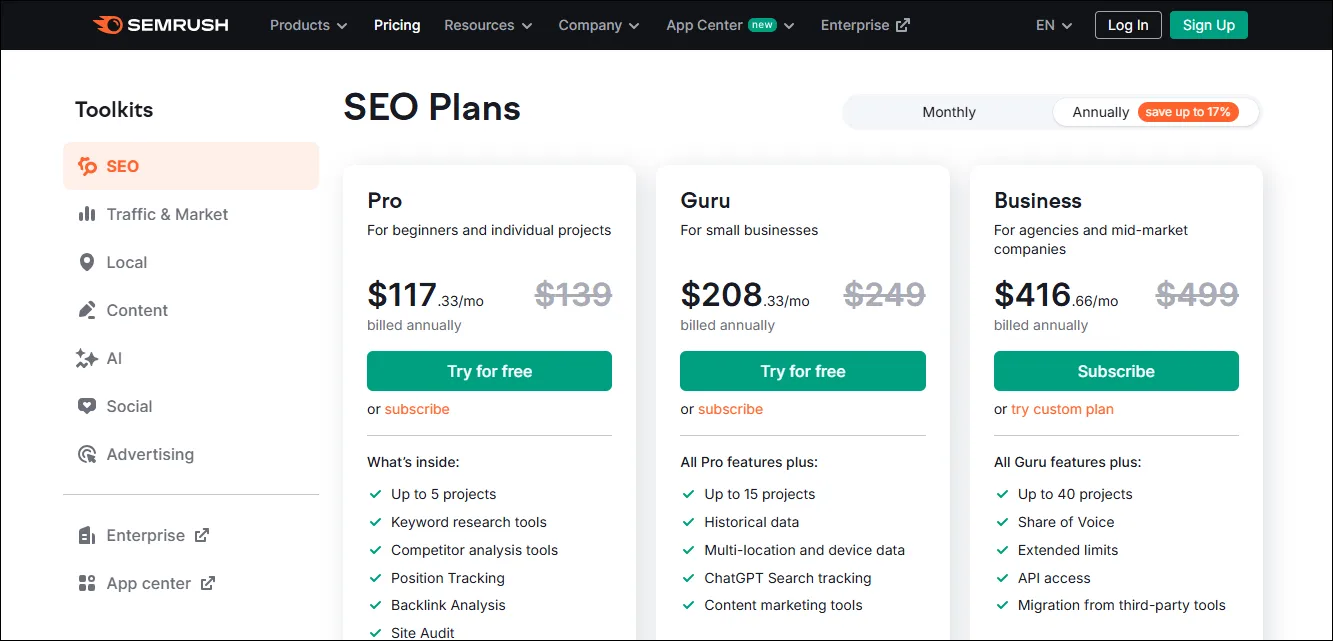
SEO PowerSuite Pricing: $299/year vs Semrush $139.95/month
The price gap between these tools jumps out right away. SEO PowerSuite’s Professional plan costs $299 per year, which works out to about $24.92 monthly. Their Enterprise version runs $499 annually ($41.58 monthly). Budget-conscious users can get multi-year plans with discounts up to 34%, which brings a 3-year Professional license down to $16.50 per month.
Semrush sticks to monthly subscriptions. Their Pro plan starts at $139.95, Guru at $249.95, and Business at $499.95 per month. Users save about 17% by paying annually. This makes Semrush cost more than SEO PowerSuite as time goes on.
Free Forever Plan vs 14-Day Trial
Both platforms let users try their features without paying upfront. SEO PowerSuite’s “Free Forever” plan gives access to all applications with some limits. The biggest catch is that you can’t save projects – they vanish when you close the software.
Semrush takes a different path with a 14-day trial (up from 7 days) that lets users access all features. After two weeks, users must subscribe or lose access.
Modular Licensing vs All-in-One SaaS
The pricing models differ because of how each tool works under the hood. SEO PowerSuite runs on your computer through traditional software licensing. This keeps ongoing costs low since your hardware does the heavy lifting instead of cloud servers.
Semrush uses a Software-as-a-Service (SaaS) model. Their tools live on their servers, and users access them through web browsers. This needs constant infrastructure investment, which leads to higher subscription costs.
Ease of Use and Accessibility
These two SEO platforms are different in how businesses use their marketing tools every day.
Desktop Software vs Cloud-Based Platform
SEO PowerSuite works as a desktop solution that needs installation on your computer. You must download and access each tool—Website Auditor, Rank Tracker, SEO SpyGlass, and Link Assistant—as separate applications on your local machine. Your data stays on your computer, which gives you more control over your information. The software works offline too, which helps when you have poor internet connectivity.
Semrush takes a completely different path with its cloud-based design. The platform runs online without any downloads or installations. You can log in through any web browser to use all 55+ tools from one interface. Your data stays in the cloud and you can access it from any device that connects to the internet.
Performance and Speed Differences
Desktop and cloud solutions each have their own performance traits. SEO PowerSuite utilizes your computer’s hardware and can process large-scale audits faster. Your computer’s power matters though—less capable machines might run slower or crash sometimes.
Semrush’s cloud architecture uses remote servers to process data. This setup retrieves data by a lot faster, especially when you have deep site audits and backlink analysis. You get instant results for keyword research in Semrush, while SEO PowerSuite users wait at least a minute per tool.
Learning Curve for Beginners
Semrush provides a more accessible experience through its unified interface. The single platform makes workflow smoother even with many features. New users might feel overwhelmed at first by all the data.
SEO PowerSuite uses four separate applications. This setup lets users focus on specific SEO tasks, but they need to learn different interfaces. Beginners often find it easier to learn because they can become skilled at one tool at a time.
Pros and Cons Summary
A detailed look at both platforms reveals their strengths and limitations to help small businesses choose the right tool.
SEO PowerSuite: Unlimited Keywords, Lower Cost
SEO PowerSuite provides great value with unlimited keyword tracking at no extra cost. This makes it different from Semrush, which limits users to 500-5,000 keywords based on their plan. The price gap is significant – SEO PowerSuite Professional costs $299 per year (about $24.95 monthly) while Semrush starts at $139.95 per month.
SEO PowerSuite’s advantages go beyond cost savings. Users can access a free version that covers simple needs. The desktop software runs on Windows, Linux, and Mac systems. The tool shines at in-depth analysis and works offline after installation.
The platform has its shortcomings. Users often find its interface dated and cluttered compared to newer tools. Navigation through multiple tabs can confuse new users. The Java-based system might slow down when analyzing large websites. The lack of immediate data updates means users must refresh manually.
Semrush: More Data, Better UX, Higher Price
Semrush commands its premium price through deeper data insights. Its database includes 43 trillion links, while SEO PowerSuite has 6.5 trillion. Users get access to more than 55 tools that cover SEO, PPC, content, and social media.
The user experience sets Semrush apart. Its accessible interface makes complex SEO tasks easier. Cloud-based architecture lets users work from any device with consistent performance.
The choice between these tools depends on your needs. SEO PowerSuite works best for companies that want unlimited tracking on a budget. Semrush fits organizations that need complete data and better usability and can handle higher costs.
SEO Powersuite Review
SEO PowerSuite has grown into a respected alternative in the SEO tools market since 2004. This desktop-based solution managed to keep its focus on data privacy and user’s control over SEO information.
The software’s complete approach to SEO tasks stands out in user reviews. The suite comes with four core applications: Rank Tracker, Website Auditor, SEO Spyglass, and LinkAssistant. These tools handle everything in optimization work effectively. Users love the color-coded interface that makes navigation easier. Red, yellow, and green indicators help prioritize SEO problems based on their severity.
The platform’s customer support shines through multiple help channels. Users can access extensive online documentation, quick live chat responses, and a ticket system for specific questions. The support team shows deep technical knowledge, and most users get detailed solutions right away.
PowerSuite excels at handling large-scale projects, though it processes data slower than cloud-based alternatives. Users consistently praise the tool’s value. It delivers complete SEO features at substantially lower prices than competitors.
SEO PowerSuite proves to be an excellent choice for budget-conscious businesses that need unlimited keyword tracking. Technical SEO specialists find its resilient site auditing features and detailed link analysis tools perfect for complete site improvements.
SEO Powersuite vs Ahrefs
Businesses looking at SEO tools often compare Ahrefs and SEO PowerSuite as alternatives to Semrush. Ahrefs stands out as a backlink-focused platform. SEO PowerSuite, on the other hand, offers broader functionality in multiple SEO disciplines.
The user-friendly dashboard of Ahrefs makes it approachable for beginners. SEO PowerSuite’s separate desktop applications take more time to learn. Small teams without much technical expertise might prefer Ahrefs’ combined approach.
These tools have distinct pricing differences. Ahrefs starts at $99 monthly, which puts it between SEO PowerSuite ($299/year) and Semrush ($139.95/month). Ahrefs doesn’t offer a free version but provides a 7-day trial for $7.
Keywords Explorer, Ahrefs’ research tool, excels at competitor analysis and helps identify content gaps. This tool outperforms SEO PowerSuite’s Rank Tracker when it comes to competitive intelligence. Ahrefs also offers better content exploration tools that spot top-performing content in specific niches.
To conclude, Ahrefs might work better for teams focused on backlink analysis and content strategy. SEO PowerSuite could be the right choice for those who need complete SEO capabilities at a lower cost. Teams with complex digital marketing needs beyond SEO would find Semrush the most versatile option among these three platforms.
Moz Pro vs SEO PowerSuite
SEO tools beyond the Semrush ecosystem show that Moz Pro and SEO PowerSuite take two distinctly different approaches to search optimization.
SEO PowerSuite consistently outperforms Moz Pro in critical feature comparisons. The keyword analysis scores show PowerSuite at 9.0 while Moz trails at 8.6. Site audit capabilities reveal an even bigger gap, with PowerSuite scoring 9.0 compared to Moz’s 7.6.
The pricing structure sets these tools apart significantly. Moz Pro’s web-based platform costs $99 monthly, which is much higher than SEO PowerSuite’s $349 annual license. These price differences reflect in their value-for-money ratings, where PowerSuite scores 4.5/5 and Moz receives 4.1/5.
The tools’ technical capabilities tell a similar story. Moz Pro users can only crawl 3,000 pages per subdomain twice daily, while SEO PowerSuite provides unlimited crawling. Backlink analysis shows the same pattern – Moz caps users at 10,000 links per domain, but PowerSuite offers unlimited link examination.
SEO channel coverage highlights more differences between these tools. PowerSuite scores 8.3 against Moz’s 5.9. Local SEO capabilities (8.0 vs 5.3) and mobile optimization tools (8.0 vs 6.2) show the widest gaps.
SEO PowerSuite clearly offers better technical capabilities at a lower price point. However, Moz’s cloud-based platform might be a better match for teams that value web accessibility.
Our SEO Powersuite vs Semrush Comparison Table
| Feature | SEO PowerSuite | Semrush |
|---|---|---|
| Platform Type | Desktop-based SEO software (4 core tools) | All-in-one cloud-based SEO platform |
| Pricing (Paid Plan) | $349/year (Professional plan) | $839.40/year (Pro plan, billed annually) |
| Monthly Cost (Approx.) | ~$29/month | ~$70–$117/month (depending on billing cycle) |
| Free Version / Trial | Free version available (limited features) | 7–14 day free trial (limited access) |
| Keyword Research | Multiple keyword discovery methods (20+) | Advanced keyword database with multiple filters |
| Backlink Database Size | Large backlink index (trillions of links) | One of the largest backlink databases globally |
| Search Engine Coverage | Supports Google + hundreds of regional engines | Primarily Google, Bing, and major global engines |
| Site Audit Capabilities | Highly detailed technical audits | Comprehensive site audits with prioritized issues |
| Crawl Limits | Unlimited crawling (system-dependent) | 20,000 pages per audit (Pro plan) |
| Rank Tracking | Unlimited keywords (license-based) | 500–5,000 keywords (plan dependent) |
| Data Storage | Stored locally on your system | Stored securely in the cloud |
| Update Frequency | Manual or scheduled updates | Automatic daily data updates |
| Installation Required | Yes (Windows, macOS, Linux) | No (browser-based) |
| Internet Dependency | Partial (some features work offline) | Fully internet-dependent |
| Total SEO Tools | 4 focused SEO tools | 55+ SEO, PPC, and marketing tools |
Conclusion
The choice between SEO PowerSuite and Semrush comes down to your business needs, priorities, and budget after really looking at both tools.
SEO PowerSuite delivers exceptional value by offering unlimited keyword tracking and site auditing at a price much lower than Semrush. Small businesses watching their marketing budgets will like SEO PowerSuite’s one-time yearly payment of $349 compared to Semrush’s monthly $117.33 fee. Teams that feel at home with desktop software might prefer SEO PowerSuite’s complete offline features, especially when you have large websites that need extensive crawling.
Semrush’s premium price tag brings better data depth, user experience, and cloud access. The platform has a massive 43 trillion backlink database, easy-to-use interface, and works smoothly across all devices. Marketing teams who want complete insights without technical hurdles will find it perfect. Businesses that need deep competitive analysis will see great value in Semrush’s broader features.
Both tools have their drawbacks. SEO PowerSuite users deal with an outdated interface and need manual updates. Semrush customers face high ongoing costs and limits on keyword tracking.
Small businesses should focus on three key things: budget flexibility, technical comfort, and SEO priorities. Teams that want unlimited keyword tracking at low cost should look at SEO PowerSuite. Those who value complete data and modern usability might find Semrush worth the higher price.
Ahrefs and Moz Pro are options too, but these two platforms give small businesses the best mix of features and value in 2025. Starting with SEO PowerSuite’s free version helps assess its capabilities before making a long-term choice.
Without doubt, both tools can boost your SEO results when used well. The real question isn’t about which tool works better – it’s about finding the one that best matches your business’s resources, technical skills, and optimization goals.
Key Takeaways
Small businesses choosing between SEO PowerSuite and Semrush face a clear trade-off between cost-effectiveness and comprehensive data access.
• SEO PowerSuite offers exceptional value at $349/year with unlimited keyword tracking, while Semrush costs $839/year but provides 43 trillion backlinks versus 6.5 trillion
• Desktop vs cloud architecture creates distinct workflows: SEO PowerSuite works offline with local storage, Semrush requires internet but offers seamless cross-device access
• SEO PowerSuite excels at detailed technical audits (217 issues found vs 21 for Semrush) and supports 600+ search engines compared to Semrush’s major engines only
• Semrush justifies higher costs through superior user experience, real-time data updates, and 55+ integrated marketing tools beyond just SEO
• Budget-conscious businesses needing unlimited tracking should choose SEO PowerSuite; teams prioritizing data depth and modern usability should invest in Semrush
The decision ultimately hinges on whether your business values comprehensive affordability or premium data accessibility. Both tools can significantly improve SEO performance when aligned with your specific technical capabilities and optimization priorities.
SEO PowerSuite and Semrush FAQs
Q1. Which tool is better for small businesses with limited budgets?
SEO PowerSuite is generally more budget-friendly for small businesses, offering unlimited keyword tracking and comprehensive features for $349/year. Semrush, while more expensive at $839/year, provides more extensive data and a user-friendly interface.
Q2. How do the keyword research capabilities compare between SEO PowerSuite and Semrush?
SEO PowerSuite offers 23 different keyword research methods, while Semrush provides 8 approaches. Semrush’s Keyword Magic Tool allows analysis of up to 100 keywords simultaneously and offers more detailed metrics like search intent and trend data.
Q3. What are the main differences in backlink analysis between the two tools?
Semrush boasts a larger backlink database with 43 trillion links compared to SEO PowerSuite’s 6.5 trillion. Semrush also delivers faster results, taking about 90 seconds to analyze 10 domains, while SEO PowerSuite requires about 25 minutes for similar tests.
Q4. How do the reporting features differ between SEO PowerSuite and Semrush?
Both tools offer white-label reporting and customization options. Semrush provides a drag-and-drop report builder with integration from various tools, while SEO PowerSuite allows for quick generation of reports with any metric visible in the software. Both enable automated report scheduling and delivery.
Q5. Which tool is easier to use for beginners?
Semrush generally offers a more intuitive experience with its unified, cloud-based interface accessible from any device. SEO PowerSuite, being a desktop application with four separate tools, may have a steeper learning curve but allows users to focus on specific SEO tasks independently.
