
SurferSEO Review: I Tested It on 50+ Articles
Need an honest SurferSEO review based on actual results? My experience spans months of testing this tool across 50+ articles. The results show how this tool can revolutionize content optimization if you use it properly.
Among content optimization tools, SurferSEO distinguishes itself through its evidence-based approach to on-page SEO. My comprehensive testing tracked SurferSEO’s pricing against its delivered value. The evaluation focused on essential features like Content Editor, SERP Analyzer, and keyword clustering tools. The primary question remained: Could Surfer boost rankings instead of making empty promises?
My Surfer SEO review clears away marketing hype and reveals what actually worked and what fell short. I’ve achieved measurable results that will help you decide if this tool belongs in your SEO toolkit. Content creators, SEO professionals, and agency owners will find a practical breakdown of SurferSEO’s ground application based on evidence rather than theory.
What Is Surfer SEO?
SurferSEO works as an evidence-based on-page optimization platform that helps content creators match their work with top search results. The tool analyzes over 500 on-page signals from high-ranking pages and spots patterns that relate to better SERP positions.
Most SEO tools focus only on keywords, but Surfer gets into content structure, NLP terms, headings, and ideal word counts to give you practical recommendations. The platform sets a standard approach to on-page optimization through pattern recognition and competitive analysis.
Who Should Use SurferSEO?
Content teams, freelance writers, digital marketers, and SEO professionals who want to optimize content quickly will find SurferSEO helpful. Agencies with multiple clients value its standardized approach to content creation. The tool works great for people who don’t have deep technical SEO knowledge but need to create search-optimized content.
Core use cases for content teams and SEOs
Content teams make use of Surfer to create relevant articles that match search intent. Writers get real-time guidance on structure, headings, and related terms through the Content Editor. SEO professionals use the SERP Analyzer to understand the competitive landscape and spot ranking factors.
You can also audit content to find ways to improve it, research and cluster keywords for content planning, and analyze gaps to build topical authority. The platform helps optimize existing content through its audit feature.
How SurferSEO fits into a content workflow
Surfer naturally fits at several points in content production. The tool helps with research and planning through keyword clustering and SERP analysis. Writers then use the Content Editor while drafting to optimize their content in real-time.
Content teams need less SEO guidance between specialists and writers with Surfer. The platform’s scoring system offers quality standards, though experienced users know these work better as guidelines than strict rules. Surfer simplifies processes by making optimization part of writing instead of a separate step.
Key Features of SurferSEO
Let’s get into the powerful features that make SurferSEO stand out in the content optimization world.
Content Editor & Optimization Tools
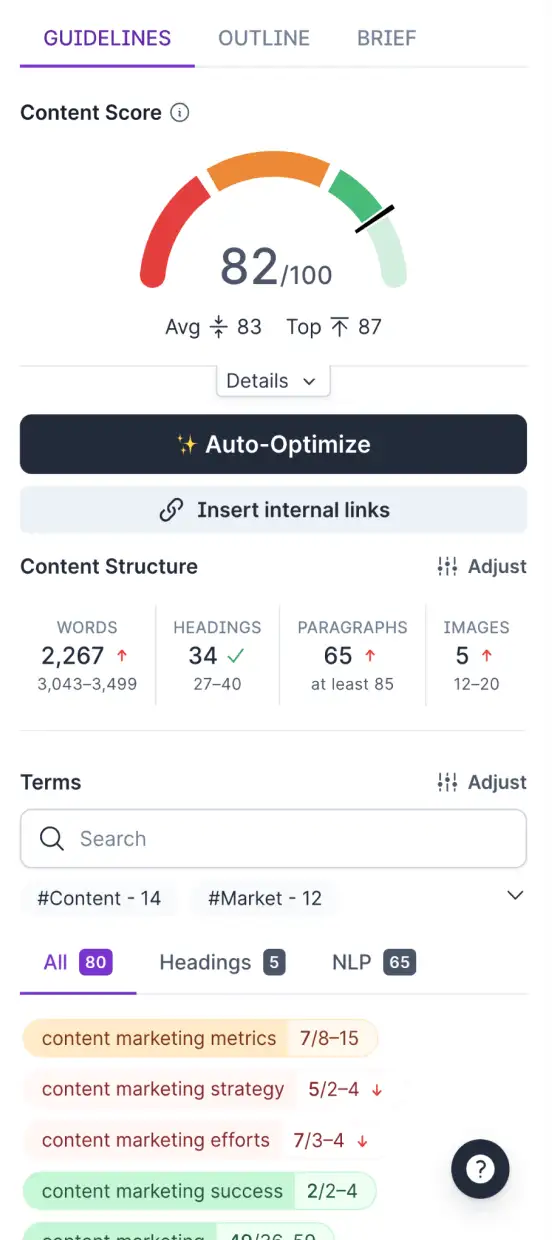
The Content Editor is the foundation of Surfer’s platform and guides your writing with up-to-the-minute optimization tips. You’ll get specific recommendations for word count, headings, paragraphs, and image usage based on top-performing content when you enter a target keyword. The editor shows LSI keywords with suggested usage frequency that turn green once you hit the sweet spot. You’ll find a “Topics and Questions” section that pulls straight from Google’s “People also ask” box to ensure you cover everything thoroughly.

SERP Analyzer
Surfer’s SERP Analyzer goes deeper than standard tools by showing ranking factors across top results visually. The tool doesn’t just show what ranks – it reveals why pages rank by comparing metrics like word count, backlinks, and referring domains against positions. You can choose which top-ranking pages to analyze, whether it’s just the top 3, 5, or 10 results, instead of including lower-quality content from page two.
Keyword Research & Clustering
The Keyword Research tool finds terms your audience searches for and their intent patterns. The tool groups related keywords into topic clusters automatically, which makes content planning much easier. This helps you build complete topic coverage rather than creating standalone articles.
SEO Audit & SEO Suggestions
Surfer’s audit tool compares your existing content against current SERP leaders for specific keywords. The tool spots content structure gaps, missing keywords, internal linking opportunities, and technical issues like page speed and broken links. You’ll see which pages can bring the most traffic increases with minimal work in the recommendations tab.
Integration with Other Tools
Surfer combines smoothly with Google Docs, WordPress, and Google Search Console, so your optimization workflow stays unbroken. The core team can work on the same document at once, which makes it perfect for agencies and content teams.
SurferSEO Content Editor: Real-Time Optimization Engine
SurferSEO’s Content Editor is the core feature that provides immediate optimization guidance while you write. My extensive testing shows its intelligence impresses but has some limitations.
Keyword suggestions and content score explained
The Content Editor gives each article a Content Score from 0-100 that shows how well your content lines up with top-performing pages. This score looks at quality and relevancy against competitors. My experience shows that pursuing the highest possible score might lead to over-optimization. You should meet or slightly exceed the average score instead of chasing the top score. This strategy creates better-ranking content without stuffing keywords.
NLP terms and LSI keyword integration
A detailed list of NLP terms and LSI keywords comes with specific usage frequency suggestions. These terms turn green as you add them, which adds a fun game-like element. In spite of that, blindly using these suggestions sometimes creates awkward phrasing. A recent article wanted “internal links” added 12-32 more times when it already appeared 52 times—this would have made the content unreadable.
AI writing and auto-optimize features
Two notable AI-powered features stand out in Surfer. The “Write with AI” function creates complete articles based on your target keyword. Tests showed Surfer’s AI detector gave this content a 91% AI score. This works as a starting point but needs significant editing. The “Auto-Optimize” feature adds NLP terms to increase your Content Score automatically. The suggestions often don’t make sense or read naturally, so manual optimization remains the quickest way.
SurferSEO humanizer: Does it improve AI content?
“Surfy,” the Humanizer tool, works as an AI writing assistant that edits, rephrases, and refines content immediately. Users can ask for specific improvements through “/AskSurfy” commands like adding statistics, rewriting in active voice, or expanding topics. The tool still doesn’t solve AI-generated content’s basic problems—originality and depth of expertise remain challenging.
SERP Analyzer: Deep Dive into Competitor Data
Surfer’s SERP Analyzer goes beyond keyword suggestions. It helps us learn about why certain pages rank well. This feature proved incredibly useful as I planned my content strategy.
Metrics tracked: word count, backlinks, referring domains
The SERP Analyzer shows important ranking factors against search result positions in visual form. My analysis of “Best Email Marketing Tool” showed top 10 pages averaged 5,872 words and 23,258 referring domains. The tool tracks social shares and rates each competitor’s content out of 100, as with the Content Editor.
The real power comes from seeing how different metrics associate with rankings. We can see if longer content ranks better or if pages with more backlinks take the top spots. These visual insights show which factors matter most for your keyword.
Customizing SERP analysis by top results
The tool’s best feature lets you choose which results to analyze. You can look at just the top 3, 5, or 10 results instead of lower-ranking pages. You can also leave out specific pages you don’t want to imitate.
This selective approach makes sense because who wants to copy content from the second page? Looking at only the best performers gives you more useful insights.
How to use SERP Analyzer for content planning
The SERP Analyzer becomes a powerful planning tool with the right approach. Start by finding the average length of successful pages. Then get into the common keywords and topics that top-ranking pages cover.
Next, analyze competitor content to understand search intent better. To cite an instance, check if top pages are guides, reviews, or comparison posts. This shows which format you should use.
My testing showed that while the SERP Analyzer offers great insights, the amount of data can feel overwhelming. The best results come from focusing on metrics that clearly link to better rankings.
Topical Mapping to Identify Content Gaps & Opportunities
SEO strategists face their biggest problem when they try to expand their site’s topic coverage by finding content gaps. SurferSEO offers a solution through its Topical Map feature. This optimized tool helps you find promising topics to fill your content calendar.
You’ll get the best results from Topical Map by connecting it to your Google Search Console account. The system analyzes your content and spots missing topics that line up with your site’s authority. The feature stands out because it suggests topics you can realistically rank for, instead of random keyword ideas.
My hands-on experience with Traffic Think Tank’s GSC account yielded practical topic suggestions right away. To name just one example, it suggested “seostack keyword tool” which fits perfectly in an SEO tool comparison article. Another suggestion was “keyword ranking in google” – perfect to create a how-to guide. These ideas matched the site’s current authority and content needs.
The tool makes implementation easy. When you find a promising topic, you can:
- Create optimized content right away using the Content Editor
- Let Surfer AI draft an article you can polish later
Topical Map connects content analysis and creation naturally. The tool spots gaps in your content ecosystem and helps you fill them through Surfer’s integrated tools.
The feature shines when it suggests topics based on your site’s real performance data. The recommendations lose much of their value without GSC connection.
The Topical Map feature might not revolutionize content planning. Yet it adds value by combining content gap analysis and topic discovery on one platform efficiently.
Content Audit and Domain Planner: Fix What’s Broken
Fixing existing content often brings faster results than finding new content opportunities. SurferSEO’s Content Audit and Domain Planner tools help you find ways to optimize your published pages.
Audit setup: URL and keyword input
The Content Audit setup in Surfer is simple but gives you valuable insights. You need to enter your target URL and the keyword you want to rank for. The platform then compares your page with top-ranking competitors for that keyword.
The simple process helps beginners analyze their content quickly. Surfer scans your page within minutes and analyzes everything from content structure to technical elements that influence rankings.
Recommendations for internal links, meta tags, and structure
Surfer analyzes your page and gives you applicable information in several categories:
- Content structure improvements – ways to adjust headings, paragraphs, and word count
- Missing keywords – terms your competitors use that you should add
- Meta tag optimization – better titles and descriptions to improve click-through rates
- Internal linking opportunities – relevant pages on your site that need links to distribute authority better
These recommendations are ranked by their potential effect, so you can easily see which changes will improve your rankings the most.
Domain Planner limitations and use cases
Domain Planner takes the audit concept to your whole website and shows which pages have room for improvement. In spite of that, this feature has some limitations you should know.
The Domain Planner works best with sites that have existing content and rankings. New sites don’t provide enough data for meaningful recommendations.
The tool sometimes suggests changes that favor search engines over user experience. Following every suggestion can sometimes make your content sound unnatural.
Content teams managing multiple sites find Domain Planner most useful as a way to prioritize. It helps them decide which pages need immediate attention and which can wait for later optimization.
Keyword Research Tool: Find and Cluster New Topics
My evaluation of SurferSEO’s keyword research capabilities shows it works like other market solutions but has some unique differences.
Seed keyword input and topic clusters
Surfer’s keyword research tool follows a simple process – you type in a seed keyword and it shows related terms. The tool’s ability to group these keywords into topic-based clusters makes content planning easier. You can also access this feature through a free Chrome extension without opening the main platform.
Search intent and keyword difficulty insights
Compared to dedicated keyword tools, Surfer’s keyword research shows simple volume data and difficulty scores. The metrics sometimes lack depth and accuracy when compared to specialized tools. In spite of that, its search intent classifications help you understand which content types work best for each keyword.
SurferSEO vs Ahrefs and other keyword tools
Surfer’s keyword research capabilities are nowhere near as comprehensive as Ahrefs when it comes to data depth. User reports indicate Surfer’s Content Score correlates only 26-28% with actual Google rankings. This suggests it works better as a supplement to dedicated keyword tools. Surfer shines at optimization guidance after you select keywords rather than helping you find them. The keyword research feature adds value within Surfer’s ecosystem but isn’t its main strength.
SurferSEO Alternatives
SurferSEO has strong content optimization features, but learning about alternatives might better match what you need. Here are the top competitors I’ve worked with.
Writesonic – AI-Powered SEO & Content Writing Tool
We used Writesonic mainly for AI-driven content creation, with SEO optimization as an additional feature. The tool takes a different path from Surfer’s data-heavy approach by focusing on quick content production. The interface runs more smoothly, but you won’t find Surfer’s deep SERP analysis features here.
Frase – AI-Powered Content Briefs & Optimization
Frase stands out by creating complete content briefs from SERP analysis. The tool gives similar content optimization suggestions to Surfer but focuses more on addressing search queries. Users often find Frase’s interface easier to use than Surfer’s, though its keyword research isn’t as strong.
Clearscope – Optimize Content for Relevance & Readability
Clearscope specializes in content optimization through complete term suggestions. The tool caters to enterprise users with cleaner reports and a more direct optimization process than Surfer. This simplicity comes with higher costs that might not work for smaller teams.
SE Ranking – All-in-One SEO Suite with Content Tools
SE Ranking delivers a wider SEO toolkit where content optimization is just one part. Unlike Surfer’s content-first approach, SE Ranking includes complete SEO analysis with backlink monitoring, rank tracking, and site auditing along with simple content optimization features.
MarketMuse – Build Topical Authority & SEO Insights
MarketMuse excels at building topical authority through AI-powered content planning. The tool ended up being great at finding content gaps and creating complete content strategies. It goes beyond Surfer’s article-by-article approach by focusing on domain-wide content planning.
SurferSEO Pricing and Plan Comparison
SurferSEO’s pricing structure comes with three distinct tiers that cater to different user needs. Let me get into what each plan offers and help you decide if they’re worth your investment.
Essential vs Scale vs Enterprise plans
The Essential plan ($99/month) gives you 10 content editors, 20 audits, 5 SERP analyzers, and basic keyword research capabilities. This plan works best for freelancers or solo content creators. In stark comparison to this, the Scale plan ($219/month) steps up with 30 content editors, 100 audits, and 15 SERP analyzers, plus advanced NLP analysis. Larger teams can opt for the Enterprise plan with custom pricing, unlimited usage and priority support.
Every tier includes access to the Content Editor and SERP Analyzer. The higher plans add team features and remove usage limits.
Monthly vs annual billing savings
Surfer gives you a straightforward 20% discount when you choose annual billing. The Essential plan costs drop to about $79/month (billed annually), while the Scale plan comes down to roughly $175/month. These numbers add up to yearly savings of $240 for Essential users and over $500 for Scale subscribers.
Is it worth the cost for freelancers or agencies?
The Essential plan makes sense for freelancers who work on fewer than 10 content pieces monthly. Agencies handling multiple clients should look at the Scale plan as their minimum option. SurferSEO packs more powerful content optimization features than typical SEO suites. Content-focused teams will find more value here than technical SEO specialists.
SurferSEO Pros and Cons: What I Discovered During Testing
My thorough testing of SurferSEO with over 50 articles has revealed both its strengths and weaknesses.
The platform shines with its easy-to-use interface that helps SEO beginners find their way around. Live optimization suggestions provide quick feedback using actual SERP data. The tool stands out from its competitors by letting users analyze specific top-ranking pages (top 3, 5, or 10 results) instead of looking at all results blindly.
The tool comes with its share of limitations. The system’s gamification of content scores pushes users toward over-optimization. When we followed all keyword suggestions, our content became unnatural and focused more on pleasing algorithms than readers. One suggestion wanted us to add “internal links” 12-32 more times in an article that already had 52 mentions.
Auto-Optimize feature adds NLP terms automatically but often misses the context. The price tag ($99-$219/month) makes it hard for freelancers and small businesses to justify the investment.
The tool’s keyword research capabilities fall short compared to specialized platforms like Ahrefs. Studies show Surfer’s Content Score only has a 26-28% correlation with Google rankings.
SurferSEO vs. Writesonic
My testing of various SEO tools revealed an interesting difference between SurferSEO and Writesonic. These tools target similar users but take opposite approaches to content creation.
SurferSEO shines with its analytical insights. It analyzes top-ranking content to guide your writing. Writesonic takes a different path – it’s primarily an AI content generator with optimization features added later. Surfer guides you to create SEO-friendly content through analysis, while Writesonic generates content first and helps optimize it afterward.
The pricing structure tells an interesting story. Surfer’s Essential plan costs $99/month. Writesonic proves more budget-friendly with plans starting at $19/month. This price gap shows their core strengths – Surfer’s detailed data analysis versus Writesonic’s focus on quick AI generation.
Each tool fits into your content creation process differently. Surfer provides guidance as you write. Writesonic wants to streamline your writing workflow by creating AI-generated drafts you can refine.
These tools serve different types of users. Content teams who need data-backed optimization will get more value from Surfer’s analytical approach. Marketing teams looking to scale content production quickly with good optimization will find Writesonic’s generation-first strategy more useful.
SurferSEO Support
My feature analysis of SurferSEO led me to check out their customer support. The process seemed simple enough – just click the Intercom chat button at the bottom of each page.
I wanted to assess their support quality, so I asked them about Surfer’s site authority calculations. This metric shows up in their Content Editor but I couldn’t find any details about how it works. The team responded right away, which was great. Their answer turned out to be a bit vague though, missing the technical specifics I was looking for about their authority metrics.
When I asked for more details, they couldn’t explain their methodology any further. The support team’s quick responses deserve praise, but their answers sometimes lack depth.
Surfer’s educational resources make up for some of these support limitations. Users get access to webinars and a thriving community of over 20,000 members who help each other out. Their SEO blog covers optimization tips while a detailed knowledge base guides you through various features. The 2025 Content Optimization Masterclass course rounds out their learning materials nicely.
My SurferSEO Review 2025: Is This Tool Really Worth It?
My extensive testing of SurferSEO on dozens of articles led me to a clear conclusion based on context and what you expect from it. The tool works best when you use it as a guide rather than following it blindly. The rankings improved for articles I optimized with Surfer, but only because I was selective about which suggestions to implement.
Teams looking to create content with consistent SEO standards will find this tool valuable. Despite its benefits, the price tag seems high compared to what it offers, especially if you’re a freelancer or run a small business on a tight budget.
The Content Editor stands out as Surfer’s best feature, though you still need to use your judgment. Blindly adding suggested terms can make your content hard to read. The SERP Analyzer shows competitive data in a way that makes it easy to understand – something you won’t find in most other tools.
The tool gives the most value to teams that create lots of content. Small content creators might struggle to justify the cost. Surfer has become an important part of my content optimization toolkit, even with its limitations like the sometimes mechanical approach to optimization.
SurferSEO FAQs
Q1. What are the key features of SurferSEO?
SurferSEO offers a Content Editor for real-time optimization, SERP Analyzer for competitor analysis, keyword research and clustering tools, SEO audit capabilities, and integrations with other platforms like Google Docs and WordPress.
Q2. How does SurferSEO’s pricing compare to other SEO tools?
SurferSEO offers three main plans: Essential ($99/month), Scale ($219/month), and Enterprise (custom pricing). Annual billing provides a 20% discount. While more expensive than some basic tools, it’s competitively priced for its comprehensive features.
Q3. Is SurferSEO suitable for beginners?
Yes, SurferSEO is designed with an intuitive interface that even SEO beginners can navigate easily. It provides real-time optimization suggestions based on SERP data, making it accessible for those new to SEO.
Q4. How does SurferSEO compare to Writesonic?
SurferSEO focuses on data-driven optimization of existing content, while Writesonic is primarily an AI content generator with integrated optimization features. Surfer is better for detailed SEO analysis, while Writesonic excels in rapid content creation.
Q5. What are the limitations of SurferSEO?
Some limitations include the potential for over-optimization when following all suggestions, occasionally unnatural content from the Auto-Optimize feature, and keyword research capabilities that aren’t as comprehensive as specialized tools like Ahrefs.