
We Tried the Top AI SEO Tools to Boost Your SEO Results
I have been writing SEO (Search Engine Optimization) content and helpful resources since 2018. No wonder, SEO has changed a lot in the last 7 to 8 years—and so have the SEO tools. You may know that most of the old-school SEO tools we loved and used are no longer effective.
ChatGPT and AI (Artificial Intelligence) search engines have changed how brands are discovered, and how much traffic and leads you generate for your business. Some may say, SEO is dead! That’s a bold but savvy statement. In the AI era, AI SEO tools are leading the game—but your years of SEO expertise are still a gold mine.
I must quote here: in a recent tweet, John Mueller said SEO still follows the same old fundamentals, E-E-A-T (Experience, Expertise, Authoritativeness, Trustworthiness).
You don’t need to optimize for AEO (Answer Engine Optimization) or GEO (Generative Engine Optimization), which is overhyped, I believe. Though it’s not exactly the same, I can surely say this from my experience. We want more traffic, leads, and revenue, and it won’t come if we’re still old-school. For high-quality link building, keyword research, AI engine ranking, and visibility tracking, or better content creation, we now need AI-powered SEO tools that know and do things better than ever before.
These best AI SEO tools, I’ve tested, have directly contributed to the 68% higher SEO and content marketing ROI that companies typically see when using AI effectively. The mediocre ones? They’re just expensive distractions.
Whether you’re managing client websites or optimizing your own content, this article breaks down which AI SEO tools actually work, what they’re best for, and which ones are worth your investment. I’ve personally tested each one so you don’t have to waste time or money on solutions that don’t deliver. Sounds good?
Let’s dive in!
Can AI SEO Tools Really Improve Your Website’s SEO?
The short answer? Yes, but with some important caveats.
67% of businesses already use AI tools for content marketing and SEO, with 78% reporting satisfaction with the results.
That’s a pretty strong vote of confidence, and I can see why.

Semrush’s latest study on AI Mode spills some interesting tea about how it’s shaking up the SEO game:
- AI Mode and other LLMs (Large Language Models) are basically pulling info straight from Google’s top 10 results.
- Perplexity.ai is matching Google’s top 10 domains a whopping 91% of the time.
- Around 92% of AI Mode answers come with a sidebar showing about 7 different links—51% of those domains and 32% of the URLs are the same as what you’d find in Google’s top 10.
- And here’s the kicker—Reddit is everywhere. It dominates AI Mode, AI Overviews, ChatGPT, and Perplexity, popping up in over 40% of results with extra links, leaving many traditional brand websites in the dust.
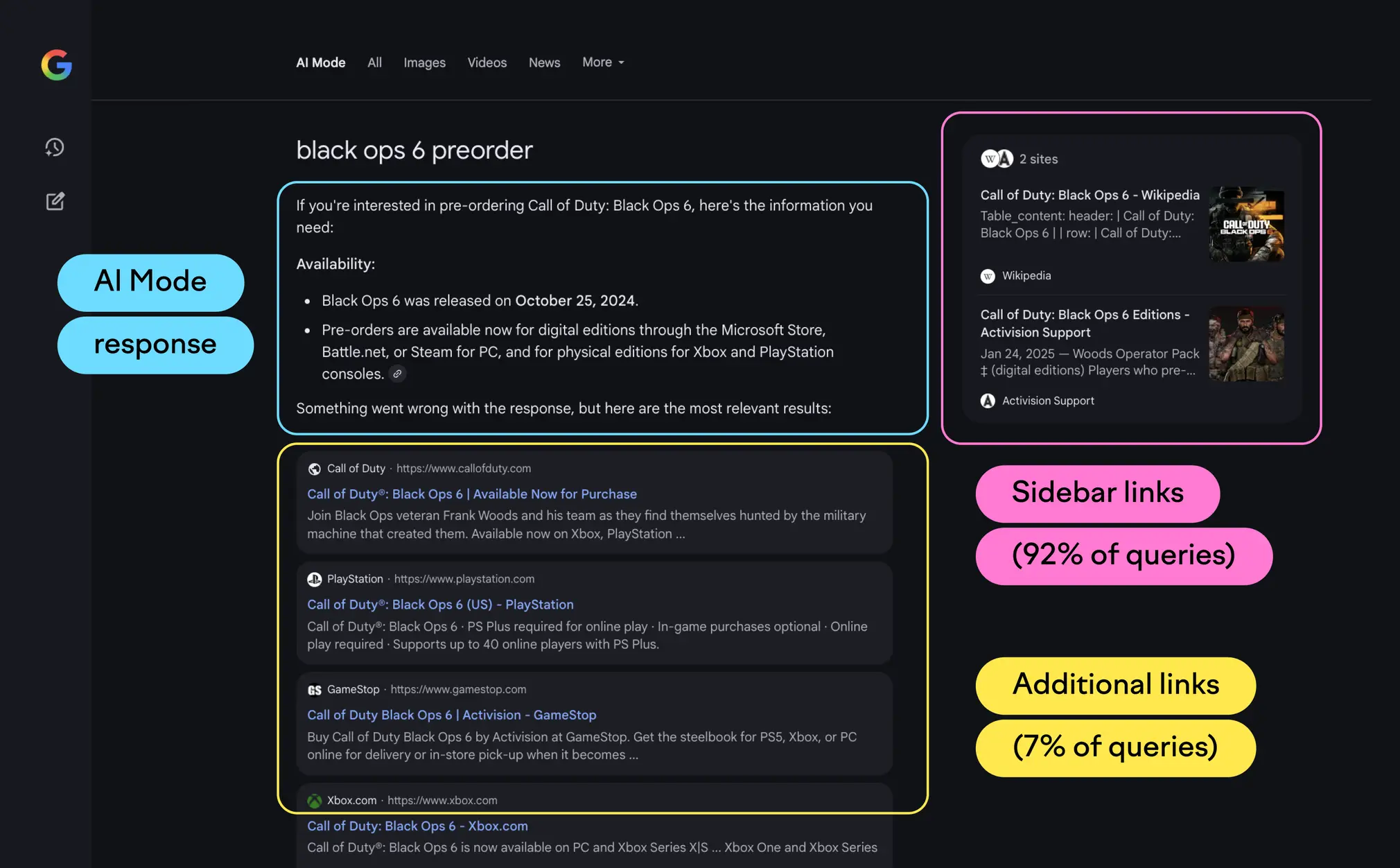
I don’t think I still need to tell you that Google pulls data from top credible websites (from Google Search) to answer users in AI Mode and cites the source for each sentence or paragraph, with additional resources shown in the sidebar. However, unlike the SERP with 10 results and pagination, you’ll find a limited number of sites here. But here’s where it gets interesting—only about 1 in 5 marketers use AI to draft complete SEO articles. Why? Because the best content still requires human input. I’ve seen this firsthand. When I let AI handle everything, the content feels robotic and misses the emotions, expertise, and insights that actually help readers.
And, 50% of consumers can easily spot AI-generated content, and 52% report less engagement when they suspect content is AI-written.
The risks of going full AI are real. As a top SEO expert, I know Google now cares less about keywords in the content (a.k.a. keyword stuffing), content length, number of H1 or H2 tags on the page, or other old-school SEO tactics, and focuses more on user satisfaction, prioritizing real, value-driven content that serves the user’s intent.
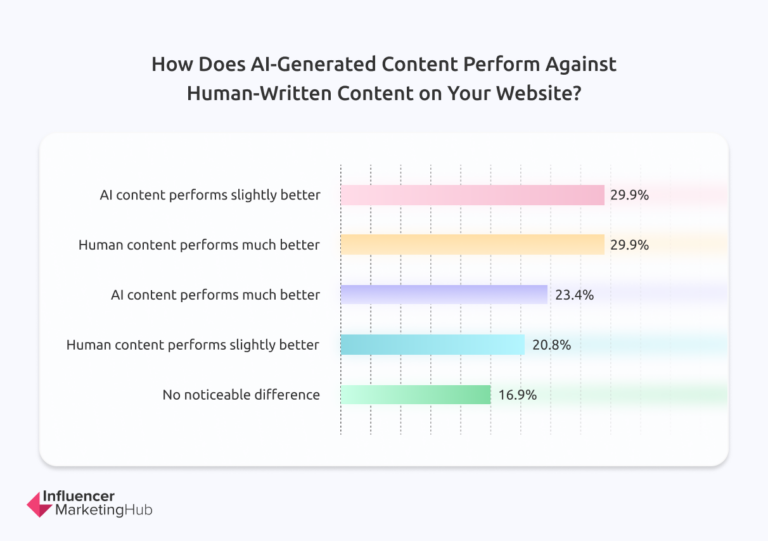
One study showed sites using only AI-generated content saw traffic drop by 17% and SERP rankings fall by 8 positions. Meanwhile, AI content with human intervention experienced just a 6% traffic reduction.
That’s a huge difference. The most effective approach combines AI efficiency with human expertise. AI tools excel at processing data and providing analytical insights, but they often lack the strategic thinking needed for nuanced decision-making.
Here’s what I’ve learned from testing these tools: AI is fantastic for research, data analysis, and initial drafts. But you need human creativity to ensure content authenticity and relevance. As Neil Patel‘s research shows, the human touch remains essential for engaging content that resonates with audiences. The future of SEO isn’t about replacing humans with AI. It’s about finding the right balance between both.
Top AI SEO Tools That Boost Rankings, Traffic, and Leads
Whether you’re a marketer, business owner, or SEO professional, using the right AI-powered tools can significantly boost your website’s visibility and performance. In this guide, we’ve handpicked the 15 best AI SEO tools that are transforming how websites rank on Google and beyond.
| Tool Name | Core Features | Starting Price (USD/mo) | Best Use Case |
|---|---|---|---|
| Semrush AI Toolkit | AI-driven insights with ChatGPT and Gemini integration, sentiment tracking, SEO Copilot | $129/mo for AI Toolkit; Full SEO Toolkit from $140 to $500+ | Enterprise-level brand visibility and competitor tracking |
| Writesonic | AI content generation, SEO automation, site audits, Google Search Console & Analytics integration | Free tier; Paid plans from $39 to $1,499+ per month | Content teams and marketers scaling SEO workflows |
| Ahrefs | Backlink analysis, keyword explorer, content assistant, site audits, competitor research | Plans start around $99/mo | SEO professionals focused on backlink and keyword data |
| Frase.io | AI-generated content briefs, SERP analysis, topic clustering, real-time writing suggestions | Starting from ~$15/mo | Content creators needing research-driven briefs |
| Surfer SEO | Real-time content optimization, keyword mapping, SEO score, internal linking suggestions | Plans from $79 to $219+ per month | On-page SEO optimization and AI-assisted content writing |
| Scalenut | Long-form AI content generation, SEO scoring, keyword & traffic analytics | Around $39 to $79 per month | Teams producing large volumes of content |
| SE Ranking | AI rank tracking, site audit, keyword suggestions, competitor analysis | Starting at approximately $55 per month | Small to medium businesses and agencies |
| Jasper | AI-powered SEO mode, branded content templates, collaboration, Surfer SEO integration | Plans from $49 to custom pricing | Brands scaling their content creation efforts |
| HubSpot AI Search Grader | AI-powered brand visibility scoring, keyword presence tracking | Free | Marketers auditing brand visibility in AI search |
| Indexly | Index monitoring, backlink indexing alerts, site health tracking | Custom pricing | Large content sites monitoring indexing issues |
| Search Atlas (OTTO SEO) | Automated on-page SEO fixes, internal linking, large-scale site audits | Starting at $99 per month | Enterprises managing extensive website portfolios |
| Koala AI | Automated internal linking, schema markup, SERP-guided content writing | $9 to $16 per month | Bloggers and creators automating SEO content |
| Alli AI | Schema & metadata automation, CMS integration for live SEO updates | Around $249 per month | High-traffic websites needing continuous SEO automation |
| Keywordly | Keyword clustering, AI-powered optimization suggestions | Pricing not disclosed | Solo bloggers seeking lightweight keyword tools |
| ChatGPT SEO | Prompt-based keyword ideas, topic clustering, meta tag generation, content analysis | ChatGPT Plus subscription at $20 per month | Flexible AI assistant for various SEO content needs |
Swipe left to see more →
1. Semrush AI Toolkit
Semrush has taken a different approach with their AI toolkit compared to most competitors. Instead of just focusing on content creation like everyone else, they’re tackling something I think is way more important: how AI platforms actually see your brand.
What is the Semrush AI Toolkit?
The Semrush AI Toolkit automatically analyzes your brand’s presence across major AI platforms including ChatGPT, SearchGPT, Google’s AI Mode, Gemini, and Perplexity. It uses machine learning to detect patterns in large language model (LLM) data and gives you actionable insights without having to manually check each platform. This helps you understand not just your traditional SEO positioning, but also how you appear when people ask AI tools questions about your industry. Pretty smart approach, if you ask me.
Semrush Key Features
Here’s what the toolkit can do:
- AI Market Share Tracking – Shows how visible your brand is in AI-generated search results compared to competitors
- Sentiment & Brand Perception Analysis – Reveals how AI platforms describe your business and what themes come up in AI responses
- Strategic Business Recommendations – Gives you AI-driven insights to improve your marketing strategies.
- My Reports Integration – Turns AI insights into presentation-ready reports with just a few clicks
Semrush Pros and Cons
Pros:
- Takes an innovative approach to AI search visibility that most tools ignore
- Unified dashboard that pulls data from multiple AI platforms
- Lets you analyze up to 50 competitors
Cons:
- Some users report data accuracy issues with metrics that change frequently
- AI-generated recommendations can feel generic sometimes
- Not very useful for smaller brands that don’t get mentioned much in LLMs
Semrush Pricing
The AI Toolkit costs $99.00 per month per domain. Each domain needs its own subscription. There’s no free trial, but Semrush does offer a free demo report so you can test the tool’s functionality before buying.
Semrush Best Use Case
This toolkit works best for mid to top-level team members who want to use AI strategically. CEOs use it to understand brand perception, business managers track performance to spot new opportunities, and marketing executives optimize strategies based on AI insights. It’s especially helpful for agencies preparing client reports or pitches about AI visibility.
2. Writesonic (AI SEO Automation Platform)
I’ve been using Writesonic for several months now, mainly for client projects where I need to scale content production quickly. What caught my attention about this tool is how it combines content creation with AI visibility tracking in one platform. Most competitors focus on either writing or optimization, but Writesonic tries to handle both.
- Best for: Content marketers, Content writers, small and mid-size businesses, SEOs.
- Best features: SEO Checker and Optimizer, Humanizer, Botsonic to create chatbots for your website.
- Pricing: Starts at $39 per month (Lite plan). Standard plan at $79/month offers unlimited AI Agent generations and 30 articles monthly. There’s also a free plan with limited access.
Write Content That Ranks on AI and Google
Writesonic’s Article Writer 6.0 generates SEO-optimized content that aims to satisfy Google’s E-E-A-T requirements. The platform connects with data sources like Ahrefs and Analytics to pull real-time insights, which helps ensure content aligns with both search engine algorithms and user intent.
One thing that really caught my eye is that Writesonic connects with tools like Ahrefs, Semrush, and Google Search Console to pull in keyword data, domain overview, and site audit insights. Pretty cool, right? Even if you don’t have your own Semrush or Ahrefs account, you still get to peek at their insights.
What makes Writesonic different
Here’s what you can do with Writesonic:
- GEO suite (Generative Engine Optimization) that tracks brand mentions across ChatGPT, Claude, and Google AI Overviews
- SEO AI Agent for keyword research, competitor analysis, and content optimization
- Site audit tools that automatically fix technical issues
- Multi-model AI support including GPT-4o, Claude, and more
- Enterprise-grade security with SOC 2, GDPR compliance
There’s one more feature that helps it stand out: Writesonic helps you see how your brand shows up in AI search. You can check how easy it is to find your brand in AI search engines, what people say about it, and if your site shows up for the right topics. Many people have started using AI writing tools like this, so it’s becoming something most brands want to have.
My honest take on Writesonic
After using it for a few months, here’s what I’ve noticed: What works well:
- Combines content creation, optimization, and AI visibility tracking in one place
- Reduces need for multiple expensive subscriptions
- Really fast for high-volume content operations
What could be better:
- Slight learning curve due to extensive features
- Can be overwhelming for SEO beginners
Who should use Writesonic?
Writesonic works best for content creators who need to scale production without sacrificing quality. It’s particularly valuable for bloggers, affiliate marketers, and eCommerce businesses that rely heavily on organic traffic. It also works well for international companies since it supports 25+ languages. What I also like about Writesonic is that they make it really easy to get started. You can sign up for free without needing to enter your credit card. Super low commitment. If you end up needing more capacity, their paid plans start at $16/month. But honestly, the free version is a great way to test things out without paying a cent.
3. Ahrefs

Ahrefs has been the go-to SEO tool for serious professionals for years, and honestly, I can see why. I’ve used Ahrefs extensively for competitor analysis and backlink research on client projects. What sets it apart from other tools is its massive database — they update their backlink index every 15-30 minutes, which gives you incredibly fresh data.
Best for: SEO professionals, content marketers, and agencies who need deep competitive analysis and backlink intelligence. Best features:
- Site Explorer for analyzing competitor websites and backlink profiles
- Keywords Explorer with accurate difficulty scores and traffic potential data
- AI Content Helper that optimizes content quality using artificial intelligence
- Content Explorer to find top-performing content in your niche
- Site Audit for identifying technical SEO issues
- Rank Tracker for monitoring your positions across search engines
Pricing: Plans start at $99/month for the Lite plan, going up to $1,199/month for Enterprise. There’s no free plan, but they do offer limited Webmaster Tools at no cost.
Here’s what I really like about Ahrefs: their keyword difficulty scores actually mean something. They show you exactly how many referring domains you’ll need to compete, which helps you make realistic decisions about which keywords to target. The AI Content Helper is pretty solid too. It analyzes top-ranking content and gives you suggestions to improve your own articles.
But there are some downsides. It’s definitely pricier than alternatives like SE Ranking or Search Atlas. Plus, if you’re working with search engines other than Google, you might be disappointed — their focus is heavily Google-centric. I’d recommend Ahrefs if you’re serious about competitor analysis and have the budget for it.
The backlink data alone is worth the price for most SEO professionals. For content marketers, the Content Explorer feature is excellent for finding trending topics and analyzing what’s working in your industry.
4. Frase.io
When I need to understand what’s actually ranking for my target keywords, Frase.io is where I turn. This tool takes a smart approach by focusing on SERP analysis first, then using that data to guide your content strategy. Instead of just generating random AI content, it shows you exactly what Google rewards in the top 20 results.
Frase.io Key Features
Here’s what makes Frase.io stand out for content research:
- SERP-based research that analyzes top 20 Google results for any keyword
- AI-powered content generation with customizable templates
- Automated content briefs with suggested headings and topics
- Real-time optimization scoring against competitors
- Multi-language support across 20+ languages
The content brief feature is particularly useful. You can see competitor headings, popular questions, and related topics all in one dashboard.
Frase.io Pros and Cons
Pros:
- Exceptional content research capabilities that save hours of manual work
- Intuitive outline builder using competitor headings
- Topic scoring helps you understand optimization gaps
- User-friendly interface compared to similar tools
Cons:
- AI writing quality occasionally requires significant editing
- Base plans have limited AI generation without Pro Add-on
- Gets expensive when you add premium features
Frase.io Pricing
Frase offers three main subscription tiers:
- Starter: $45/month for 1 user and 15 content projects
- Professional: $115/month for 3 users and 75 content projects
- Enterprise: Custom pricing for larger teams
The Pro Add-on costs an additional $35/month for unlimited AI words.
Frase.io Best Use Case
I’ve found Frase works best when you need to create research-heavy content that actually competes with what’s already ranking. It’s particularly valuable for content marketers who want to understand search intent before writing, and for anyone optimizing existing content based on current SERP data. If you’re just looking for basic AI writing, there are cheaper options. But if you want to know why certain content ranks and how to beat it, Frase delivers solid insights.
5. Surfer SEO
Surfer SEO takes a different approach than most AI writing tools I’ve tested. Instead of just generating content, it focuses on optimizing what you write based on what’s actually ranking in the top 10. I’ve used it for several client projects, and the results speak for themselves.

- Best for: Content creators who want data-driven optimization, agencies managing multiple clients, bloggers serious about improving existing content
- Best features: Content Editor with real-time scoring, Auto-Optimize feature, AI writing assistant called Surfy
- Pricing: Essential plan starts at $79/month annually (or $99/month monthly) with 30 Content Editor credits and 5 AI articles
How Surfer SEO works
Surfer’s Content Editor analyzes over 500 web signals and uses NLP technology to guide your writing. You get real-time feedback as you write, showing exactly how your content stacks up against top-ranking pages. The platform offers several key features:
- Content Score system that measures optimization quality
- AI-powered writing assistant called Surfy
- Auto-Optimize feature that instantly boosts content quality
- AI article creation (takes about 20 minutes per piece)
- Content auditing for identifying underperforming pages
- Plagiarism checker for ensuring originality
What I like about Surfer SEO
The data-driven approach actually works. I’ve seen traffic improvements on pages I’ve optimized using Surfer’s recommendations. The Content Editor interface is intuitive and provides real-time feedback during the writing process. Plus, their customer support is available 24/7, which is helpful when you’re working on tight deadlines.
What could be better
SurferSEO is somewhat expensive compared to other tools. The AI writer costs add up quickly, especially if you’re creating a lot of content. Sometimes the suggestions feel irrelevant, and the tool can be overwhelming for beginners. You need to know enough about SEO to filter the useful recommendations from the noise.
Is Surfer SEO worth it?
If you’re serious about creating SEO-optimized content at scale, yes. The Scale plan ($175/month annually or $219/month monthly) offers 100 Content Editor credits and 20 AI articles, which works well for agencies managing multiple clients or in-house marketing teams. With over 150,000 customers across 159+ countries, Surfer has proven itself effective for those committed to data-driven SEO. I’d recommend it if you’re already comfortable with SEO basics and want to take your content optimization to the next level.
- SurferSEO Review: I Tested It on 50+ Articles.
6. Scalenut
Scalenut caught my attention as an AI-powered platform that promises to handle your entire SEO content lifecycle. Originally built for content optimization, it’s evolved into a solution for planning, researching, creating, and optimizing content all in one place.
.webp)
Scalenut Key Features
The standout feature here is Cruise Mode, which lets you create full blog posts in about 5 minutes. Pretty impressive, right? Beyond that, you get:
- Content Editor with real-time SEO scores
- AI-driven Keyword Planner for topic clusters
- Over 40 AI templates for different content types
- SERP analysis that examines the top 30 ranking articles for competitive insights
Scalenut Pros and Cons
Pros:
- Excellent AI SERP research with NLP key terms and competitive analysis
- Solid customer support via live chat and email across all plans
- Cruise Mode makes content creation super fast
Cons:
- Limited language support compared to tools like Frase and Surfer
- AI content needs significant editing before you can publish it
- The user interface isn’t the most intuitive—dashboard can feel confusing
Scalenut Pricing
The Essential plan starts at $49/month and gives you 5 SEO articles plus 100,000 AI words. The Growth plan costs $79/month with 30 SEO articles, optimizations, and keyword clusters. If you need more capacity, the Pro plan at $149/month includes 75 SEO articles and supports up to 5 team members.
Scalenut Best Use Case
From my testing, Scalenut works best for startups and medium-sized businesses focused on growing organic traffic. Content marketers will appreciate the research capabilities, and SEO professionals looking for efficient content optimization workflows should find it useful. However, if you’re expecting polished, publish-ready content straight from the AI, you might be disappointed. It’s more of a research and drafting tool that still requires human input to shine.
7. SE Ranking
SE Ranking has been around for years, and I’ve been familiar with it long before most of these newer AI tools hit the market.
What I like about SE Ranking is that it doesn’t try to be flashy with its AI features. Instead, it’s focused on being a solid, reliable SEO platform that happens to include some useful AI functionality—without the premium price tag that usually comes with it. With over 1,000,000 users worldwide, it’s clearly doing something right.
SE Ranking Key Features
Here’s what you get with SE Ranking’s AI-powered toolkit:
- Rank Tracker with location-specific data
- AI Writer powered by GPT-4o technology
- Machine learning-based traffic forecasting
- Automated website auditing
- Backlink monitoring with a database of over 3 trillion links
- AI-powered review analysis for local businesses
SE Ranking Pros and Cons
Pros:
- Excellent value for money compared to competitors
- Color-coded charts and visual reports for easy comprehension
- Responsive customer support team
- AI-assisted automation features
Cons:
- Multiple menu tiers that expand and collapse, creating navigation challenges
- Additional costs for tools like Keyword Grouper
- Content Editor requires significant tweaking for accurate scoring
- Confusing billing portal
SE Ranking Pricing
SE Ranking offers three main plans with annual discounts:
- Essential: $65/month for 5 projects and 500 keywords
- Pro: $119/month for 30 projects and 2,000 keywords
- Business: $259/month for unlimited projects and 5,000 keywords
SE Ranking Best Use Case
From my experience, SE Ranking works best for small to mid-sized agencies and in-house teams who want solid SEO capabilities without breaking the budget. It’s particularly valuable if you appreciate detailed analytics with colorful, easy-to-read reports. The interface can feel a bit cluttered at first, but once you get used to it, there’s a lot of functionality packed in there.
I wouldn’t recommend it if you’re just starting out with SEO—the navigation can be confusing for beginners. But for intermediate marketers who know what they’re looking for? It’s a solid choice.
8. Jasper
I’ve been using Jasper (formerly Jarvis) for content creation since early 2023, and it’s definitely one of the more polished AI writing tools out there. What sets Jasper apart is its focus on brand consistency. While other tools just generate content, Jasper actually learns your brand voice and maintains it across everything you create.
Jasper Key Features
Here’s what makes Jasper worth considering:
- Command feature that lets you give natural language instructions to the AI
- 50+ templates for different content types including blog posts and ads
- Chrome extension that works across Gmail, Google Docs, and social platforms
- Integration with Surfer SEO for optimized content
- Brand Voice feature that keeps your tone consistent across all content
- Knowledge assets to provide context about your products and company
Jasper Pros and Cons
Pros:
- Generates high-quality content quickly (much better than ChatGPT for marketing copy)
- Intuitive interface that feels like using a familiar word processor
- Native Grammarly support makes editing smoother
- Flexible approaches for different skill levels
Cons:
- Struggles with highly technical topics (I’ve noticed this with complex SEO concepts)
- Requires research and fact-checking like any AI tool
- Plagiarism detection costs extra
- Higher price point than many competitors
Jasper Pricing
Jasper offers three main plans with annual discounts:
- Creator: USD 39.00/month (annually) or USD 49.00/month (monthly) for single users
- Pro: USD 59.00/month (annually) or USD 69.00/month (monthly) for small teams
- Business: Custom pricing with unlimited brand voices and dedicated account manager
Jasper Best Use Case
Best for: Marketing teams, agencies, and content creators who need brand-consistent messaging at scale. I’ve found Jasper particularly useful for creating ad copy, social media posts, and email campaigns. It’s not the best choice for SEO-focused blog content (there are better options for that), but if you need marketing copy that sounds like your brand, Jasper delivers. From crafting persuasive ad copy to generating social media posts, this tool really shines for marketers who need help with brand-consistent messaging across multiple channels.
9. HubSpot AI Search Grader
HubSpot’s AI Search Grader caught my attention because it does something most other SEO tools completely ignore — it focuses specifically on how your brand shows up in AI-powered search platforms like ChatGPT, Perplexity, and Gemini. I’ve tested this tool multiple times for different websites, and honestly, it’s refreshing to see a free tool that actually delivers useful insights.
HubSpot AI Search Grader Key Features
Here’s what this tool can help you understand about your brand’s AI visibility:
- Share of Voice scoring that measures how frequently your brand appears in AI responses compared to competitors
- Brand Sentiment analysis that evaluates how positively or negatively AI tools describe your business
- Source Quality metrics to assess the credibility of mentions
- Data Richness assessment that identifies information gaps
The reports are surprisingly detailed for a free tool. I’ve seen paid alternatives that don’t provide this level of analysis.
HubSpot AI Search Grader Pros and Cons
Pros:
- Completely free with unlimited usage
- Quick setup requiring only basic company information
- Detailed theme analysis that’s often better than paid alternatives
- Easy report sharing via custom URLs
Cons:
- You can’t manually select competitors for comparison
- No way to narrow share of voice to specific keywords
- Missing side-by-side competitor sentiment analysis
HubSpot AI Search Grader Pricing
Here’s the best part — this tool is entirely free to use as many times as you want. No premium tiers, no hidden costs. I appreciate when companies offer genuinely useful free tools without trying to upsell you every five seconds.
HubSpot AI Search Grader Best Use Case
Best for: Anyone who wants to understand their brand visibility in AI search results This tool works particularly well for marketers adapting their strategies for AI-driven search, SEO professionals who need to track AI performance, and business owners wanting to maximize discovery in this new search environment. If you’re just getting started with AI search optimization, this is a perfect place to begin without spending any money.
10. Indexly
Indexly tackles something most SEO tools ignore completely — getting your pages indexed fast by search engines. I use Indexly myself to get my website pages indexed faster (usually within hours). With over 2,000 agencies and business owners already using this tool, it focuses on speeding up the indexing process that typically takes weeks with traditional methods.
Think of it as a VIP lane for search engines to quickly discover, index, and rank your pages faster than usual!
Indexly Key Features
- Auto-indexing that monitors sitemaps and submits new pages to Google, Bing, and Yandex
- LLM Indexing Toolset to make content discoverable by ChatGPT and Perplexity AI
- On-page SEO checker for meta tags and structured data optimization
- Keyword position tracking with automated alerts
- Real-time URL-level indexing status reports
Indexly Pros and Cons
Pros:
- Reduces indexing time by 75%
- Eliminates manual indexing efforts completely
- User-friendly interface requiring minimal technical knowledge
- Works across multiple CMS platforms like WordPress and Shopify
Cons:
- Requires Google Search Console connection for full functionality
- Free plan limited to Yandex search engine only
- Higher tiers needed for multiple search engines
Indexly Pricing
The Solo plan starts at $14/month for 3 sites, whereas the Team plan costs $39/month for 10 sites. Business users pay $79/month for 20 sites with Google, Bing, and Yandex integration, alongside the Agency plan at $129/month supporting 50 sites. First-time users can get 25% off any Indexly plan by using the discount code INDEXLYCOUPON at checkout.
Indexly Best Use Case
Best for: Website owners to get their sites indexed faster, ecommerce websites, website owners on a budget Indexly works exceptionally well for content publishers, ecommerce sites with numerous product pages, plus new websites struggling with initial indexing delays. I believe it’s a game-changer for new sites that usually wait weeks to get indexed (like mine did). It’s incredibly useful!
11. Search Atlas
I hadn’t heard much about Search Atlas until I started digging into newer AI SEO tools, but it caught my attention with its OTTO SEO feature. This tool takes a different approach than most competitors — instead of just pointing out SEO issues, its AI assistant actually implements fixes directly on your website.
Search Atlas Key Features
Search Atlas builds its platform around four main areas: Authority, Content, Technical, and User Experience. Here’s what stood out during my testing:
- OTTO SEO: This automated assistant handles website optimizations without you having to touch the code
- Content Optimization: Includes AI-powered tools like Content Genius and their SCHOLAR scoring system
- Topical Map Generator: Creates content structures using entity-based clustering
- Site Auditor: Finds crawlability problems and gives you a prioritized list of fixes
- Domain Power: They use their own metric based on Google Search Console data instead of backlinks that can be manipulated
Search Atlas Pros and Cons
Pros:
- Can drive serious ranking improvements—I found a case study where one user jumped from 185 keywords to 1,571 keywords
- Saves a ton of time with automation (about 17% of users report saving over 10 hours weekly)
- Offers white label capabilities for agencies
Cons:
- The interface can be confusing if you’re new to SEO tools
- Some users complain about getting too many email alerts
- Language support could be better
Search Atlas Pricing
They offer several plans: Starter ($99/month), Growth ($199/month), and Pro ($399/month). There’s also a Community Edition for $29/month if you’re in a developing market.
Search Atlas Best Use Case
From what I’ve seen, Search Atlas works best for agencies juggling multiple client websites and businesses that want automated SEO fixes without getting into the technical weeds. The OTTO automation feature is really the main selling point here. If you’re tired of manually implementing SEO changes, this could be worth a look.
12. Koala AI
I’ve been using Koala AI to create content for my website for months now. I’ve been using Koala AI to create content for my website for months now. In fact, I even generated my Koala AI review using Koala itself. Combined with my own insights and personal experience, that AI-generated article now ranks in the top 10 for my target keywords. What I like about this tool is how user-friendly it is while still giving you plenty of customization options before generating content.
Koala AI Key Features
KoalaWriter is the main feature with instant article generation based on SERP analysis. You also get KoalaChat (an SEO-focused chatbot), KoalaImages (AI image generator), and automatic internal linking that has created over 10 million links to date. Here’s what really impressed me — the real-time data integration that pulls current information from the internet. You can customize the tone of voice, set your word count, specify your target keyword for optimization, choose your target country, customize the outline, and even pick from 100+ different languages for content creation.
Koala AI Pros and Cons
Pros:
- One-click article generation that saves about 60% of content creation time
- Real-time search results integration keeps content factually accurate
- WordPress and other CMS integrations for seamless publishing
Cons:
- Takes about two weeks to really master the interface
- Content definitely needs personal refinement for optimal quality
- Interface looks pretty basic compared to competitors
Koala AI Pricing
The Professional plan at $49/month includes 100,000 words and is the most popular option. Entry-level Essentials costs $9/month for 15,000 words, while higher-volume plans range from $99-$2000/month. You can generate up to 5,000 words per month for free. That’s enough for 1–2 articles. Apply this discount code to get 15% off on all Koala AI payment plans: COUPON15
Koala AI Best Use Case
Best for: SEO writers, SEO professionals, Website owners on a budget Koala AI works exceptionally well for freelancers juggling multiple clients, bloggers creating content at scale, and Amazon affiliate marketers who can take advantage of its live product data capabilities.
13. Alli AI
I’ll be honest — when I first heard about Alli AI, I was skeptical. The idea of an AI tool that promises to make “thousands to millions of code and content changes in minutes” sounded too good to be true. But after testing it on a few client sites, I can see why agencies are drawn to this approach.
Alli AI Key Features
Alli AI focuses on automation and bulk optimization rather than content creation:
- SEO AI Agent — Provides custom SEO recommendations for your website to help you create actionable SEO plans
- Site Speed Optimizer — Includes image and font optimization, script and style minification, and more
- Internal Linking automation — Analyzes your content and generates link suggestions to increase page views and enhance on-page optimization
- Bulk optimization — Make SEO changes across your entire site without touching code
- A/B testing capabilities — Test changes like titles, content, or structure to see what works
What caught my attention is that it works with any CMS platform — WordPress, Shopify, Wix, you name it.
Alli AI Pros and Cons
Pros:
- Saves massive amounts of time on repetitive SEO tasks
- No coding knowledge required for technical implementations
- Can handle large-scale optimizations across hundreds of pages
- Works across different CMS platforms
Cons:
- Requires adding a code snippet to your site (which might intimidate beginners)
- Interface can feel overwhelming if you’re new to technical SEO
- Higher price point puts it out of reach for solo website owners
- Email alerts can get excessive
Alli AI Pricing
The Small Biz plan starts at $169 per month for one user seat and domain name, plus 100 keyword tracking. They offer a 10-day free trial, but you’ll need to enter your credit card info upfront.
Alli AI Best Use Case
This tool makes the most sense for SEO agencies managing multiple client websites or in-house teams handling large sites with hundreds of pages. If you’re just optimizing a single blog, there are more cost-effective options out there. I haven’t used it for long, but from what I’ve seen so far, it feels like a strong solution for businesses that need to scale their SEO efforts without hiring additional team members.
14. Keywordly
If you work with content and SEO regularly, you might want to check out Keywordly AI. If you work with content and SEO regularly, you might want to check out Keywordly AI. I stumbled upon this tool while looking for better ways to organize my keyword research, and honestly, it’s become one of my go-to solutions for content planning.
Keywordly Key Features
Here’s what you can do with Keywordly:
- Research keywords for Google and Bing ads
- Find related and long-tail keywords
- Find conversations on Reddit and Quora related to your topic
- Spot keyword gaps between you and your competitors
- Find product keywords for Amazon
- Get hundreds of ideas from just one seed keyword (kind of like Semrush’s Keyword Magic tool)
- Create topic clusters
- Analyze how your brand performs across language models, like ChatGPT and Perplexity
- Get optimization suggestions to boost your brand’s LLM visibility
Pretty solid AI SEO tool, right?
Keywordly Pros and Cons
Pros:
- Reddit keyword feature saves tons of research time
- Shows relevant subreddits and discussions automatically
- Super responsive development team that actually listens
- Great for finding conversation-based content ideas
Cons:
- Still a newer tool with occasional bugs
- Interface could be more polished
- Limited advanced filtering options compared to bigger tools
Keywordly Pricing
Starts at $14 per month. After registration, you’ll get 20 credits to test the tool, where each task consumes 2-3 credits.
Keywordly Best Use Case
Personally, I love the Reddit keyword feature. It saves me time by showing me relevant subreddits and discussions. If you use Reddit for marketing, I think you’ll find it helpful too. Keywordly works best for SEO writers, SEO strategists, and website owners on a budget who need fresh content ideas from real conversations. The team behind it is actively developing new features based on user feedback, which is always a good sign. I also did a full review of Keywordly in my post about keyword clustering tools, if you want to dig deeper. Unlock 20% off your Keywordly subscription today! Just enter code KEYWORDLY20 at checkout and start optimizing smarter at a better price. Don’t miss out!
15. ChatGPT SEO
How to Use ChatGPT for SEO?
ChatGPT can be a game-changer for SEO professionals, bloggers, and marketers. Whether you’re doing keyword research, writing meta descriptions, creating blog outlines, or generating content ideas—ChatGPT can help speed up the process while keeping things high-quality. Here are a few practical ways to use ChatGPT for SEO:
- Keyword Research: Ask it to generate keyword variations or long-tail keywords.
- Content Planning: Create blog post outlines, FAQs, or even full articles.
- On-page SEO: Generate meta titles, descriptions, and alt text for images.
- Competitor Analysis Help: Summarize competitor content or extract key points.
- Schema & HTML Snippets: Get basic structured data templates in seconds.
The best part? It’s fast, scalable, and doesn’t require technical skills.
Features
Here are some standout features that make ChatGPT useful for SEO:
- Natural Language Understanding: Easily creates human-like content.
- Prompt Flexibility: You can guide it to match brand voice or niche tone.
- Real-Time Suggestions: Get blog titles, keywords, or content clusters instantly.
- Multilingual Capabilities: Useful for international SEO.
- Plugins and API Support: Integrates with tools like Google Sheets or WordPress (with the right setup).
These features help you go from idea to publish-ready content faster than traditional methods.
Pricing
ChatGPT offers a few pricing tiers depending on what you need:
- Free Plan: Limited access, great for light or occasional use.
- ChatGPT Plus ($20/month): Access to GPT-4, which performs better for SEO tasks and complex content.
- Pro/Enterprise Plans: For agencies and teams who need scale, performance, and API access.
For SEO tasks, even the Plus plan is more than enough for most solo users or small businesses.
My Honest Review
After using ChatGPT for SEO over time, here’s my take: Pros:
- Saves hours on research and writing
- Delivers surprisingly accurate keyword suggestions
- Easy to use—even for beginners
- Keeps content ideas flowing consistently
Cons:
- Needs human editing (don’t rely on it blindly)
- Sometimes misses context in niche topics
- Not always up-to-date on search algorithm changes
Bottom line: If you know how to guide it with the right prompts, ChatGPT can seriously level up your SEO workflow. Just remember—it’s a tool, not a replacement for strategy.
What AI SEO tools are the best?
I’ve tested a bunch of AI SEO tools on various setups—everything from simple blog to niche sites running. Honestly, some tools really stand out, while others feel more like hype than help. After testing a wide range of AI SEO tools, I can confidently say that some are worth your time—and others, not so much.
The best ones aren’t just about flashy features; they actually make the SEO process easier, faster, and more effective. Tools like Writesonic and Koala AI stand out for their strong content generation capabilities. They help create blog posts, landing pages, and meta tags that are optimized right out of the gate. If you’re focused on high-volume content or want to speed up your workflow without sacrificing quality, these two are solid choices. A
nother tool that impressed me is Indexly. It focuses more on the technical side of SEO—like getting your pages indexed quickly and improving visibility in search engines. It’s ideal if you’re publishing a lot of new content and want it to start ranking sooner rather than later. That said, the “best” AI SEO tool really depends on what you’re trying to achieve. F
or content-heavy strategies, a tool that generates optimized articles or product descriptions is key. If you’re more concerned with rankings, site structure, or indexing, a technical-focused tool might be the better fit.
What I’ve learned is that the right AI SEO tool should actually reduce your workload—not add to it. If it feels too complicated or requires constant fixing, it’s probably not the right solution for your workflow, no matter how powerful it claims to be.
Will using AI SEO tools help or hurt your Google rankings?
Google’s stance on AI-generated content isn’t as black and white as most people think. I’ll be honest — when I first started using AI SEO tools, I was worried about potential penalties. But after testing these tools extensively and seeing how my content performs, I’ve learned that it really comes down to how you use them. Let me clear up a common misconception: Google doesn’t automatically penalize content just because AI created it.
They evaluate content based on quality, not how it was produced. However (and this is important), using automation—including AI—to generate content with the main purpose of manipulating search rankings does violate Google’s spam policies. So what makes the difference between helpful and harmful AI content? Here are the factors that determine whether your AI tools will boost or hurt your rankings:
- Quality and Value: Google prioritizes content that aligns with their E-E-A-T guidelines (Experience, Expertise, Authoritativeness, Trustworthiness). While 58% of SEO professionals already use AI tools in their workflow, the content still needs to be genuinely helpful.
- Human Oversight: Over 86% of marketers edit AI-generated content to add human perspective and expertise. I do this too — AI gives me a foundation, but I always add my own insights and experiences.
- Factual Accuracy: AI models don’t fact-check themselves and can produce outdated statistics or incorrect data. I learned this the hard way when an AI tool gave me completely wrong information about a recent Google update.
The risks of relying too heavily on AI are real. When left unchecked, AI content can be factually incorrect or even offensive. Plus, it often lacks originality and depth, which can hurt user engagement.
The bottom line? AI SEO tools can absolutely help your rankings when used responsibly to support quality, original content. Google cares about whether your content helps users—not how you created it. Just don’t try to game the system with purely AI-generated fluff. That’s a recipe for disaster.
What’s the best AI SEO tool for WordPress?
If you’re running a WordPress site, you’re probably wondering which of these AI SEO tools actually plays nice with your setup. I’ve tested most of these tools on WordPress sites, and honestly, some work better than others. Here’s the thing about WordPress — it’s flexible, but that also means you need tools that can handle the complexity. Whether you’re using page builders, custom themes, or a bunch of plugins, your AI SEO tool needs to work without breaking anything.
From my testing, Writesonic and Koala AI have the smoothest WordPress integrations. Both can publish directly to your site, and I haven’t run into any major conflicts with popular plugins. Indexly also works great if you’re struggling with getting your WordPress pages indexed quickly. It connects directly with Google Search Console and handles the technical stuff automatically.
But here’s what I learned: the “better” tool depends on what you’re actually trying to do. If you’re primarily focused on content creation and publishing, Koala AI’s one-click publishing is hard to beat. If you need more comprehensive SEO management, Writesonic’s broader feature set might be worth the extra cost.
The tools to avoid for WordPress? Anything that requires complex setup or doesn’t have native WordPress support. You’ll spend more time troubleshooting than actually improving your SEO.
- 7 Powerful B2B SEO Case Study
- Best AI Detectors
- 5 Cheap SEO Tools
Key Takeaways
After testing 15 AI SEO tools extensively, here are the essential insights that will help you choose the right solution and maximize your SEO results:
• AI tools enhance but don’t replace human expertise – 86% of marketers edit AI content, and Google prioritizes quality over creation method
• Choose tools based on specific needs – Semrush excels at AI visibility tracking, Writesonic combines content creation with optimization, Ahrefs dominates competitive analysis
• Free options provide real value – HubSpot’s AI Search Grader offers comprehensive brand visibility analysis at zero cost
• Focus on AI search optimization now – Tools tracking ChatGPT, Perplexity, and Google AI Overviews are becoming essential for future-proofing your strategy
• Automation saves significant time – Quality AI SEO tools can reduce content creation time by 60% while maintaining ranking potential The most successful approach combines AI efficiency with human oversight, using these tools to accelerate research, content creation, and optimization while ensuring quality and authenticity remain paramount.
Frequently Asked Questions About AI SEO Tools
1. What are AI SEO tools and how do they work?
AI SEO tools are software that uses artificial intelligence to analyze, optimize, and improve websites for search engines. They automate tasks like keyword research, content suggestions, and performance tracking to make SEO faster and more effective.
2. Can AI SEO tools help improve my Google rankings?
Yes, AI SEO tools can boost your rankings by providing data-driven recommendations, optimizing content, analyzing backlinks, and identifying opportunities for better search visibility.
3. Are AI SEO tools suitable for beginners?
Absolutely. Many AI SEO tools are user-friendly, offer step-by-step guidance, and provide insights in simple language, making them accessible to beginners and small business owners.
4. Do I need technical knowledge to use AI SEO tools?
Not necessarily. Most AI SEO tools are designed with intuitive dashboards and easy-to-understand recommendations, so even users with limited technical knowledge can optimize their websites effectively.
5. Which AI SEO tools are best for content optimization?
Tools like Surfer SEO, Jasper AI, and Frase are excellent for content optimization. They provide AI-powered content briefs, keyword suggestions, and recommendations to improve readability and search rankings.
6. Can AI SEO tools save time in SEO campaigns?
Yes, AI SEO tools automate repetitive tasks such as keyword analysis, competitor research, and content optimization, allowing marketers to focus on strategy and creative work while saving hours of manual effort.
7. Are AI SEO tools better than traditional SEO methods?
AI SEO tools complement traditional SEO methods. While traditional methods rely on manual research and experience, AI tools provide data-driven insights, speed, and accuracy, enhancing the overall SEO strategy.
8. Do AI SEO tools provide analytics and reporting?
Most AI SEO tools include dashboards that track keyword rankings, site performance, backlink health, and content effectiveness, offering detailed analytics and actionable reports for SEO improvement.
9. Can AI SEO tools help with backlink analysis?
Yes, many AI SEO tools monitor backlinks, evaluate link quality, detect toxic links, and provide suggestions for building high-authority backlinks to strengthen your website’s SEO profile.
10. How do I choose the right AI SEO tool for my website?
Choosing the right AI SEO tool depends on your needs, budget, and website size. Consider features like content optimization, keyword research, analytics, ease of use, and support to select a tool that fits your SEO goals.